
What Is a Test Case?
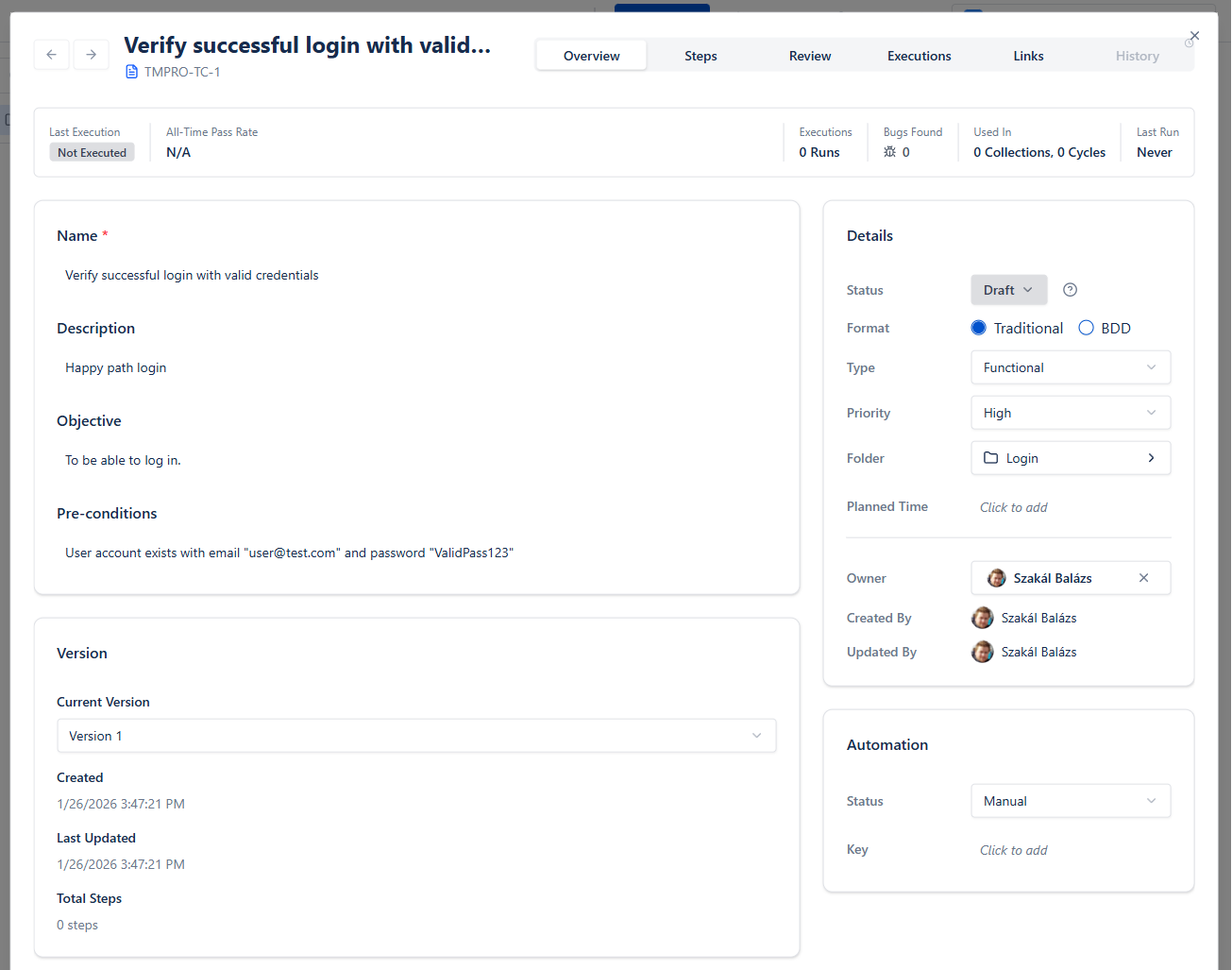
A test case is a documented set of conditions and steps used to verify whether a software feature or functionality works as expected. It serves as both a testing guide and quality documentation.
Key components of a test case:
- •Test Case ID: A unique identifier for tracking and reference
- •Title/Summary: A brief description of what is being tested
- •Preconditions: Required state before execution (e.g., "User must be logged in")
- •Test Steps: Sequential actions to perform
- •Expected Results: What should happen after each step or at the end
- •Actual Results: What actually happened (filled during execution)
- •Status: Pass, Fail, Blocked, or Skipped
Think of a test case as a recipe: it tells anyone exactly how to test something and what outcome to expect.
Why Test Cases Matter
Well-written test cases are the foundation of reliable software testing. Here's why they're essential:
Consistency and Repeatability
When anyone on your team can execute a test case and get the same results, you've achieved consistency. This is crucial for:
- •Regression testing across releases
- •Onboarding new team members
- •Audit trails and compliance
Coverage Tracking
Test cases mapped to requirements show exactly what's tested and what isn't. This visibility helps teams:
- •Identify untested features before release
- •Prioritize testing efforts
- •Report coverage metrics to stakeholders
Knowledge Preservation
Test cases capture testing knowledge that would otherwise exist only in testers' heads:
- •Edge cases discovered over time
- •Business logic nuances
- •Historical context for why certain tests exist
Defect Prevention
Teams that invest in test case quality catch bugs earlier. Studies show that defects found in testing cost 10-100x less to fix than those found in production.
Anatomy of a Good Test Case
A well-structured test case has specific characteristics that make it effective:
Clear and Specific Title
"Test login"
"Verify user can log in with valid email and password"
The title should tell you exactly what's being tested without reading further.
Atomic Focus
Each test case should verify ONE specific thing. If a test fails, you should immediately know what's broken.
"Test user registration, login, and profile update"
Three separate test cases for each function
Complete Preconditions
List everything needed before the test can run:
- •System state (database seeded, services running)
- •User state (logged in, specific permissions)
- •Data state (specific records exist)
Unambiguous Steps
Each step should have exactly one interpretation:
"Enter user information"
"In the Email field, enter 'test@example.com'"
Verifiable Expected Results
Expected results must be objectively verifiable:
"Page loads correctly"
"Dashboard page displays with user's name 'John Doe' in the top-right corner"
Independent Execution
A test case should not depend on another test case's execution. Each test should set up its own preconditions.
The Test Case Writing Process
Follow this systematic approach to write effective test cases:
Understand the Requirement
Before writing anything, ensure you understand: - What the feature does - Who uses it and why - Acceptance criteria - Edge cases and error conditions
Talk to product owners, read specifications, and review designs.
Identify Test Scenarios
List all the scenarios that need testing: - Happy path (normal, expected usage) - Alternative paths (valid but different inputs) - Negative scenarios (invalid inputs, error conditions) - Boundary conditions (min/max values, limits) - Security scenarios (unauthorized access attempts)
Design Test Data
Determine what data you need: - Valid data for positive tests - Invalid data for negative tests - Boundary values (0, 1, max-1, max, max+1) - Special characters and edge cases
Write the Test Cases
For each scenario, document: - Preconditions and setup - Step-by-step actions - Expected outcomes
Review and Refine
Have peers review your test cases for: - Completeness (all scenarios covered?) - Clarity (can anyone execute this?) - Accuracy (do expected results match requirements?)
In tools like BesTest, use the built-in test case review workflow to formalize this process and ensure quality before execution.
Test Case Templates and Examples
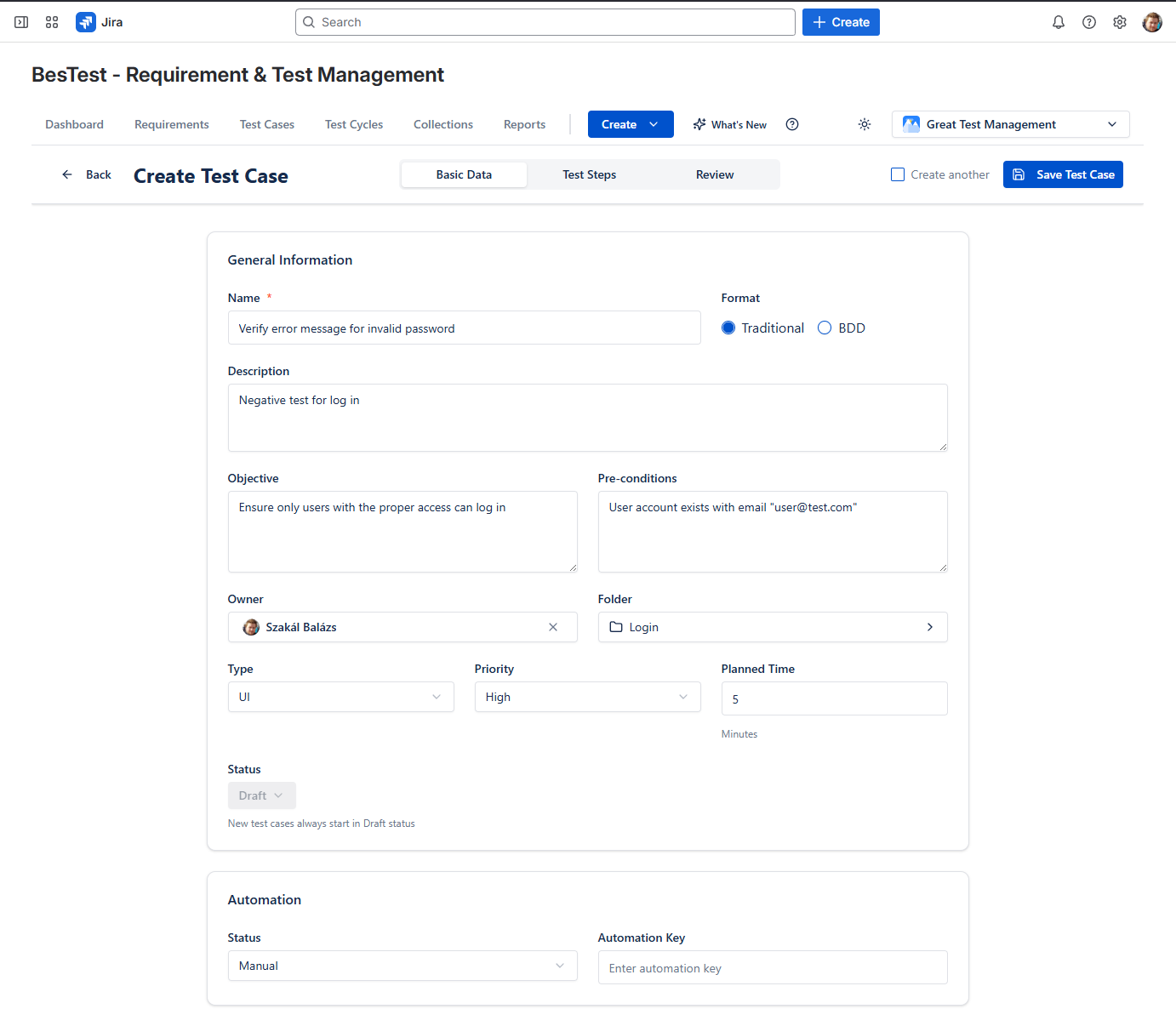
Here are practical templates you can adapt:
Basic Test Case Template
| Field | Value |
|---|---|
| Test Case ID | TC-LOGIN-001 |
| Title | Verify successful login with valid credentials |
| Preconditions | User account exists with email "user@test.com" and password "ValidPass123" |
| Priority | High |
| Category | Authentication |
Steps:
- •Navigate to the login page
- •Enter "user@test.com" in the Email field
- •Enter "ValidPass123" in the Password field
- •Click the "Sign In" button
Expected Result: User is redirected to the dashboard. Welcome message displays "Hello, [User Name]"
Negative Test Case Example
| Field | Value |
|---|---|
| Test Case ID | TC-LOGIN-002 |
| Title | Verify error message for invalid password |
| Preconditions | User account exists with email "user@test.com" |
| Priority | High |
| Category | Authentication |
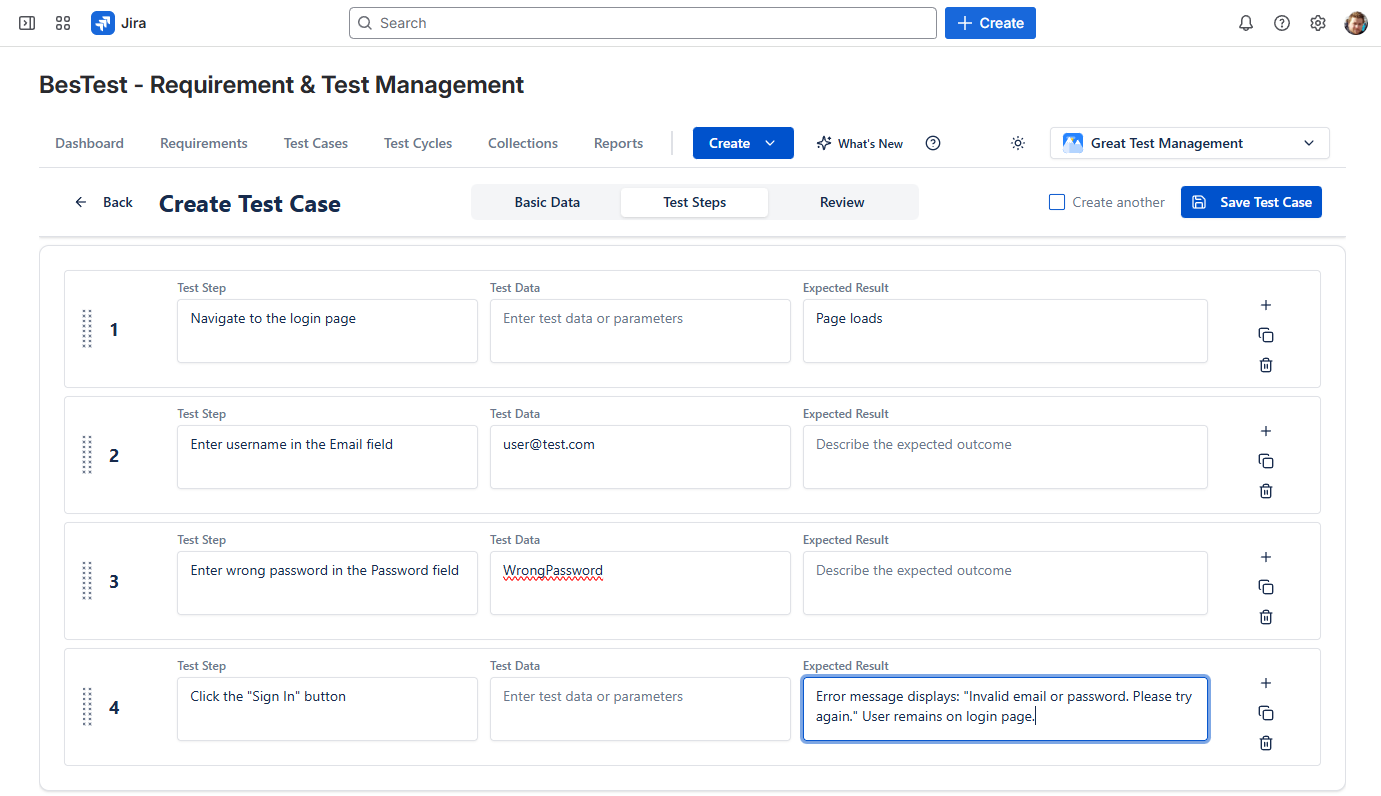
Steps:
- •Navigate to the login page
- •Enter "user@test.com" in the Email field
- •Enter "WrongPassword" in the Password field
- •Click the "Sign In" button
Expected Result: Error message displays: "Invalid email or password. Please try again." User remains on login page.
BDD/Gherkin Format
Feature: User Login
  As a registered user
  I want to log into my account
  So that I can access my dashboard

  Scenario: Successful login with valid credentials
    Given I am on the login page
    And I have a valid account with email "user@test.com"
    When I enter "user@test.com" in the email field
    And I enter "ValidPass123" in the password field
    And I click the "Sign In" button
    Then I should be redirected to the dashboard
    And I should see "Hello, [User Name]" in the header
Common Test Case Mistakes to Avoid
Learn from these frequent pitfalls:
Vague Steps
Problem: "Test the form validation"
Solution: Break into specific steps with exact inputs and expected outcomes
Missing Preconditions
Problem: Test fails because required data doesn't exist
Solution: Always document the exact state needed before execution
Assumption-Based Expected Results
Problem: "System behaves correctly"
Solution: Define exactly what "correctly" means with specific, observable outcomes
Overly Complex Test Cases
Problem: 50-step test case that tests multiple features
Solution: Split into smaller, focused test cases
No Negative Testing
Problem: Only testing happy paths
Solution: Include tests for invalid inputs, error handling, and edge cases
Outdated Test Cases
Problem: Test cases don't match current application behavior
Solution: Update test cases when requirements change (BesTest's review workflow helps here)
Duplicate Tests
Problem: Same scenario tested in multiple test cases
Solution: Review existing test cases before writing new ones; use traceability
Environment-Specific Hardcoding
Problem: Test case only works in one environment
Solution: Use variables or document environment requirements in preconditions
Test Case Best Practices
Apply these professional techniques:
Use Consistent Naming Conventions
Adopt a pattern like: [Module]-[Feature]-[Scenario]-[Number]
Example: AUTH-LOGIN-VALID_CREDENTIALS-001
Prioritize Test Cases
Not all tests are equal. Classify by:
- •Critical: Core functionality, must pass for release
- •High: Important features, significant user impact
- •Medium: Secondary features, moderate impact
- •Low: Nice-to-have, minimal impact
Organize with Folders
Structure test cases logically:
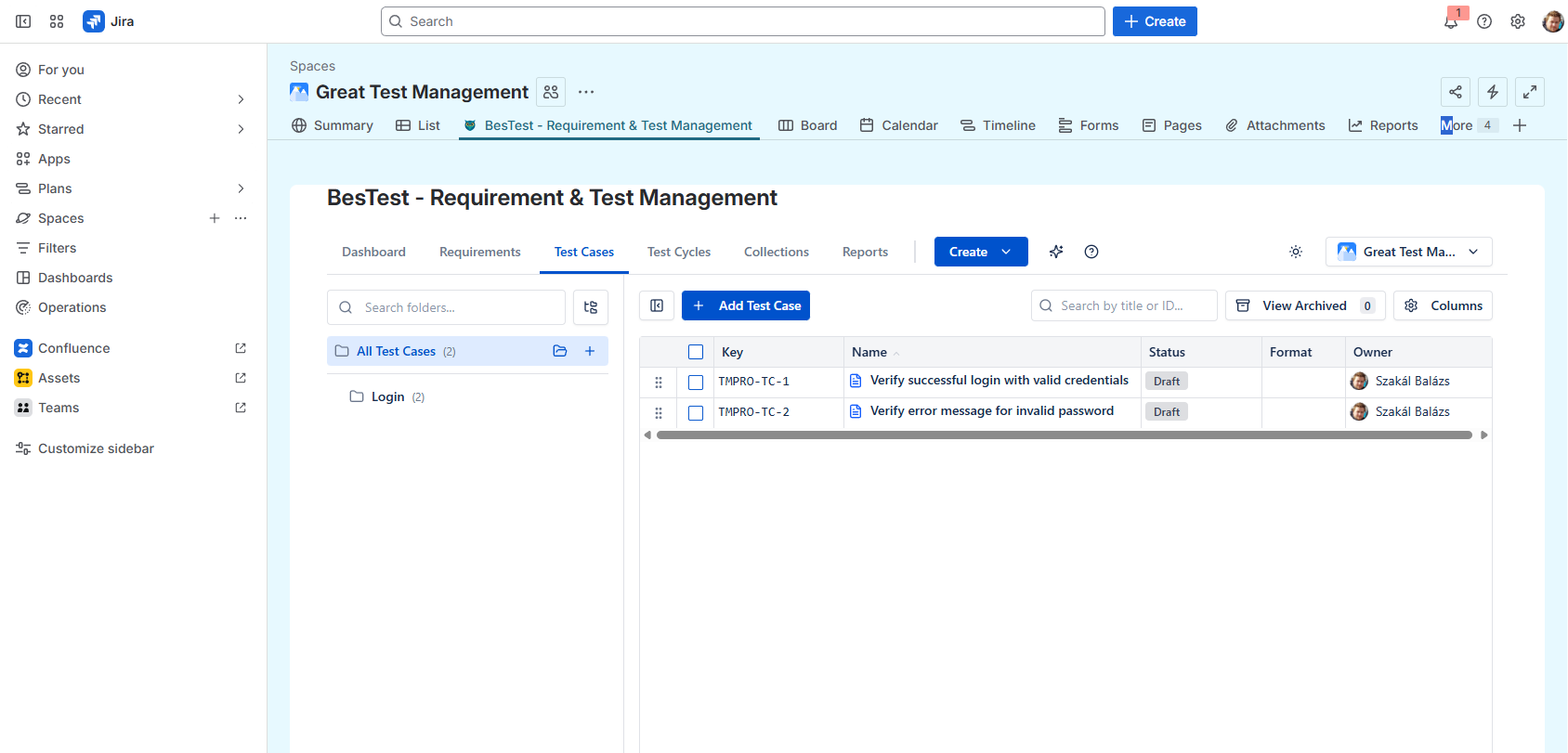
/Login & Authentication
  /Login
    TC-001: Valid login
    TC-002: Invalid password
  /Registration
  /Password Reset
/Dashboard
/Reports
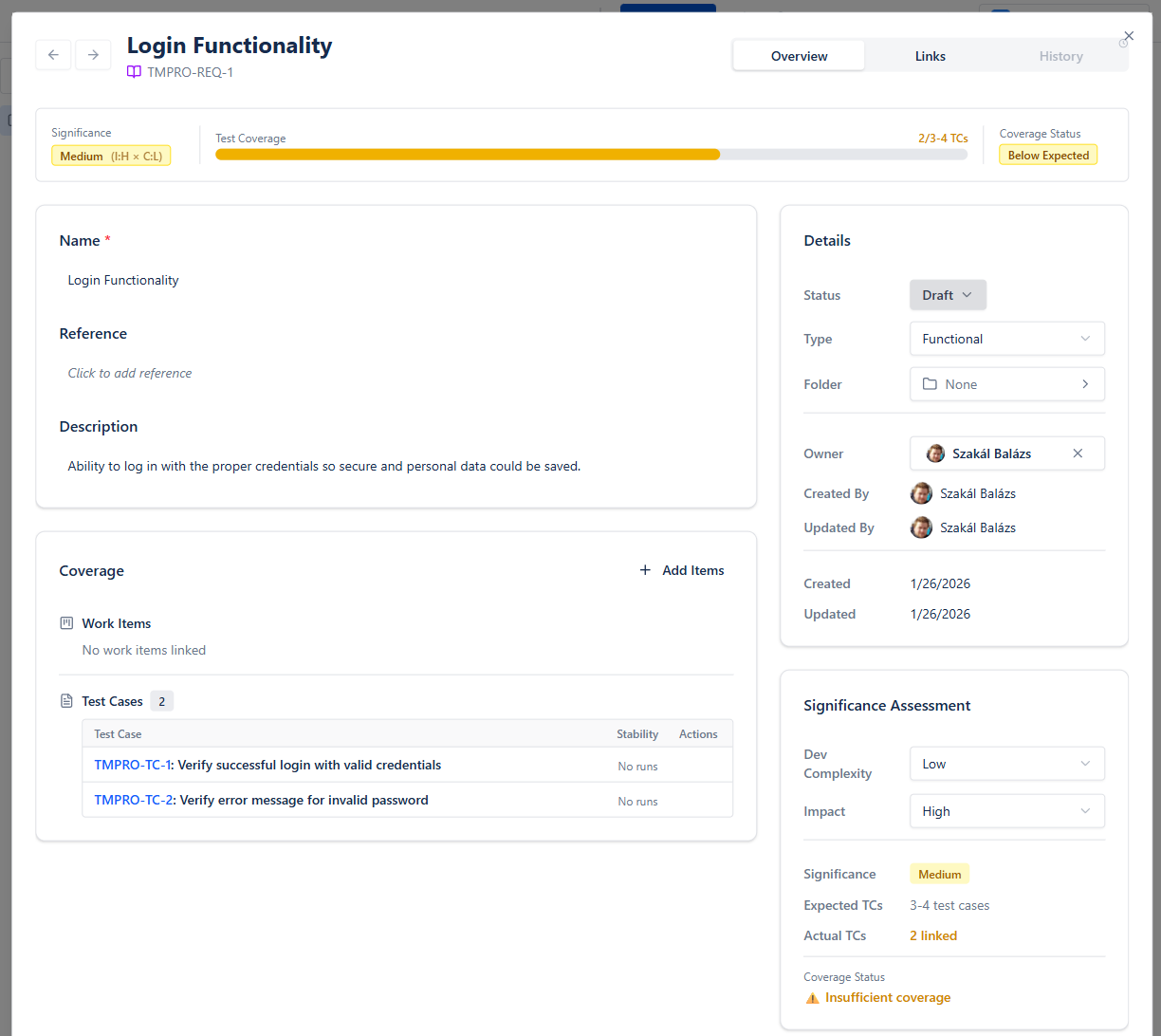
Link to Requirements
Every test case should trace to at least one requirement. This enables:
- •Coverage analysis
- •Impact assessment when requirements change
- •Audit compliance
In BesTest, requirements traceability is built-in, making this connection automatic and always visible.
Use Data-Driven Approach
When testing with multiple data sets, use parameterization instead of duplicating test cases:
Instead of:
- •Test login with email "user1@test.com"
- •Test login with email "user2@test.com"
Use one test case with data parameters:
- •Test login with email
Keep Test Cases Maintainable
- •Use descriptive names that explain intent
- •Avoid screenshots in steps (they become outdated)
- •Reference shared preconditions instead of copying them
Managing Test Cases in Jira
Jira is excellent for issue tracking, but it wasn't built for test management. Here's how teams typically handle test cases in Jira:
Option 1: Native Jira (Limited)
Create a custom issue type called "Test Case" with custom fields:
- •Test Steps (multi-line text)
- •Expected Results (multi-line text)
- •Preconditions (multi-line text)
Limitations: No test execution tracking, no reporting, no traceability matrix, manual everything.
Option 2: Test Management Apps
Use dedicated test management tools that integrate with Jira:
BesTest Approach:
- •Test cases stored in a separate, optimized database (not as Jira issues)
- •Jira-native UI that feels familiar
- •Built-in review workflow for test case approval
- •Automatic requirements traceability
- •Smart Collections for dynamic test cycles
This keeps your Jira clean and fast while providing professional test management capabilities.
Why Separate Storage Matters
Some tools (like Xray and RTM) store test cases as Jira issues. This can cause:
- •"Issue bloat" slowing down Jira
- •Cluttered backlogs with test items
- •Performance degradation at scale
BesTest avoids this by keeping test data separate while maintaining seamless Jira integration.
Test Case Review Workflow
Professional QA teams don't just write test cases—they review them. Here's why and how:
Why Review Test Cases?
- •Catch errors before they affect testing
- •Ensure completeness of coverage
- •Share knowledge across the team
- •Maintain consistent quality standards
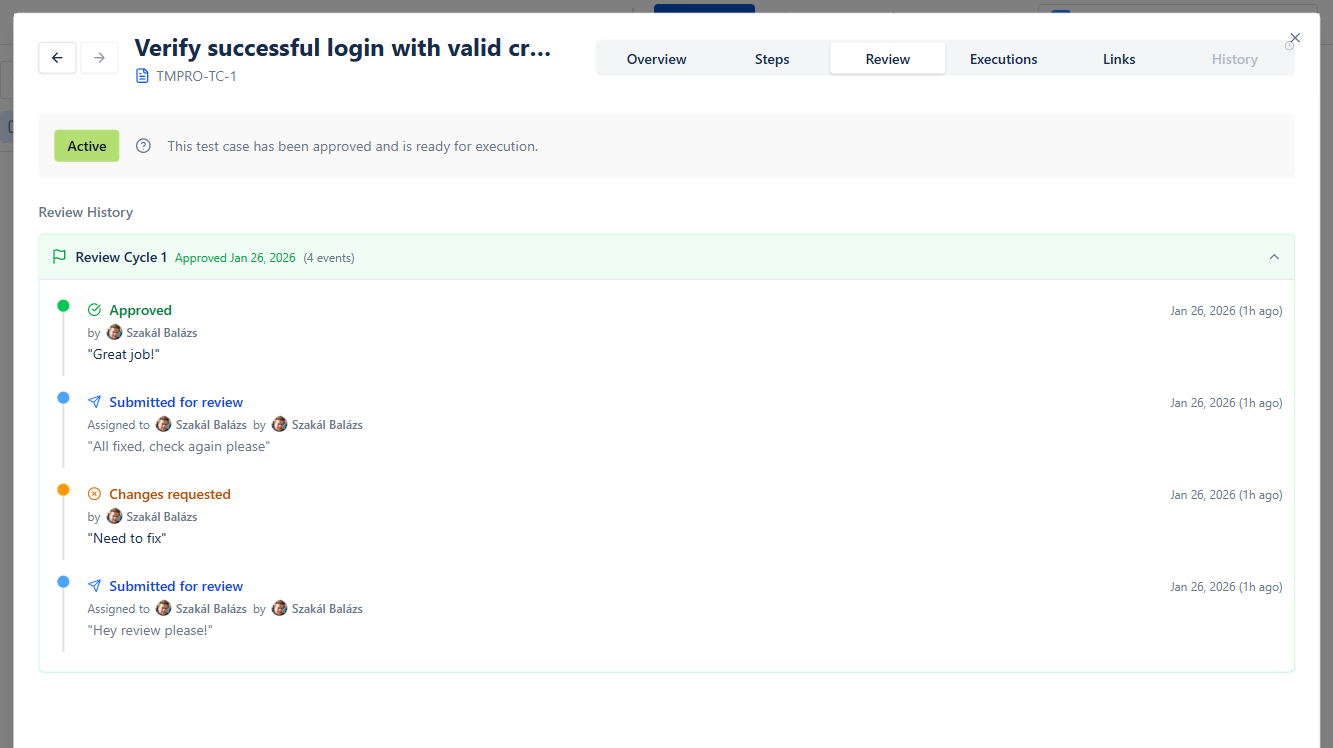
The Review Process
- •Draft: Author writes the test case
- •Review Request: Author submits for peer review
- •Review: Reviewer checks for quality, completeness, clarity
- •Feedback: Reviewer approves or requests changes
- •Revision: Author addresses feedback
- •Approval: Test case is approved for use
- •Execution: Approved test cases are executed
Review Checklist
- •[ ] Title clearly describes what's being tested
- •[ ] Preconditions are complete and specific
- •[ ] Steps are unambiguous and executable
- •[ ] Expected results are verifiable
- •[ ] Test case is independent (doesn't depend on other tests)
- •[ ] Traces to at least one requirement
- •[ ] Follows team naming conventions
- •[ ] No duplicate coverage with existing tests
In BesTest, the test case review workflow is built into the product. Test cases can be submitted for review, reviewers can approve or request changes, and only approved test cases can be added to test cycles. This ensures quality gates are enforced automatically.
Measuring Test Case Quality
How do you know if your test cases are good? Track these metrics:
Coverage Metrics
- •Requirements Coverage: % of requirements with linked test cases
- •Feature Coverage: % of features with test cases
- •Code Coverage: % of code executed by tests (for automated tests)
Effectiveness Metrics
- •Defect Detection Rate: Bugs found by test cases vs. total bugs
- •Escaped Defects: Bugs found in production that should have been caught
- •False Positives: Test failures that aren't actual bugs
Efficiency Metrics
- •Test Case Execution Time: Average time to execute a test case
- •Pass Rate: % of test cases passing (should be stable over time)
- •Flaky Tests: % of tests with inconsistent results
Maintainability Metrics
- •Reuse Rate: % of test cases used across multiple test cycles
- •Update Frequency: How often test cases need modification
- •Review Cycle Time: Time from draft to approval
Target Benchmarks
- •Requirements coverage: >90%
- •Defect detection rate: >80%
- •Pass rate (stable build): >95%
- •Average execution time: <15 minutes per test case
Getting Started: Your First Test Cases
Ready to apply what you've learned? Here's your action plan:
Week 1: Foundation
- •Choose a small feature to test (e.g., login functionality)
- •List all scenarios (happy path, negative, edge cases)
- •Write 5-10 test cases using the templates above
- •Have a colleague review them
Week 2: Expansion
- •Apply what you learned to a larger feature
- •Set up folder organization
- •Link test cases to requirements
- •Track execution results
Week 3: Optimization
- •Review metrics (coverage, pass rate)
- •Identify gaps in coverage
- •Refine test cases based on execution feedback
- •Establish team standards
Tools to Help
For teams using Jira, BesTest provides:
- •Intuitive test case creation with structured fields
- •Built-in review workflow
- •Requirements traceability out of the box
- •Dashboard with real-time metrics
- •Free for up to 10 users
The key is to start small, learn from execution, and continuously improve your test cases over time.
Frequently Asked Questions
How many steps should a test case have?
Aim for 5-15 steps per test case. Fewer than 5 might indicate the test is too simple or missing important verifications. More than 15 suggests the test case should be split into multiple smaller tests. The goal is to test one specific scenario thoroughly without creating a maintenance burden.
Should I include screenshots in test cases?
Screenshots can help clarify complex UI interactions, but use them sparingly. They become outdated when the UI changes and increase maintenance overhead. Instead, write clear, descriptive steps. If screenshots are necessary, consider linking to them rather than embedding, and establish a process to update them.
How do I handle test cases for frequently changing features?
For volatile features: (1) Keep test cases at a higher level of abstraction, (2) Use a review workflow to ensure updates are made when requirements change, (3) Tag test cases with the feature version, (4) Consider automated tests that are faster to update. BesTest's review workflow helps ensure test cases stay current.
What's the difference between a test case and a test scenario?
A test scenario is a high-level description of what to test (e.g., "User login functionality"). A test case is the detailed, step-by-step instructions for testing that scenario (e.g., specific steps to test login with valid credentials). One scenario typically has multiple test cases covering different conditions.
Should every test case be automated?
No. Prioritize automation for: (1) Frequently executed tests (regression, smoke), (2) Stable features unlikely to change, (3) Data-driven tests with many variations, (4) Tests that are tedious to execute manually. Keep manual test cases for: exploratory testing, usability evaluation, and rapidly changing features.
How do I write test cases without complete requirements?
This is common in agile environments. Start with what you know: user stories, acceptance criteria, or conversations with product owners. Write draft test cases and mark assumptions clearly. Use the review process to validate with stakeholders. Update test cases as requirements become clearer.
Write Better Test Cases with BesTest
BesTest provides structured test case creation, built-in review workflows, and requirements traceability—all in a Jira-native interface. Free for up to 10 users.
Try BesTest Free