
What Is Requirements Traceability?
Requirements traceability is the ability to track a requirement from its origin through design, development, testing, and deployment. It answers the critical question: "Have we built and tested what was asked for?"
The Traceability Chain:
Business Need → Requirement → Design → Code → Test Case → Execution → DefectEach link in this chain can be traced forward (from requirement to test) and backward (from defect to requirement).
Why It Matters:
- •Verification: Prove that requirements are implemented and tested
- •Impact Analysis: Know what's affected when a requirement changes
- •Gap Identification: Find requirements without tests or tests without requirements
- •Compliance: Meet audit requirements for regulated industries
- •Release Confidence: Know what's tested before shipping
A Requirements Traceability Matrix (RTM) is the document or tool that captures these relationships.
Types of Requirements Traceability
There are four types of traceability, each serving different purposes:
Forward Traceability (Requirements → Implementation)
Tracks requirements to their implementation in design, code, and tests.
Use Case: "Is this requirement implemented and tested?"
Backward Traceability (Implementation → Requirements)
Traces from tests, code, or design back to the originating requirement.
Use Case: "Why does this test case exist?"
Bidirectional Traceability
Combines forward and backward traceability for complete visibility.
Use Case: "Show me everything related to this requirement"
Horizontal Traceability
Links artifacts at the same level across different systems or teams.
Use Case: "How does this business requirement map to technical requirements?"
Which Should You Use?
For most software teams, bidirectional traceability provides the best balance of effort and value. It enables both coverage analysis (forward) and impact analysis (backward).
Start with bidirectional traceability between requirements and test cases. This single link provides the most value for the least effort.
Building a Requirements Traceability Matrix
Here's how to create an RTM from scratch:
Gather Requirements
Collect all requirements from: - Product requirements documents (PRD) - User stories and acceptance criteria - Business requirements - Regulatory requirements - Non-functional requirements (performance, security)
Assign a unique ID to each requirement (e.g., REQ-001, US-042).
Create the Matrix Structure
| Req ID | Requirement | Test Case ID | Test Status | Defect ID |
|---|---|---|---|---|
| REQ-001 | User can log in with email/password | TC-001, TC-002 | Pass | - |
| REQ-002 | Password reset via email | TC-003 | Fail | BUG-101 |
| REQ-003 | Account lockout after 5 failed attempts | - | Not Tested | - |
Link Test Cases
For each requirement, identify and link: - Test cases that verify the requirement - Both positive and negative test cases - Edge case and boundary tests
Track Execution Status
Update the matrix with: - Test execution results (Pass/Fail/Blocked) - Links to defects found during testing - Execution dates and environments
Analyze Coverage
Review the matrix for: - Requirements without test cases (coverage gaps) - Failed tests requiring attention - Defects that need resolution before release
RTM Best Practices
Apply these practices for effective traceability:
Start Early
Begin traceability when requirements are defined, not after testing starts. It's much harder to establish links retroactively.
Make It Bidirectional
Every test case should link to a requirement, and every requirement should link to test cases. This enables both coverage and impact analysis.
Keep It Updated
Traceability is only valuable if it's current. Update links when:
- •Requirements change
- •Test cases are added or removed
- •Tests are executed
Use Meaningful IDs
Adopt a consistent naming convention:
- •Requirements: REQ-[Module]-[Number] or US-[Number]
- •Test Cases: TC-[Module]-[Number]
- •Defects: BUG-[Number] or follow Jira conventions
Define Coverage Goals
Set targets like:
- •100% of critical requirements have test cases
- •90% of all requirements have test cases
- •100% of test cases trace to requirements
Automate Where Possible
Manual RTM maintenance in spreadsheets is error-prone. Use tools that:
- •Automatically maintain links
- •Calculate coverage metrics
- •Update status in real-time
Include Non-Functional Requirements
Don't forget to trace:
- •Performance requirements → performance tests
- •Security requirements → security tests
- •Usability requirements → usability tests
Requirements Traceability in Jira
Jira users have several options for implementing traceability:
Native Jira (Basic)
Use issue links to connect requirements (epics/stories) to test issues:
- •Create custom link types: "tested by" / "tests"
- •Manually link stories to test cases
- •Use JQL to find coverage gaps
Limitations: No coverage reports, manual maintenance, no matrix view.
Spreadsheet Approach
Export requirements to Excel and manually build the RTM:
- •Import requirement IDs from Jira
- •Add test case columns
- •Update status manually
Limitations: Always out of date, no automation, disconnected from Jira.
Test Management Tools
Use dedicated tools that integrate with Jira:
BesTest Approach:
BesTest has built-in requirements management with automatic traceability:
Create Requirements
Define requirements directly in BesTest (not as Jira issues)
Link Test Cases
Associate test cases with requirements
Track Coverage
Dashboard shows coverage percentage in real-time
View the Matrix
Traceability matrix built into the product
Follow Through
Link executions and defects automatically
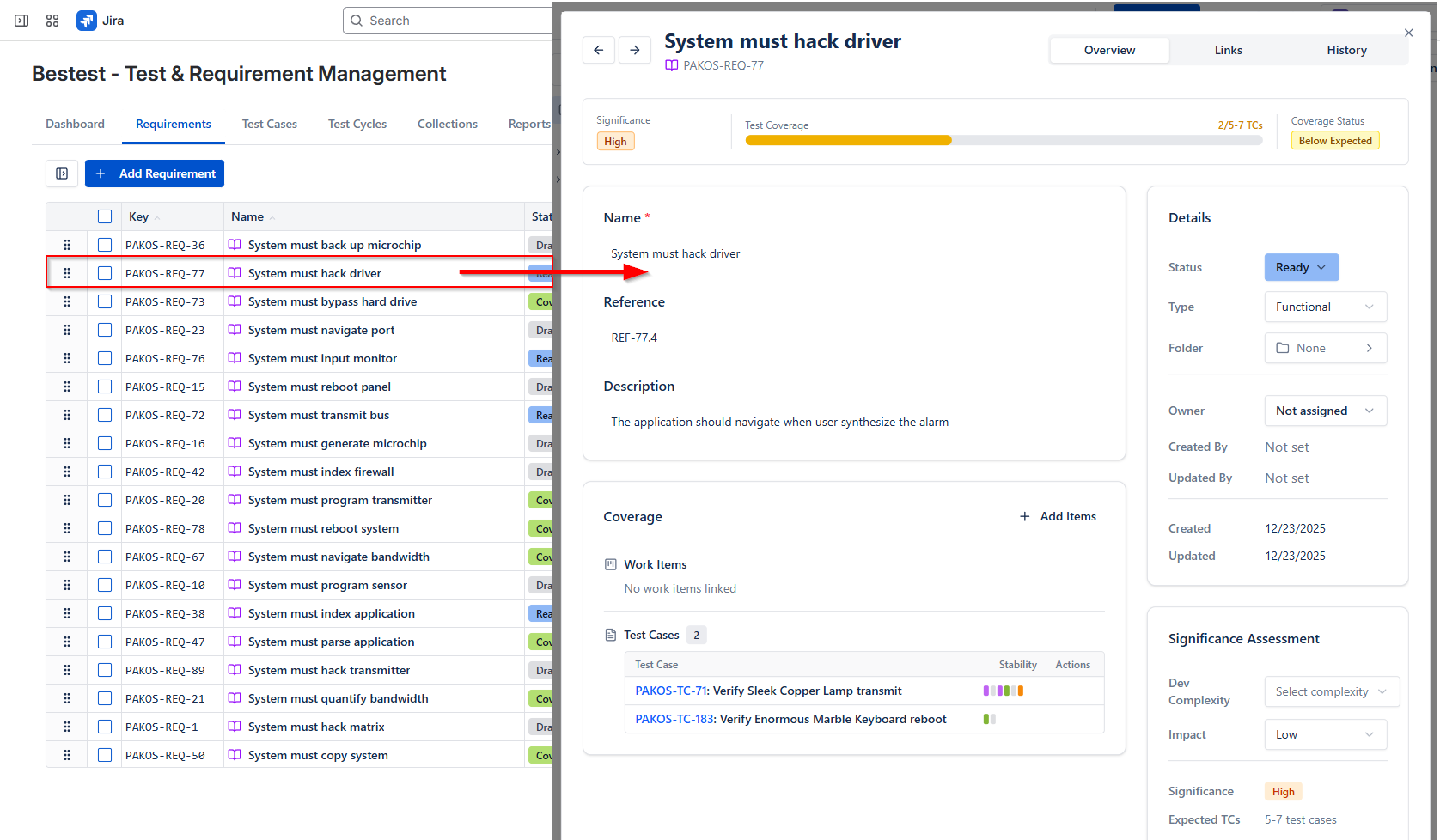
Benefits of BesTest's approach:
- •Requirements and tests in one tool
- •Automatic coverage calculation
- •Visual traceability matrix
- •No spreadsheet maintenance
- •Clean Jira (test data stored separately)
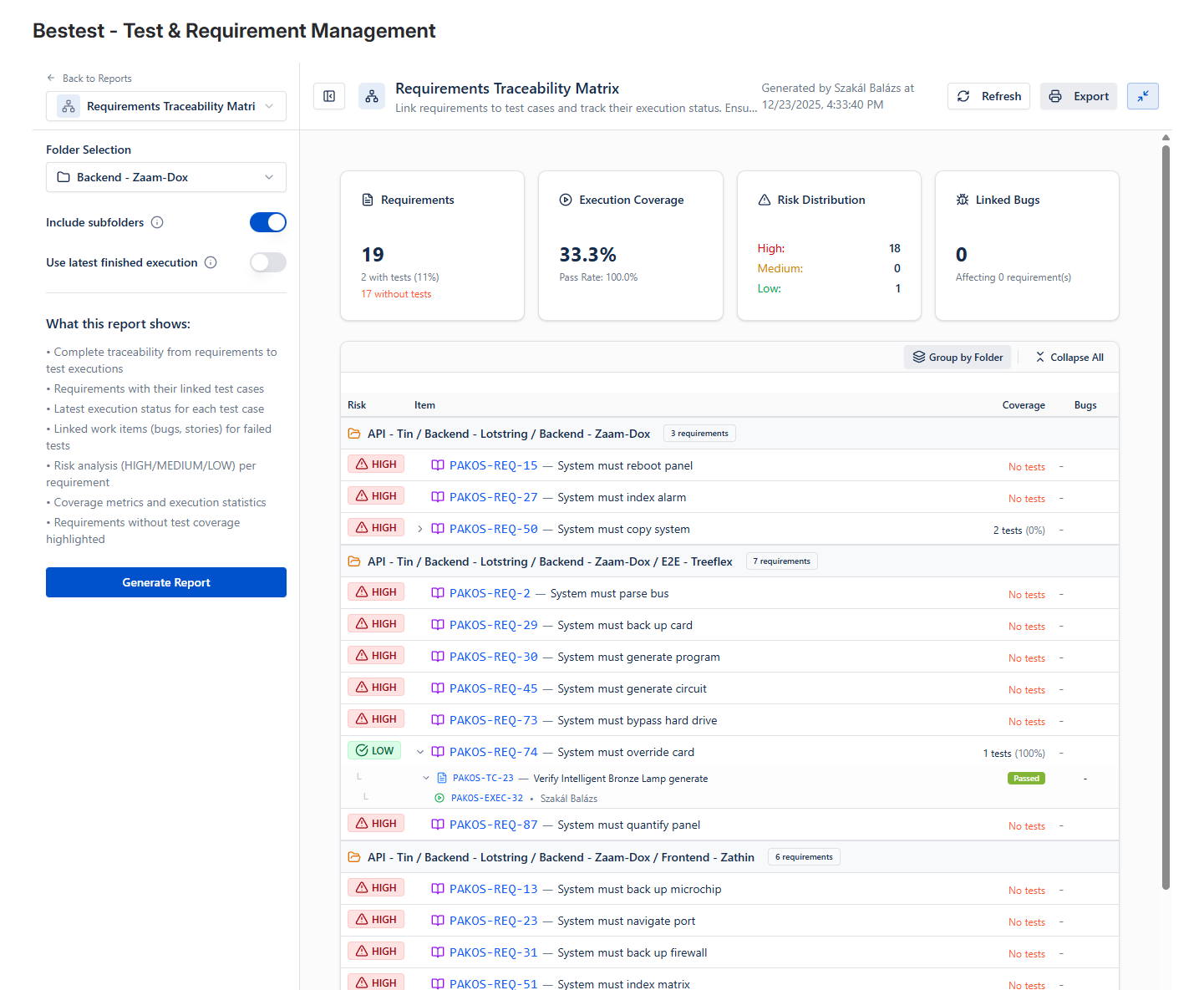
Coverage Analysis and Reporting
Traceability enables powerful coverage analysis:
Requirement Coverage Report
Shows what percentage of requirements have test cases:
| Category | Total Reqs | With Tests | Coverage |
|---|---|---|---|
| Login & Auth | 15 | 14 | 93% |
| Dashboard | 22 | 18 | 82% |
| Reports | 10 | 6 | 60% |
| Total | 47 | 38 | 81% |
Test Execution Coverage
Shows what's been tested in the current cycle:
| Status | Count | Percentage |
|---|---|---|
| Passed | 28 | 74% |
| Failed | 4 | 10% |
| Blocked | 2 | 5% |
| Not Run | 4 | 11% |
Risk-Based Analysis
Combine coverage with priority:
| Priority | Requirements | Coverage | Execution |
|---|---|---|---|
| Critical | 10 | 100% | 100% Passed |
| High | 15 | 93% | 86% Passed |
| Medium | 15 | 73% | 64% Passed |
| Low | 7 | 57% | 50% Passed |
This tells you: "Are critical requirements fully tested and passing?"
Gap Analysis
Identify:
- •Requirements without test cases
- •Test cases without requirements (orphans)
- •Requirements with failing tests
- •Requirements with no executions this cycle
In BesTest, these reports are generated automatically from your traceability data.
Impact Analysis: When Requirements Change
Traceability enables impact analysis when requirements change:
Scenario: Product owner updates REQ-005 (password complexity rules)
Without Traceability:
- •Search through all test cases manually
- •Hope you find all affected tests
- •Risk missing tests, leading to escaped defects
With Traceability:
- •Look up REQ-005 in the RTM
- •See linked test cases: TC-018, TC-019, TC-020
- •Review and update each test case
- •Re-execute affected tests
- •Update documentation
Impact Analysis Report
When REQ-005 changes, trace reveals:
- •Test Cases to Update: TC-018, TC-019, TC-020
- •Existing Defects: BUG-042 (may be affected)
- •Last Execution: Sprint 5 (all passed)
- •Affected Features: Registration, Password Reset
Change Impact Matrix
| Requirement | Linked Tests | Status | Action Needed |
|---|---|---|---|
| REQ-005 | TC-018 | Outdated | Update steps |
| REQ-005 | TC-019 | Valid | Re-execute |
| REQ-005 | TC-020 | Outdated | Update expected result |
This turns a potentially risky change into a manageable process with clear actions.
Traceability for Compliance and Audits
Regulated industries require documented traceability:
Industries with Traceability Requirements:
- •Medical Devices: FDA 21 CFR Part 820, IEC 62304
- •Automotive: ISO 26262, Automotive SPICE
- •Aerospace: DO-178C, DO-254
- •Financial Services: SOX, PCI-DSS
- •Healthcare: HIPAA
What Auditors Look For:
- •Complete Chain: Every requirement traces to verification
- •Bidirectional Links: Can trace both directions
- •Version Control: History of changes to requirements and tests
- •Execution Evidence: Proof that tests were run and passed
- •Defect Linkage: Defects traced to requirements
Audit-Ready RTM Elements:
- •Unique identifiers for all artifacts
- •Timestamps on all changes
- •User attribution (who made changes)
- •Version history
- •Execution logs with evidence
- •Defect resolution history
BesTest for Compliance:
- •Requirements with unique IDs and version tracking
- •Test cases with review workflow (approval history)
- •Execution records with timestamps
- •Automatic traceability maintenance
- •Export capabilities for audit evidence
Building traceability into your process from the start makes audits routine rather than painful.
Common Traceability Challenges and Solutions
Teams often struggle with traceability. Here's how to overcome common challenges:
The biggest traceability mistake? Waiting until the end of the project to establish links. By then, knowledge is lost, and the effort becomes overwhelming.
Challenge 1: "It's too time-consuming"
Solution:
- •Automate with tools instead of spreadsheets
- •Build traceability into the workflow (not as a separate task)
- •Focus on critical requirements first
Challenge 2: "Requirements change too frequently"
Solution:
- •Use tools that update traceability automatically
- •Implement impact analysis before accepting changes
- •Version requirements to track evolution
Challenge 3: "Our requirements aren't well-defined"
Solution:
- •Start with what you have (user stories, acceptance criteria)
- •Create testable requirements from unclear ones
- •Use traceability gaps to identify documentation needs
Challenge 4: "We have too many artifacts to link"
Solution:
- •Prioritize critical paths
- •Link at the right level (not too granular)
- •Use hierarchical requirements to reduce links
Challenge 5: "Our RTM is always out of date"
Solution:
- •Use integrated tools (not separate spreadsheets)
- •Make traceability part of Definition of Done
- •Automate status updates from test execution
Challenge 6: "Nobody uses it"
Solution:
- •Show value through coverage reports
- •Integrate into daily workflow
- •Make it easy to access and update
Getting Started with Traceability
Start your traceability journey with these steps:
Phase 1: Foundation (Week 1-2)
- •Identify your requirement sources (Jira stories, PRD, etc.)
- •Choose a traceability approach (tool-based recommended)
- •Define your coverage goals
- •Start with one module or feature
Phase 2: Implementation (Week 3-4)
- •Import or create requirements
- •Link existing test cases
- •Identify coverage gaps
- •Create tests for uncovered requirements
Phase 3: Process Integration (Week 5-6)
- •Add traceability to Definition of Done
- •Generate first coverage reports
- •Share with stakeholders
- •Gather feedback and adjust
Phase 4: Optimization (Ongoing)
- •Expand to more modules
- •Refine coverage targets
- •Integrate with CI/CD
- •Automate reporting
Start with your critical requirements only. Getting 100% coverage on 10 critical requirements is more valuable than 50% coverage on 100 requirements.
Tool Recommendation:
For Jira teams, BesTest provides:
- •Built-in requirements management
- •Automatic traceability
- •Real-time coverage dashboard
- •No spreadsheet maintenance needed
- •Free for up to 10 users
Frequently Asked Questions
What's the difference between requirements coverage and code coverage?
Requirements coverage measures what percentage of requirements have test cases (functional completeness). Code coverage measures what percentage of source code is executed by tests (technical completeness). Both are valuable: requirements coverage ensures you're testing the right things; code coverage helps identify untested code paths.
How granular should my traceability be?
Trace at the requirement level that makes sense for your project. For agile teams, user stories or acceptance criteria work well. For regulated industries, you may need to trace to individual functional requirements. Avoid tracing every line of code—it creates overhead without proportional value.
Can I start traceability mid-project?
Yes, though it's easier to start early. Begin with new features going forward, then backfill critical existing features. Focus on high-risk areas first. Use the exercise to identify documentation gaps in existing requirements.
How do I measure traceability quality?
Track: (1) Coverage percentage by priority, (2) Orphan rate (tests without requirements), (3) Gap rate (requirements without tests), (4) Update lag (time between requirement change and test update), (5) Defect escape rate for traced vs. untraced requirements.
What if our requirements are in multiple tools?
Choose one source of truth for traceability. Options: (1) Consolidate requirements in one tool, (2) Link requirements across tools via IDs, (3) Use integration platforms to sync data. BesTest provides its own requirements module specifically to avoid this fragmentation.
Is traceability worth the effort for small teams?
Yes, but scale appropriately. Small teams benefit from: (1) Knowing nothing is missed before release, (2) Quick impact analysis when things change, (3) Knowledge preservation when team members leave. Keep it simple—basic traceability is better than none.
Automatic Requirements Traceability with BesTest
BesTest has built-in requirements management with automatic traceability to test cases and executions. See coverage at a glance without maintaining spreadsheets.
Start Free