


Why UAT Sign-Off Matters
Finishing UAT testing is not the same as finishing UAT. Without formal sign-off, you have no documented agreement that the software is ready for production. That creates real problems:
Accountability gaps. When something breaks after release, the first question is always "Who approved this?" If the answer is "Well, everyone sort of agreed in a meeting," you have no accountability trail.
Audit and compliance risk. Regulated industries - finance, healthcare, government - require documented evidence that business stakeholders accepted the software before deployment. An informal thumbs-up in Slack does not satisfy an auditor.
Scope disputes. Without a signed record of what was tested and what was deferred, teams end up arguing about whether a bug was "known" or "new" after release.
Release delays. When sign-off is informal, getting final approval becomes a game of chasing people over email and waiting for responses that never come.
A proper UAT sign-off process gives you:
| Benefit | What it solves |
|---|---|
| Written approval record | Proves who accepted the release and when |
| Conditional sign-off options | Lets you release with known minor issues documented |
| Defect disposition log | Records which defects were fixed, deferred, or accepted |
| Stakeholder accountability | Each approver is individually recorded |
| Audit-ready documentation | One document covers the entire UAT outcome |
The rest of this guide gives you everything you need to implement formal UAT sign-off: a complete document template, ready-to-send emails, and a phase-by-phase checklist.
UAT Sign-Off Template
This is the core deliverable - a complete UAT sign-off document you can copy into your wiki, Word document, or Confluence page. Replace the bracketed placeholders with your project details.
### Document Header
============================================
       UAT SIGN-OFF DOCUMENT
============================================

Project:          [Project Name]
Release:          [Release Version / Sprint ID]
Date Prepared:    [YYYY-MM-DD]
Prepared By:      [Name, Role]
Document Status:  [Draft / Final]
Document Version: [1.0]
### UAT Summary
UAT Scope:        [Brief description of features/modules tested]
UAT Environment:  [Environment name and URL]
UAT Period:       [Start Date] to [End Date]
UAT Coordinator:  [Name]

Participants:
- [Name], [Role] - [Module/Area tested]
- [Name], [Role] - [Module/Area tested]
- [Name], [Role] - [Module/Area tested]
### Test Execution Results
| Metric              | Count | Percentage |
|---------------------|-------|------------|
| Total Test Cases    | [N]   | 100%       |
| Passed              | [N]   | [N]%       |
| Failed              | [N]   | [N]%       |
| Blocked             | [N]   | [N]%       |
| Deferred            | [N]   | [N]%       |
| Not Executed        | [N]   | [N]%       |
|---------------------|-------|------------|
| Pass Rate           |       | [N]%       |
| Execution Rate      |       | [N]%       |
### Outstanding Defects
| Defect ID  | Severity | Summary           | Status   | Disposition        |
|------------|----------|-------------------|----------|--------------------|
| [PROJ-123] | Critical | [Brief summary]   | [Open]   | [Fix before release] |
| [PROJ-124] | Major    | [Brief summary]   | [Open]   | [Defer to next release] |
| [PROJ-125] | Minor    | [Brief summary]   | [Open]   | [Accept as-is]    |
| [PROJ-126] | Minor    | [Brief summary]   | [Fixed]  | [Verified fixed]   |
Disposition options:
- •Fix before release - Must be resolved before go-live
- •Defer to next release - Accepted risk, scheduled for a future release
- •Accept as-is - Stakeholders accept the current behavior
- •Verified fixed - Was defective, now confirmed resolved
### Sign-Off Decision
Overall UAT Decision:  [ ] Approved for Release
                       [ ] Approved with Conditions (see below)
                       [ ] Rejected - Not Ready for Release

If Approved with Conditions, list conditions:
1. [Condition - e.g., "PROJ-124 to be fixed in hotfix within 5 business days"]
2. [Condition - e.g., "Monitoring to be enabled for payment processing module"]
3. [Condition]
### Stakeholder Signatures
| Name          | Role              | Decision            | Date       | Comments         |
|---------------|-------------------|---------------------|------------|------------------|
| [Name]        | [Business Owner]  | [Approve/Reject]    | [Date]     | [Optional notes] |
| [Name]        | [Product Manager] | [Approve/Reject]    | [Date]     | [Optional notes] |
| [Name]        | [QA Lead]         | [Approve/Reject]    | [Date]     | [Optional notes] |
| [Name]        | [IT/Ops Lead]     | [Approve/Reject]    | [Date]     | [Optional notes] |
### Conditions and Caveats
Known Limitations:
- [Any known limitations of the tested release]

Deferred Scope:
- [Features/scenarios intentionally excluded from this UAT cycle]

Post-Release Monitoring:
- [Any metrics or areas that require extra monitoring after go-live]

Notes:
- [Any other relevant context for future reference]This template covers the full formal sign-off process. For smaller releases, you may not need every section - but always keep the test execution results, outstanding defects table, and stakeholder signatures. Those three sections are the minimum for meaningful sign-off documentation.
UAT Sign-Off Email Templates
Chasing stakeholders for sign-off is one of the most frustrating parts of UAT. These three email templates cover the most common scenarios. Copy them, fill in the placeholders, and send.
### Email 1: Requesting Sign-Off
Use this when UAT execution is complete and you need stakeholders to review results and provide their approval.
Subject: UAT Sign-Off Requested - [Project Name] [Release Version]

Hi [Stakeholder Name],

User acceptance testing for [Project Name] [Release Version] is now complete.
I'm requesting your formal sign-off so we can proceed with the release
scheduled for [Release Date].

UAT Summary:
- Test period: [Start Date] to [End Date]
- Total test cases: [N]
- Passed: [N] ([N]%)
- Failed: [N] ([N]%)
- Blocked: [N]

Outstanding items:
- [N] defect(s) deferred to the next release (details in the attached
  sign-off document)
- [N] test case(s) not executed due to [reason]

The full UAT sign-off document is attached / available here: [Link]

Please review the results and confirm one of the following by [Deadline]:
1. Approved - release can proceed
2. Approved with conditions - release can proceed with noted caveats
3. Rejected - release should not proceed (please specify concerns)

If you have questions about any test results, I'm happy to walk through
them. Otherwise, a reply to this email with your decision is sufficient.

Thanks,
[Your Name]
### Email 2: Confirming Sign-Off (Approval Received)
Send this after all stakeholders have approved. It serves as the official record that sign-off is complete.
Subject: UAT Sign-Off Complete - [Project Name] [Release Version] Approved

Hi all,

UAT sign-off for [Project Name] [Release Version] is now complete.
All required stakeholders have provided their approval.

Sign-off summary:
- [Stakeholder 1, Role]: Approved on [Date]
- [Stakeholder 2, Role]: Approved on [Date]
- [Stakeholder 3, Role]: Approved with conditions on [Date]

Conditions noted:
- [Any conditions from conditional approvals, or "None"]

The release is cleared to proceed as scheduled on [Release Date].

The complete UAT sign-off document has been filed here: [Link]

Thanks to everyone who participated in testing and review.

Best regards,
[Your Name]
### Email 3: Sign-Off with Conditions
Use this when stakeholders are willing to approve but only with specific conditions or caveats documented.
Subject: UAT Conditional Sign-Off - [Project Name] [Release Version]

Hi [Stakeholder Name],

Thank you for reviewing the UAT results for [Project Name] [Release Version].

Based on our discussion, you are providing conditional approval with the
following caveats:

Conditions for release:
1. [Defect PROJ-XXX to be resolved via hotfix within N business days]
2. [Enhanced monitoring on the [module] for the first 2 weeks post-release]
3. [Rollback plan documented and approved by Ops before deployment]

Deferred items acknowledged:
- [PROJ-YYY]: [Brief description] - deferred to [next release/sprint]
- [PROJ-ZZZ]: [Brief description] - accepted as-is

Can you confirm these conditions are correct by replying to this email?
I will update the sign-off document and circulate the final version.

Thanks,
[Your Name]Email-based sign-off works, but it scatters your audit trail across inboxes. If your organization requires formal documentation, always consolidate email approvals into a single sign-off document stored in a shared location (wiki, Confluence, SharePoint). Better yet, use a tool that captures sign-off decisions alongside test results automatically.
User Acceptance Testing Checklist
This checklist covers the entire UAT lifecycle - not just the sign-off part. Use it to make sure nothing falls through the cracks from planning through to closure.
### Pre-UAT Phase
- •[ ] Acceptance criteria defined for all in-scope requirements
- •[ ] UAT test cases written and linked to requirements
- •[ ] Test cases reviewed by business stakeholders (not just QA)
- •[ ] UAT environment provisioned with production-like configuration
- •[ ] Test data prepared - realistic, anonymized if using production data
- •[ ] UAT testers identified and availability confirmed
- •[ ] Calendar time blocked for UAT sessions (don't rely on "when people have time")
- •[ ] Access and credentials verified for all testers in the UAT environment
- •[ ] UAT kickoff session scheduled to brief testers on scope, tools, and process
- •[ ] Defect logging process documented - how to report issues, severity definitions, who triages
- •[ ] Entry criteria met - build deployed, smoke test passed, no critical blockers
- •[ ] Sign-off template prepared with project details pre-filled
### During UAT Phase
- •[ ] Kickoff meeting held - scope reviewed, questions answered, demo of test execution tool
- •[ ] Test cases assigned to specific testers
- •[ ] Daily progress tracked - execution rate, pass/fail counts, blocked tests
- •[ ] Defects logged immediately with steps to reproduce, expected vs. actual results
- •[ ] Daily triage meetings held - review new defects, prioritize, unblock testers
- •[ ] Defect fixes deployed to UAT environment and failed tests re-executed
- •[ ] Blocked tests unblocked or documented with reason for non-execution
- •[ ] Stakeholders updated on progress (dashboard, email, or standup)
- •[ ] Scope changes documented if new test cases are added mid-cycle
- •[ ] Test evidence captured - screenshots, notes, and actual results recorded per test
### Post-UAT / Sign-Off Phase
- •[ ] All test cases executed (or non-execution justified and documented)
- •[ ] All critical and major defects resolved or disposition agreed upon
- •[ ] Outstanding defects documented with severity, status, and disposition
- •[ ] UAT sign-off document completed with test results summary
- •[ ] Sign-off requested from all required stakeholders
- •[ ] Sign-off received - approved, conditional, or rejected
- •[ ] Conditions documented if conditional approval given
- •[ ] Sign-off document filed in a permanent, accessible location
- •[ ] Release team notified of UAT outcome
- •[ ] UAT retrospective scheduled to capture lessons learned
This checklist works as a living document for each UAT cycle. Copy it into your project wiki or test management tool at the start of each cycle and check items off as you go. Over time, you can customize it to fit your team's specific workflow.
When to Sign Off with Open Defects
In a perfect world, every defect would be fixed before sign-off. In reality, you almost always have open defects at the end of a UAT cycle. The question is not whether to release with open issues - it's how to make that decision responsibly.
The Decision Framework
Not all defects are equal. Use severity and business impact to guide the decision:
| Severity | Definition | Sign-off guidance |
|---|---|---|
| Critical | System crash, data loss, security vulnerability | Never sign off. Must be fixed before release. |
| Major | Core workflow broken, significant functionality missing | Rarely sign off. Fix unless a viable workaround exists and stakeholders accept the risk. |
| Minor | Cosmetic issue, edge case, inconvenience | Usually safe to defer. Document and schedule for next release. |
| Trivial | Typo, minor UI inconsistency | Safe to defer. Include in routine maintenance. |
The Conditional Approval Path
Most real-world UAT cycles end with conditional sign-off. Here's how to structure it:
- •Document every open defect with its severity, current status, and agreed disposition
- •Get explicit stakeholder agreement on each disposition - don't assume silence means acceptance
- •Set deadlines for deferred fixes - "next release" is too vague; "Sprint 14, targeting May 15" is actionable
- •Define monitoring requirements - if you're releasing with a known issue, specify what to watch post-release
- •Record the risk acceptance - the stakeholder who approves conditional release owns the risk
Red Flags - Do Not Sign Off If:
- •Any critical defect is open, regardless of workarounds
- •More than 20% of test cases failed (indicates systemic issues, not isolated defects)
- •Core business workflows are broken or require manual workarounds
- •The defect count is growing faster than fixes are deployed (unstable build)
- •Key stakeholders have not participated in UAT or reviewed results
- •Test coverage is below the agreed threshold for in-scope requirements
When auditors review your sign-off document six months later, they want to know why each open defect was acceptable. "Low priority" is not enough. Write something like: "PROJ-456 (Minor) - Date picker shows wrong default month on first load. Workaround: users select the correct month manually. Impact is cosmetic. Scheduled for Sprint 14." That's an audit-ready disposition.
Replace Manual Sign-Off Documents with Built-In Tracking
BesTest tracks UAT test execution, defects, and coverage inside Jira - so your sign-off evidence is always up to date. Set up in under a minute, free for up to 10 users.
Try BesTest FreeCommon Sign-Off Mistakes
After years of working with QA teams, these are the sign-off mistakes that cause the most pain:
No Written Record
The most common mistake. The team "agrees" to release in a meeting or over chat, but nobody documents it. Three months later when a production bug surfaces, there's no record of who approved what, or what was known at the time.
Fix: Always produce a sign-off document, even for small releases. It doesn't have to be elaborate - the template above takes 15 minutes to fill in.
Sign-Off from the Wrong People
A QA lead signs off, but the business owner never reviewed results. Or a junior analyst approves on behalf of their manager. When things go wrong, the people with actual authority say "I never agreed to that."
Fix: Define required approvers at the start of UAT, not at the end. Include anyone whose name would appear in the incident review if something goes wrong.
Ignoring Deferred Defects
Defects get deferred to "the next release" but nobody tracks them. They quietly disappear from the backlog, and the same issues resurface months later when a customer complains.
Fix: Create Jira issues for every deferred defect with a target fix version. Review deferred defects at the start of each new UAT cycle.
Treating UAT as a Rubber Stamp
When UAT is scheduled for one day at the end of a sprint, the message is clear: sign-off is a formality, not a genuine quality gate. Testers rush, skip edge cases, and approve because the release date is already committed.
Fix: Schedule adequate UAT time. If UAT regularly finds zero defects, either your test cases aren't thorough enough or you should question whether UAT is adding value.
No Exit Criteria Defined
Without clear criteria for what constitutes a passing UAT, the sign-off decision becomes subjective. One stakeholder thinks 90% pass rate is fine; another expects 100%.
Fix: Agree on exit criteria before UAT starts. Common thresholds: 100% of critical test cases passed, overall pass rate above 95%, no open critical or major defects.
Signing Off on Untested Scope
The sign-off document says "UAT Complete" but 15% of test cases were never executed due to time constraints. The team signs off on what was tested, implicitly accepting risk on what was not - without documenting that decision.
Fix: The sign-off document should explicitly list any unexecuted test cases and the reason. Stakeholders need to knowingly accept the risk of untested functionality.
Automating UAT Sign-Off Tracking in Jira
Manual sign-off documents work, but they create overhead that compounds with every release. The template above solves the content problem, but not the process problem: you're still manually assembling results, chasing approvals, and filing documents.
Here's how to move from manual documents to integrated tracking inside Jira.
What Manual Sign-Off Looks Like
- •Export test results from wherever you tracked them (spreadsheet, email, Confluence)
- •Manually count pass/fail/blocked numbers
- •Copy defect details from Jira into the sign-off document
- •Email the document to stakeholders
- •Wait for replies (and send reminders)
- •Update the document with each approval
- •File the final version somewhere findable
This takes hours per release and creates a document that's immediately out of date.
What Integrated Sign-Off Looks Like
With a test management tool inside Jira, most of this work disappears:
- •Test execution results are already tracked - no manual counting or exporting
- •Defects are linked to failed test cases - the relationship is built-in, not copy-pasted
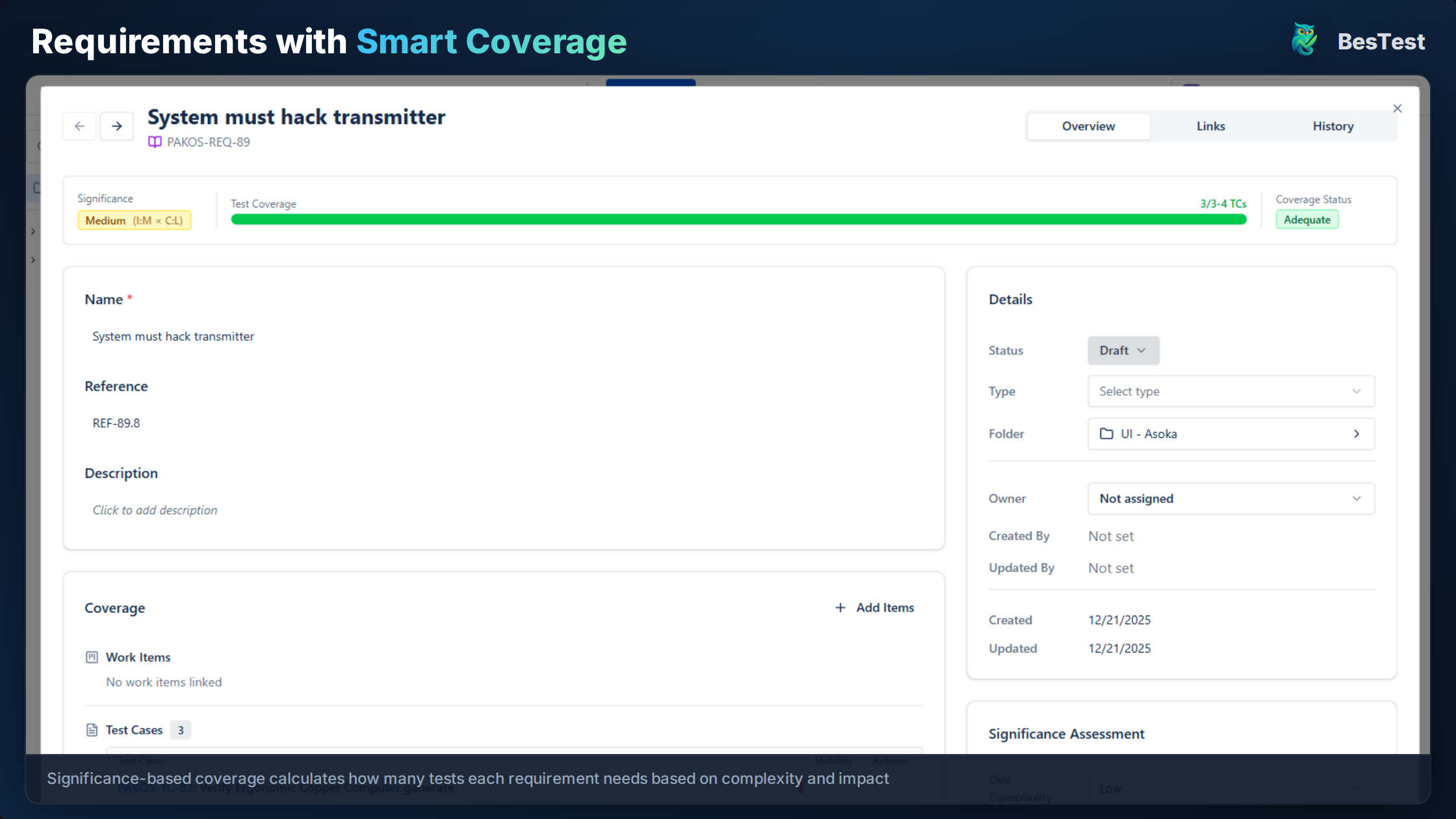
- •Coverage is calculated automatically - you can see which requirements are fully tested based on significance, not just whether a test case exists
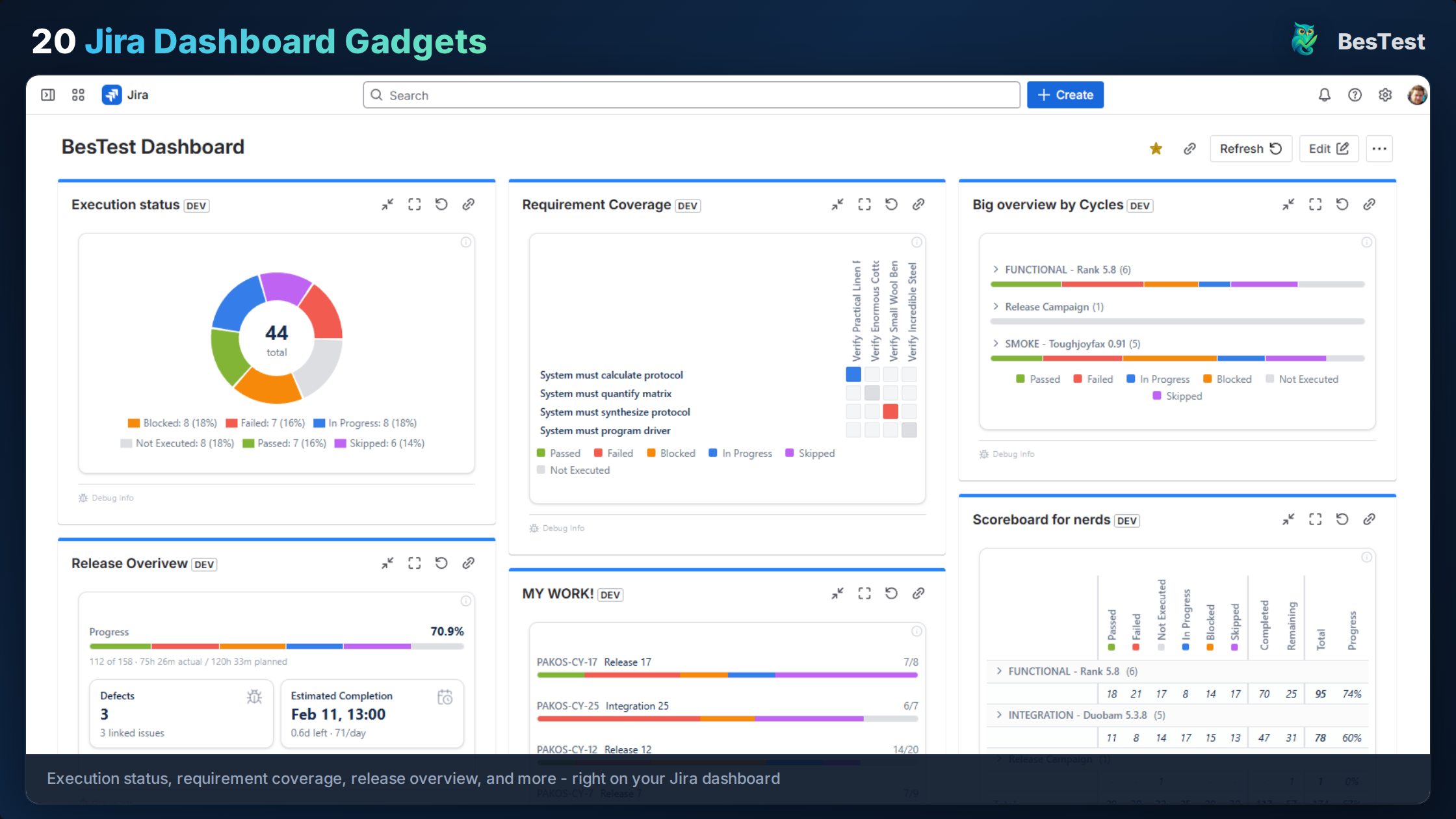
- •Dashboard gadgets show real-time status - stakeholders check progress themselves instead of waiting for your email update
- •In-app notifications prompt action - testers and approvers get notified when it's their turn
BesTest handles this natively in Jira. Instead of maintaining a parallel sign-off document:
- •Requirements link directly to test cases, and coverage is calculated based on significance (development complexity multiplied by business impact) - not just "has at least one linked test"
- •Test cycles track execution progress with real-time pass/fail/blocked counts
- •Dashboard gadgets give stakeholders visibility without asking for status reports
- •The test case review workflow lets stakeholders verify test quality before execution begins
- •In-app notifications keep business users engaged without requiring them to monitor Jira
You still need a sign-off decision. No tool eliminates the need for a human to say "yes, this is ready for production." But the evidence supporting that decision - test results, defect dispositions, coverage data - should be generated automatically, not assembled manually.
If you're currently doing UAT sign-off informally (or not at all), start with the template in this guide. It gives you a structured process immediately. Once that process is established and you're running regular UAT cycles, moving to an integrated tool like BesTest eliminates the manual overhead while keeping the same rigor.
References
- •IEEE 829-2008, "Standard for Software and System Test Documentation" - defines standard templates for test summary reports and test completion documentation, which form the basis for UAT sign-off documents.
- •ISO/IEC/IEEE 29119-3:2021, "Software and Systems Engineering - Software Testing - Part 3: Test Documentation" - updated international standard for test documentation including acceptance test completion criteria.
- •ISTQB Foundation Level Syllabus v4.0, 2023 - Section 2.4 covers acceptance testing objectives and exit criteria, Section 5.2 covers test completion activities including sign-off.
- •FDA, "General Principles of Software Validation," 2002 - documents regulatory requirements for user acceptance testing and formal sign-off in the medical device and healthcare software context.
Frequently Asked Questions
What should a UAT sign-off document include?
A UAT sign-off document should include: a document header (project, release, date), UAT summary (scope, dates, participants), test execution results (passed, failed, blocked counts), outstanding defects table with dispositions (fix, defer, accept), the sign-off decision (approve, conditional, reject), stakeholder signatures with dates, and a conditions/caveats section for any known limitations or deferred items.
Who should sign off on UAT?
At minimum: the business owner or product owner (confirms business requirements are met), a senior business user or subject matter expert (confirms usability and workflows), and the QA lead (confirms test coverage and execution completeness). For regulated industries, you may also need compliance officers, IT operations leads, or project sponsors. Define required approvers before UAT starts, not after.
Can you release with open UAT defects?
Yes, through conditional sign-off - but only with documented stakeholder agreement. Critical defects should never be released. Major defects require a viable workaround and explicit risk acceptance. Minor and trivial defects are commonly deferred with a target fix date. The key is that every open defect has a documented disposition (fix, defer, or accept) and the stakeholders who approved the release are recorded.
What is the difference between UAT sign-off and go-live approval?
UAT sign-off confirms that the software meets business requirements based on testing results. Go-live approval is broader - it also covers operational readiness (deployment plan, rollback plan, monitoring, support staffing, communication plan). UAT sign-off is an input to go-live approval, not a replacement for it. You can pass UAT but still delay go-live if operational prerequisites are not met.
How do I handle stakeholders who won't respond to sign-off requests?
First, set a clear deadline in your sign-off request email. Second, escalate to the project sponsor if the deadline passes. Third, establish a sign-off policy before UAT starts: "If no response is received within 3 business days, silence is treated as approval" or "If no response is received, the release is blocked until explicit approval is given." The right policy depends on your organization's risk tolerance and compliance requirements.
Do I need a UAT sign-off template for agile projects?
Yes, though it can be lighter. Agile projects still need documented acceptance of each release, especially if multiple stakeholders are involved or you operate in a regulated industry. For agile, consider a streamlined template focused on the sprint scope, pass/fail summary, open defects, and stakeholder approval. The overhead is small compared to the risk of an undocumented release approval.
Replace Manual Sign-Off Documents with Built-In Tracking
BesTest tracks UAT test execution, defects, and coverage inside Jira - so your sign-off evidence is always up to date. Set up in under a minute, free for up to 10 users.
Try BesTest Free