
What Is UAT and Why Does It Matter?
User Acceptance Testing (UAT) is the final phase of software testing where real users or business stakeholders verify that the software meets their needs before it goes live. Unlike unit tests or integration tests that focus on technical correctness, UAT answers a fundamentally different question:
"Does this software actually do what the business needs it to do?"
UAT in Jira means running that check with Jira as the hub: acceptance criteria live on Jira stories, business users run test cases written against them, and the defects they find become Jira issues. Jira itself has no test cases, test runs, or sign-off, so teams either build workarounds or add a test management app. This guide covers both.
UAT sits at the top of the testing pyramid - it's the last quality gate before production. When UAT fails or gets skipped, the consequences are real:
- •Features ship that don't match business requirements
- •Stakeholders lose confidence in the development process
- •Post-release defects spike, costing 5-10x more to fix according to NIST research
- •Compliance and audit requirements go unmet
UAT is not optional. For regulated industries (finance, healthcare, government), formal UAT with documented sign-off is a compliance requirement. For everyone else, it's the difference between shipping software that works and shipping software that matters.
Who runs UAT?
| Role | Responsibility |
|---|---|
| Business analysts | Define acceptance criteria |
| Product owners | Prioritize UAT scope |
| End users / SMEs | Execute test cases |
| QA team | Coordinate, support, track results |
| Project managers | Monitor progress, manage timeline |
The challenge? These people are rarely testers. They don't live in Jira. They need clear, simple, non-technical test documentation - and that's where most teams struggle.
Why UAT in Jira Is Harder Than It Should Be
Jira is built for developers and project managers. It's great for tracking issues and sprints, but UAT exposes its limitations:
Challenge 1: No Built-in Test Management
Jira has no native concept of test cases, test cycles, or test execution. You can't write a test case, assign it to a business user, and track pass/fail - not without workarounds or plugins.
Challenge 2: Non-Technical Stakeholders
UAT testers are often business users who find Jira overwhelming. They don't know JQL. They don't want to navigate complex issue hierarchies. They need something straightforward.
Challenge 3: Tracking Sign-Off
UAT requires formal sign-off from multiple stakeholders. Jira has no built-in mechanism for collecting, recording, and reporting on approvals.
Challenge 4: Visibility Gap
Project managers need to answer: "Where are we with UAT?" In native Jira, this means manually counting issues, checking labels, or asking people - none of which scales.
Challenge 5: Scattered Documentation
Without a dedicated tool, UAT artifacts end up everywhere:
- •Test cases in Confluence or Google Docs
- •Results in spreadsheets
- •Defects in Jira
- •Sign-off in email threads
- •Screenshots on someone's desktop
The result? Teams spend more time managing the UAT process than actually testing. And when audit time comes, pulling together evidence is a scramble.
Many teams default to UAT spreadsheets. This feels easy at first but creates a parallel system that's always out of sync with Jira. Defects logged in the spreadsheet don't link to Jira issues. Status updates require manual copy-paste. Historical data gets lost when someone overwrites the file. Don't fall into this trap.
3 Ways to Handle UAT in Jira
Let's compare the approaches, from basic to professional:
Approach 1: Native Jira Workaround
Create a custom issue type "UAT Test" with custom fields:
- •Steps to test (text field)
- •Expected outcome (text field)
- •UAT Result (dropdown: Pass / Fail / Blocked)
- •Tester (user picker)
- •Sign-off (checkbox)
Pros: Free, everything in Jira
Cons: No execution interface, no reports, clutters backlog, doesn't scale
Only viable for <10 UAT test cases per release. Anything more becomes unmanageable.
Approach 2: Confluence + Jira
Write UAT plans in Confluence with tables of test cases. Link to Jira stories. Track results in the Confluence table.
Pros: Better documentation, familiar for business users
Cons: Two tools to maintain, no automation, manual reporting, no traceability
Better than pure Jira, but still manual. Works for small projects with infrequent releases.
Approach 3: Dedicated Test Management Tool
Use a Jira-integrated test management app like BesTest that provides:
- •Structured test cases with steps and expected results
- •Dedicated test execution interface
- •UAT cycles and assignments
- •Real-time progress tracking
- •Requirements traceability
- •Dashboard gadgets and reporting
The professional choice. Test data stays organized, business users get a clean interface, and stakeholders get real-time visibility.
UAT is usually one part of a bigger decision about how your team manages testing in Jira overall. If you are choosing tooling for more than UAT, the test management in Jira guide walks through that broader decision.
Setting Up UAT in Jira: Step-by-Step
Here's a practical walkthrough for setting up a proper UAT process in Jira using a test management tool:
Before you start, put a plan on paper: the free UAT Test Plan Generator assembles a complete plan (scope, entry/exit criteria, schedule, roles, sign-off) in your browser and exports Word, Markdown, or PDF.
Define Acceptance Criteria
Before writing any test case, document what "done" means for each feature. Work with stakeholders to define clear acceptance criteria on your Jira stories:
- •Use the format: "As a [user], I can [action], so that [outcome]"
- •Be specific: "Invoice total calculates correctly with tax" not "Invoice works"
- •Include edge cases: "System handles zero-quantity line items gracefully"
Create UAT Test Cases
Write test cases in business language, not technical jargon. Each test case should map to one or more acceptance criteria.
Good UAT test case:
Title: Verify invoice total with multiple line items and tax
Precondition: User is logged in with billing permissions

Step 1: Navigate to Invoicing > Create Invoice
Expected: Invoice creation form displays

Step 2: Add 3 line items with quantities 2, 5, and 1
Expected: Line totals calculate automatically

Step 3: Select tax rate "VAT 20%"
Expected: Tax amount displays as 20% of subtotal

Step 4: Click "Generate Invoice"
Expected: Invoice total = subtotal + tax, PDF preview displays correctly
Bad UAT test case:
Title: Test invoice
Steps: Create an invoice and check it works
Expected: Should be correct
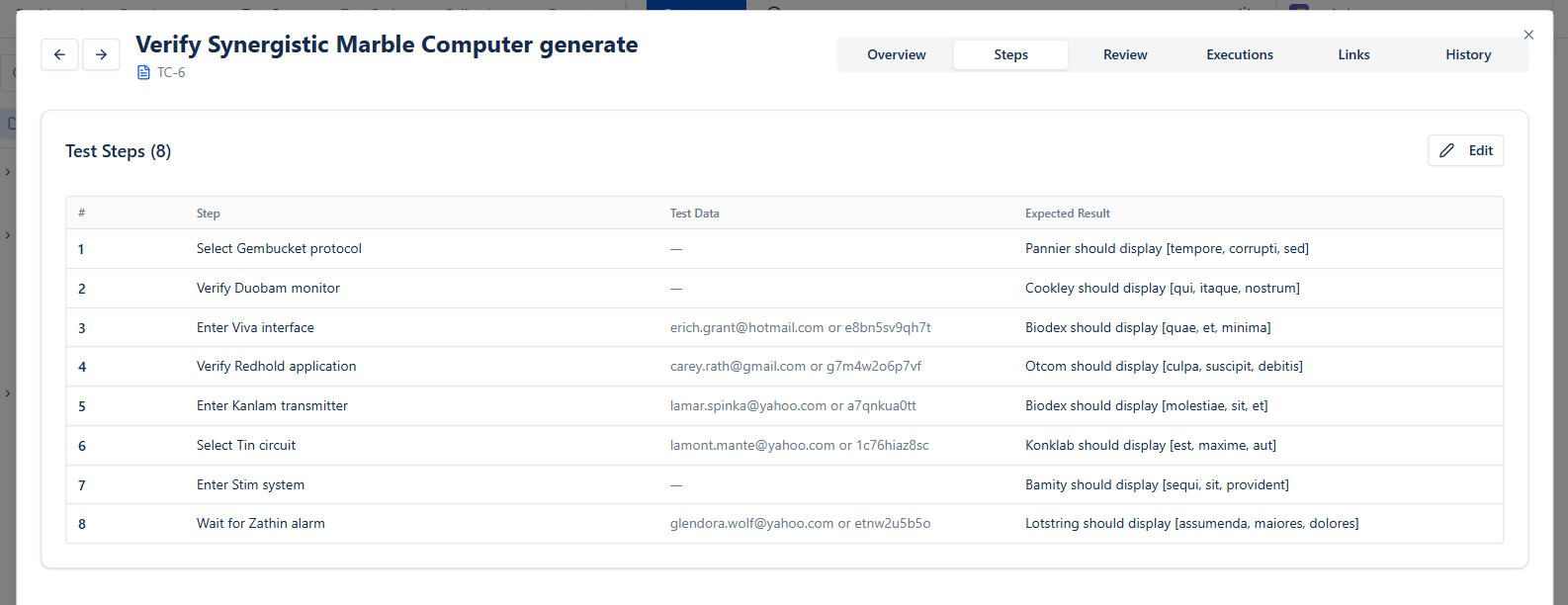
In BesTest, each step has its own action, test data, and expected result, and you can add the next step without leaving the keyboard. If you already have a list of scenarios, Create in bulk turns it into test cases in one go (one name per line), and you can create them from the BesTest panel on a Jira story so they are linked to it from the start.
Organize Into a UAT Cycle
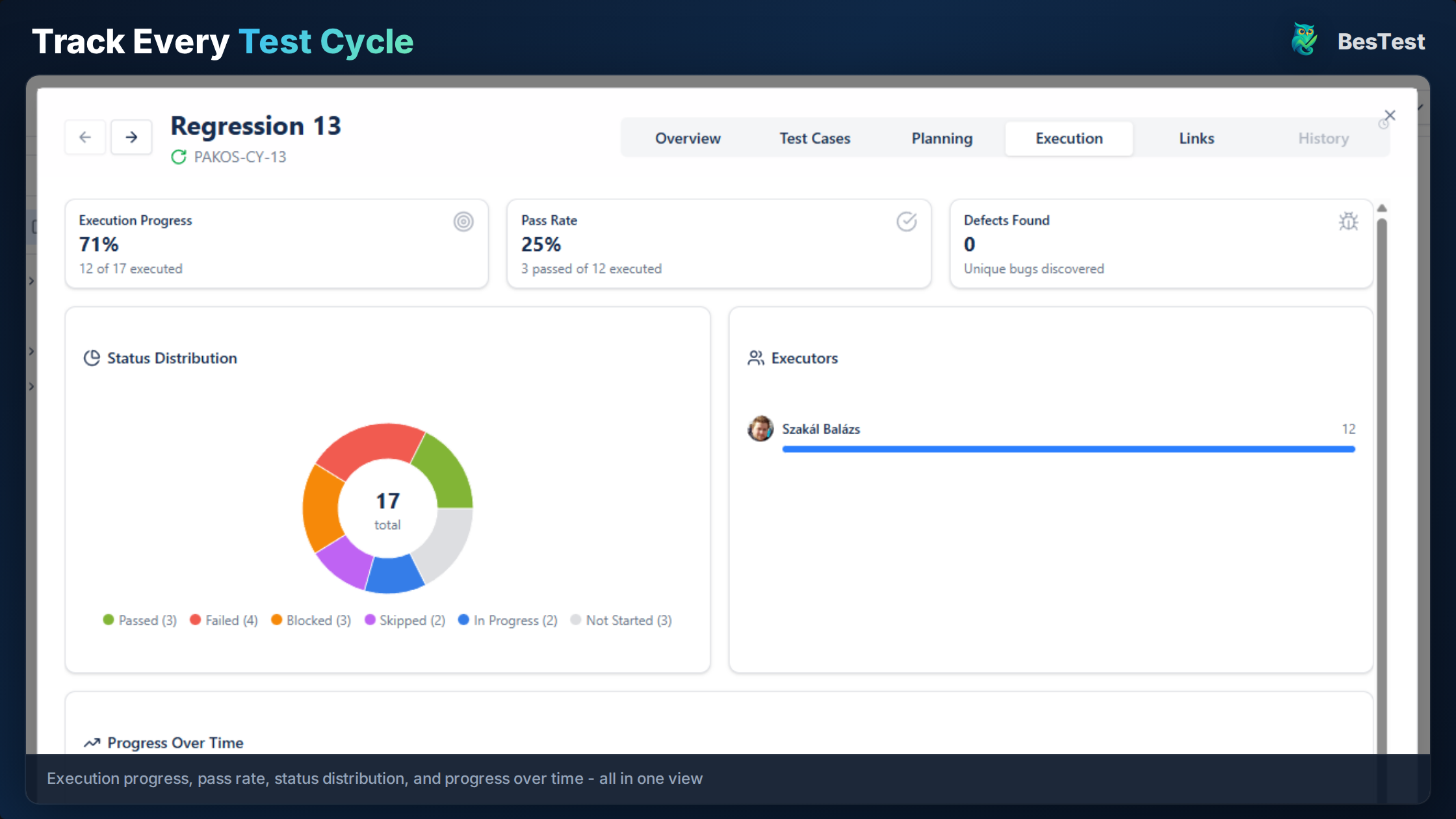
Group your test cases into a dedicated UAT test cycle:
- •Name it clearly: "Release 3.2 UAT - Billing Module"
- •Set a target start and end date
- •Add the test cases one by one, a whole collection, or the requirements in scope (their linked test cases come along)
- •Assign test cases to specific business users
- •Set the cycle to Ready to Execute - in BesTest, this is when testers get notified that their runs are waiting
Link to Requirements
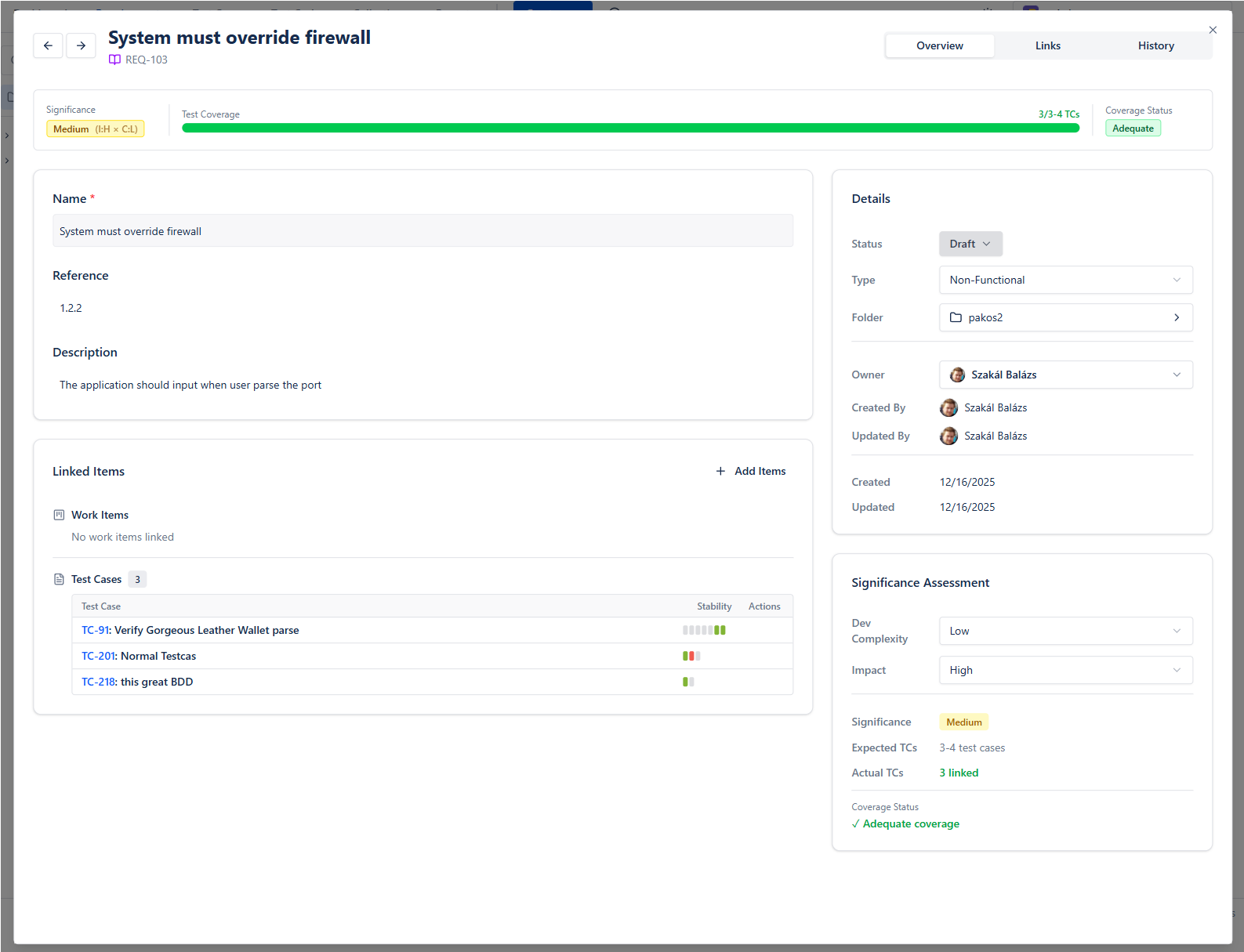
Connect every UAT test case to the Jira story or requirement it validates. This requirements traceability is critical for:
- •Proving coverage: "Every requirement has enough UAT tests for how much it matters"
- •Impact analysis: "If this story changes, these UAT tests need updating"
- •Audit compliance: "Here's the evidence that requirement X was tested and approved"
In BesTest, a requirement's Traceability card shows the Jira work items it comes from and the test cases that test it, and its Coverage card says how many tests it has against how many its significance needs ("3 linked of 5 needed"). The result is Covered, Partly covered or Not covered, so a critical requirement with one test does not pass as covered.
Brief Your UAT Testers
Business users need a clear kickoff:
- •What to test and why
- •How to access the test environment
- •How to execute tests (walkthrough of the tool)
- •How to log defects when something fails
- •Timeline and expectations
Running the UAT Cycle
Once setup is complete, execution follows a structured workflow:
Phase 1: Environment Preparation
- •Deploy the release candidate to a UAT environment
- •Load realistic test data (anonymized production data is ideal)
- •Verify the environment is stable (run a quick smoke test first)
- •Confirm UAT testers have access and credentials
Phase 2: Execution
Each tester works through their assigned test cases:
- 1Open the test case in the execution interface
- 2Follow each step
- 3Record the actual result
- 4Mark the step as Pass, Fail, or Blocked
- 5For failures: add notes and log a defect. Link a Jira issue to attach screenshots and evidence
In BesTest's Test Player, a tester presses My work to see only the test cases assigned to them, and Next to do (or the N key) jumps to the next one still open. Each step is marked one at a time, and a failed step can become a Jira bug right there, pre-filled with the test case, the step, and the expected vs. actual result. If a test case was edited after the cycle started, the Player says so and offers the latest steps.
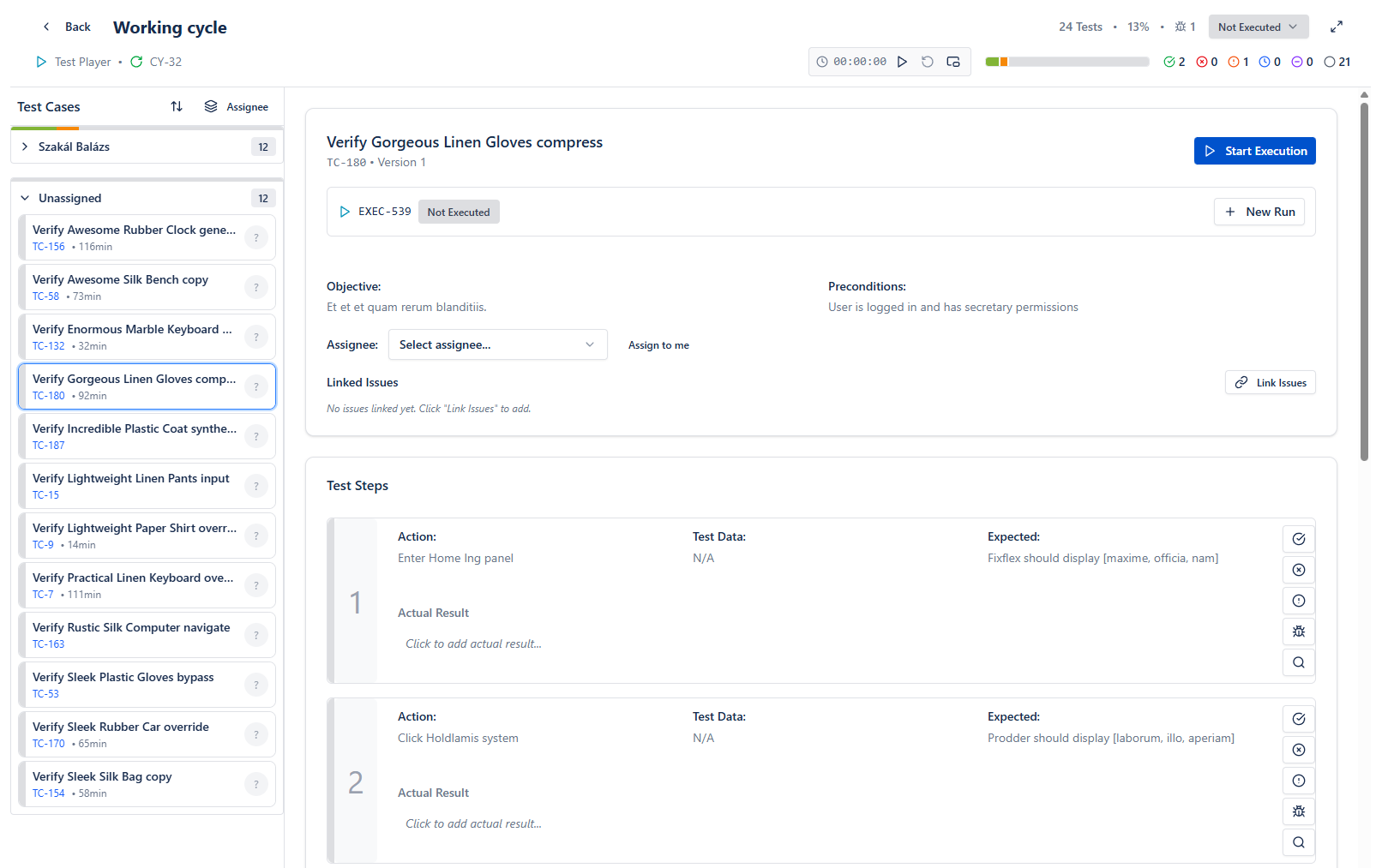
Want to see what your business testers will see? The live demo runs the real app on sample data, with no signup and no Jira install - open a cycle and run a test case in the Test Player.
Key execution principles:
- •Test one scenario at a time - don't skip around
- •Document everything - "it worked" is not enough
- •Log defects immediately - don't batch them for later
- •If blocked, flag it right away so the team can unblock
Phase 3: Daily Triage
Hold a short daily stand-up during UAT:
- •Review new failures and defects
- •Prioritize: which defects block further testing?
- •Reassign or redistribute test cases if needed
- •Update stakeholders on progress
Phase 4: Defect Resolution
For each UAT defect:
- 1Development fixes the issue
- 2Fix is deployed to UAT environment
- 3Original tester re-executes the failed test case (in BesTest, as a rerun in the same cycle - a cycle already marked Done reopens and closes again once every run has a result)
- 4Test case is marked Pass or Fail again
Phase 5: Sign-Off
Once all test cases pass (or all failures are accepted/deferred):
- •Stakeholders formally approve the release
- •Sign-off is documented with timestamp and approver
- •UAT summary report is generated for the record
Need the sign-off document itself? The free UAT Sign-off Sheet Generator builds one with acceptance criteria, defect dispositions, and signature blocks - print it to PDF or export Word or Markdown. For what goes into it and who should sign, see the UAT sign-off guide.
Tracking UAT Progress and Results
Visibility is everything during UAT. Stakeholders want to know: "Are we on track? Can we release?"
The Metrics That Matter:
| Metric | What It Tells You |
|---|---|
| % Executed | How much testing is done |
| Pass rate | How healthy the build is |
| Open defects (by severity) | What's blocking release |
| Blocked tests | What can't be tested yet |
| Days remaining | Are we on schedule? |
Dashboard Gadgets for UAT
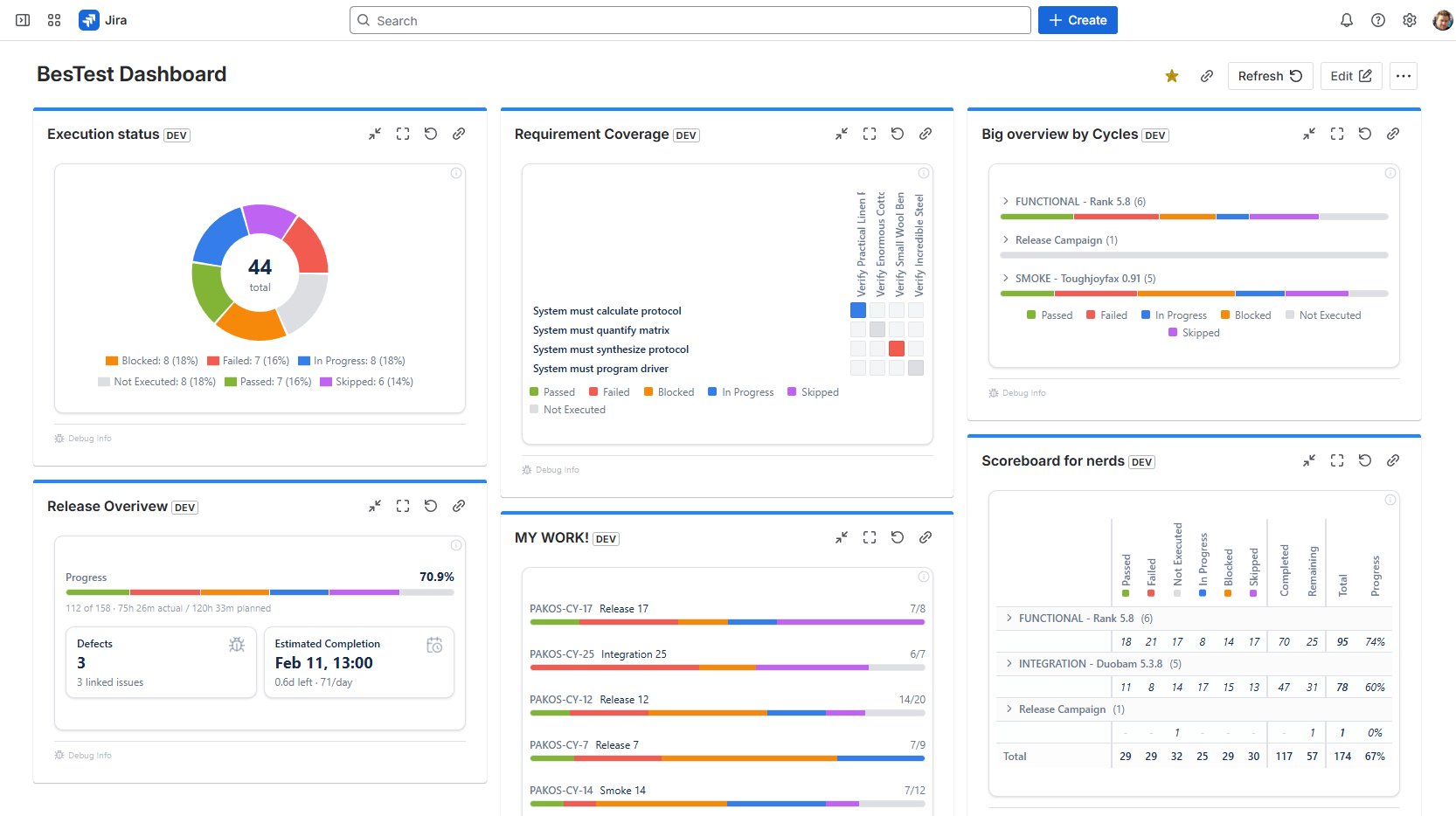
Instead of pulling numbers manually, use dashboard gadgets that update in real time. BesTest provides Jira dashboard gadgets where you can track execution progress at a glance - directly in your existing Jira dashboard, alongside your sprint board and backlog.
This means project managers and stakeholders don't need to learn a new tool or ask for status updates. They open their Jira dashboard and see:
- •Execution progress (passed, failed, blocked, skipped, not executed)
- •Trend over time (are we making progress day by day?)
- •Linked defects, and how many are resolved
- •Requirement coverage by significance: Covered, Partly covered, Not covered
In-App Notifications
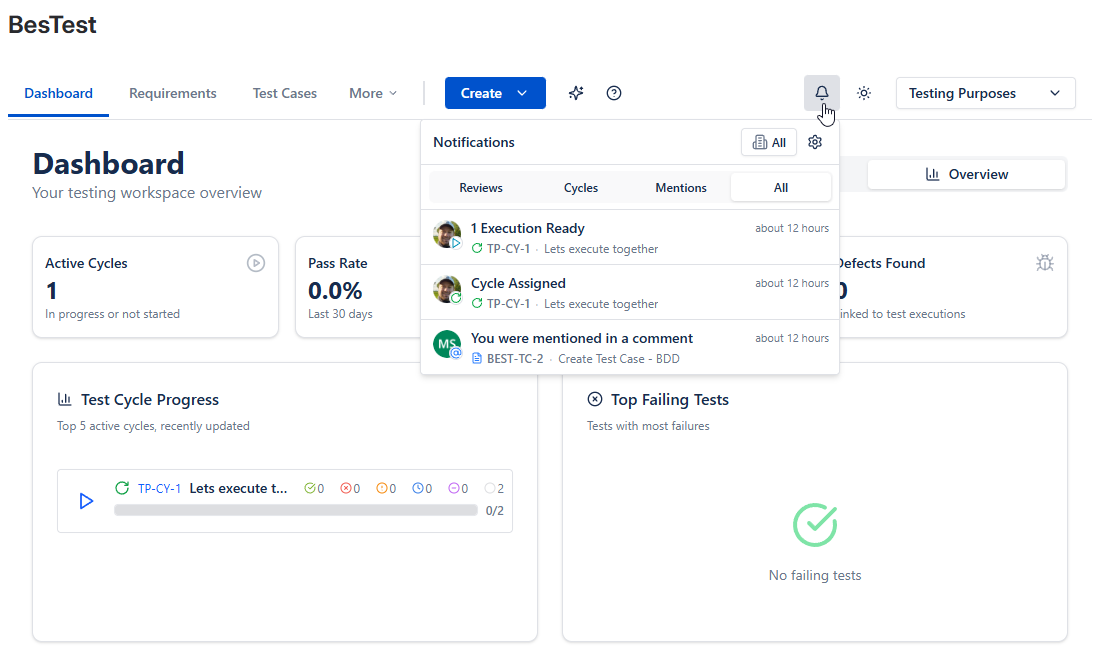
UAT involves people who don't live in Jira all day. BesTest's in-app notification system keeps everyone in the loop automatically:
- •Runs ready: when a tester has runs assigned in a cycle and the cycle is set to Ready to Execute
- •Cycle assigned / finished: the person a cycle is assigned to hears when they get it and when it finishes
- •Reviews: a reviewer hears when a test case or requirement waits on their approval, and the requester when the review is done
- •Mentions: anyone @mentioned in a comment on a requirement, test case, or cycle
This is especially valuable for business users who participate in UAT infrequently. They get notified when action is needed, without having to check dashboards or ask around. Admins choose which notifications are on for the project, and each user can fine-tune their own.
Reporting for Stakeholders
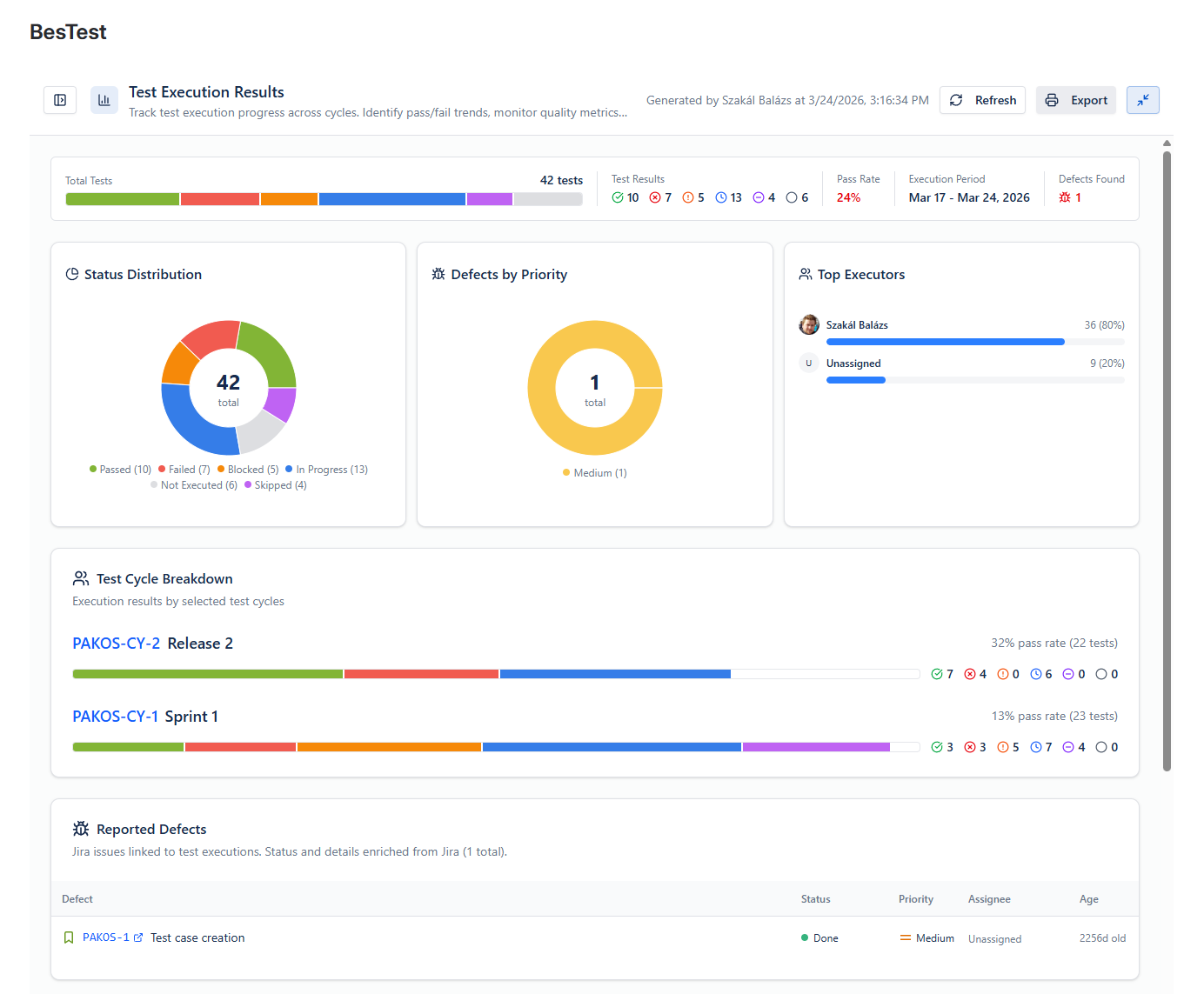
At the end of UAT, generate a summary report that includes:
- •Total test cases executed vs. planned
- •Final pass/fail/blocked counts
- •List of open defects with severity and decision (fix / defer / accept)
- •Requirements coverage: which requirements were fully validated
- •Sign-off status: who approved, when
In BesTest, the Test Execution Results report covers the first three (it exports to PDF), and the Requirements Traceability Matrix report flags requirements that are not properly tested or still have unresolved bugs. The approvals themselves go into your sign-off document.
Live preview - this is the real BesTest UI
You can run UAT in Jira. Jira just will not track it for you.
Everything above works, right up to the point where you need to know which requirements are actually covered and who signed off on what. BesTest adds that layer without adding a single Jira issue, so boards and backlogs stay clean while UAT runs on top of them. Free for up to 10 users, about a minute to enable on a project. Not the person who installs apps? Forward this to your Jira admin.
View on the Atlassian MarketplaceUAT Test Case Templates
Good UAT test cases are written for business users, not testers. The fastest way to see the difference is a before and after - both lines describe the same check:
The first version assumes the reader knows what an endpoint or a payload schema is. A finance manager does not - so they skip the step, test from memory, or quietly stop participating. The second version says where to click, what to enter, and exactly what should appear. Anyone who can use the product can run it, and a failure produces a precise bug report instead of "the invoice thing is broken".
These templates cover individual test cases - for the plan document around them (scope, entry and exit criteria, roles, schedule, and sign-off), start from our free UAT test plan template. Here are templates for common scenarios:
Template 1: Workflow Validation
Title: [Feature] - [Workflow Name] completes successfully
Precondition: User has [role/permission], [data state]

Step 1: Navigate to [location]
Expected: [Screen/page] displays with [specific elements]

Step 2: Enter [specific data] and submit
Expected: System [processes/validates] and shows [confirmation]

Step 3: Verify [outcome] in [location]
Expected: [Data/state] matches [expected value]
Template 2: Data Accuracy
Title: [Report/Calculation] shows correct [data type]
Precondition: [Known test data is loaded]

Step 1: Navigate to [report/screen]
Expected: Report loads with current data

Step 2: Verify [specific value] matches [expected calculation]
Expected: [Value] equals [expected] (tolerance: [if applicable])

Step 3: Export report and verify totals
Expected: Exported data matches on-screen values
Template 3: User Permission Check
Title: [Role] can/cannot [action]
Precondition: Logged in as [role]

Step 1: Navigate to [restricted area]
Expected: [Access granted/denied message]

Step 2: Attempt to [specific action]
Expected: [Action succeeds/is blocked appropriately]
Template 4: Integration Verification
Title: [System A] data syncs correctly to [System B]
Precondition: [Integration is active], [test record exists]

Step 1: Create/update [record] in [System A]
Expected: Confirmation of save

Step 2: Wait [sync interval] and check [System B]
Expected: [Record] appears in [System B] with matching data

Step 3: Verify [specific fields] match
Expected: [Field values] are identical in both systems- Use exact field names and menu paths ("Click Settings > Billing > Tax Rates")
- Include specific test data ("Enter quantity: 150, unit price: $24.99")
- State exactly what to look for ("Total should display $4,623.15")
- Avoid ambiguity ("works correctly" means nothing - say what "correct" looks like)
UAT Best Practices That Actually Work
After watching hundreds of UAT cycles succeed and fail, these are the practices that make the difference:
Start UAT Planning Before Development Ends
Don't wait for the build to write UAT cases. Start during sprint planning:
- •Write test cases as soon as acceptance criteria are defined
- •Submit them for stakeholder review early
- •Get agreement on what "pass" looks like before code is written
Keep the UAT Environment Stable
Nothing kills UAT momentum faster than a broken environment:
- •Freeze deployments during active UAT (no dev pushes)
- •Use a dedicated UAT environment, not staging
- •Load production-like data so results are meaningful
- •Have a rollback plan if the environment breaks
Schedule UAT Sessions, Don't Just Assign Tests
Business users have day jobs. UAT won't happen if you just assign tests and hope:
- •Block calendar time for UAT (2-hour sessions work well)
- •Have a QA person available to answer questions during sessions
- •Provide a quiet space or virtual room for focused testing
- •Send reminders before and during the cycle
Use the [Review Workflow](/blog/test-case-review-best-practices/)
Before executing UAT tests, have stakeholders review the test cases themselves:
- •Do the test cases cover what the business actually needs?
- •Is the language clear to non-technical users?
- •Are edge cases and negative scenarios included?
- •This catches gaps before execution, not after
Treat UAT Defects as Priority
UAT defects represent real business needs that aren't being met:
- •Triage UAT defects daily
- •Critical UAT defects should block release
- •Don't defer UAT defects without stakeholder agreement
- •Track defect resolution and re-test systematically
Document Sign-Off Formally
"Everyone seemed happy with it" is not sign-off:
- •Record who approved, when, and what they approved
- •Note any conditions or deferred items
- •Keep sign-off evidence accessible for audits
- •Use traceability to prove every requirement was validated
Run Retrospectives on UAT
After each UAT cycle, ask:
- •Did we test the right things?
- •Were test cases clear enough for business users?
- •Where did we waste time?
- •What should we change next cycle?
How BesTest Streamlines UAT in Jira
BesTest was built to solve the exact problems teams face with UAT in Jira. Here's how each feature maps to UAT needs:
Requirements Traceability
Link UAT test cases to requirements and to the Jira stories they come from. Each requirement shows whether it is Covered, Partly covered or Not covered for its significance. When a requirement changes, its Traceability card lists the UAT tests to revisit.
Business-Friendly Test Cases
Write test cases with clear steps and expected results - no Jira complexity. Create many at once with bulk create, from the catalog or from the Jira story itself. Business users see a clean execution interface where they follow steps, record results, and link Jira issues for evidence.
Review and Approval
Before UAT execution begins, send test cases - and the requirements behind them - to stakeholders for review. Reviewers approve or request changes, and every round is kept as a review audit trail.
UAT Test Cycles
Create dedicated UAT cycles, assign test cases to business users, and set start and end dates. A Smart Collection can fill the cycle for you from rules (for example a UAT folder) and from the requirements in scope.
Test Player Built for Big Cycles
Testers search by key, name, or execution note, filter to My work, and press Next to do (or N) to reach their next open test. Filters with counts show what failed, what has bugs, and what tends to fail.
Dashboard Gadgets
Track UAT progress directly in your Jira dashboard. Stakeholders see real-time execution status, pass rates, and defect counts without leaving their familiar Jira interface.
In-App Notifications
Testers hear when their runs are ready, reviewers when an approval waits on them, and anyone @mentioned in a comment. No one falls through the cracks.
Defect Logging from Failed Tests
When a UAT test fails, testers create a Jira bug from the Test Player. The Jira create form is pre-filled with the test case, the step, and the expected vs. actual result, and the bug is linked back to the run. Attach screenshots to the bug in Jira.
Reports for the Sign-Off Record
The Test Execution Results report shows pass rates and linked defects per cycle, the Requirements Traceability Matrix shows coverage and risky requirements, and both export to PDF for your sign-off document and audit trail.
And It's Built on Forge
BesTest is built on Atlassian Forge, Atlassian's app framework designed with enterprise security in mind.
References
- •NIST, "The Economic Impacts of Inadequate Infrastructure for Software Testing," Planning Report 02-3, May 2002 - documents the cost multiplier of post-release defects versus those caught during testing phases.
- •ISTQB Foundation Level Syllabus v4.0, 2023 - Section 2.4 on acceptance testing, defining UAT as a distinct test level with specific objectives.
- •IEEE 829-2008, "Standard for Software and System Test Documentation" - provides standard templates for test plans, test case specifications, and test completion reports applicable to UAT documentation.
- •ISO/IEC/IEEE 29119-3:2021, "Software and Systems Engineering - Software Testing - Part 3: Test Documentation" - updated international standard for test documentation including acceptance test plans.
Frequently Asked Questions
What is UAT in Jira?
UAT (User Acceptance Testing) in Jira is the process of validating that software meets business requirements before release, using Jira as the coordination hub. While Jira doesn't have native UAT features, test management apps like BesTest add structured test cases, requirement coverage, execution tracking, and review and approval directly within Jira.
How do I create UAT test cases in Jira?
With a test management tool like BesTest, you create structured test cases with steps and expected results, then link them to Jira stories. Write in business language, not technical jargon. Each test case should map to specific acceptance criteria and be reviewable by stakeholders before execution begins.
Can non-technical users run UAT in Jira?
Yes, with the right setup. Test management tools provide simplified execution interfaces where business users follow step-by-step instructions and record pass/fail results. In BesTest, testers filter to My work and press Next to do to reach their next test, and in-app notifications tell them when their runs are ready, without navigating complex Jira interfaces.
How do I track UAT progress in Jira?
Use dashboard gadgets that show real-time execution progress, pass rates, and defect counts. BesTest provides Jira dashboard gadgets for UAT tracking, so stakeholders see status at a glance without requiring separate tools or manual status reports.
What's the difference between UAT and QA testing?
QA testing verifies that software works correctly from a technical perspective (no bugs, meets specifications). UAT verifies that software meets business needs from the end user's perspective. QA is done by testers; UAT is done by business stakeholders. Both are essential - QA catches technical defects, UAT catches business requirement gaps.
How long should a UAT cycle take?
Typically 3-10 business days depending on release scope. Small releases with 20-30 test cases can complete in 3-5 days. Major releases with 100+ test cases may need 1-2 weeks. Schedule dedicated UAT sessions rather than expecting business users to fit testing around their regular work.
You can run UAT in Jira. Jira just will not track it for you.
Everything above works, right up to the point where you need to know which requirements are actually covered and who signed off on what. BesTest adds that layer without adding a single Jira issue, so boards and backlogs stay clean while UAT runs on top of them. Free for up to 10 users, about a minute to enable on a project. Not the person who installs apps? Forward this to your Jira admin.
View on the Atlassian Marketplace
Balázs Szakál
Founder & QA Lead at BesTest
Founder of BesTest and QA professional with extensive experience in software testing, test management, and Jira administration. Built BesTest to give testing teams complete visibility from requirements to release.
More about the team →