
Manual Testing in Jira,
From Requirement to Sign-Off.
Structure the work, review and approve it, execute it step by step, measure what is actually covered, and report it - one connected flow, entirely inside Jira, driven by people.
Three doors into the same flow.
Teams ask where the work begins: in Jira, with requirements, or with test cases. The answer is wherever suits you - the links keep it all connected.
Start from Jira
Your work items already describe what to build. Open one, and create the requirements and test cases that belong to it right from the panel - one by one, or in bulk with one name per line - and they are linked from the start.
See the work item panelStart from requirements
Spec first: capture requirements with significance, then build test cases against them. Coverage is measured from day one, and every later change has a place to land.
See requirements managementStart from test cases
Already have a library, or think in tests first? Import it or bulk create it, build the test case tree, run it in cycles, and link requirements later - the links connect whenever you are ready.
See test case managementFive stations, one connected flow.
Pick a station to see how it looks in the app - each one hands its work to the next.
Structure
Requirements and test cases live as first-class records in their own dedicated space, not as Jira issues - so your backlog stays clean and Jira stays fast. Folders, steps, BDD, and custom fields shape the library your way.
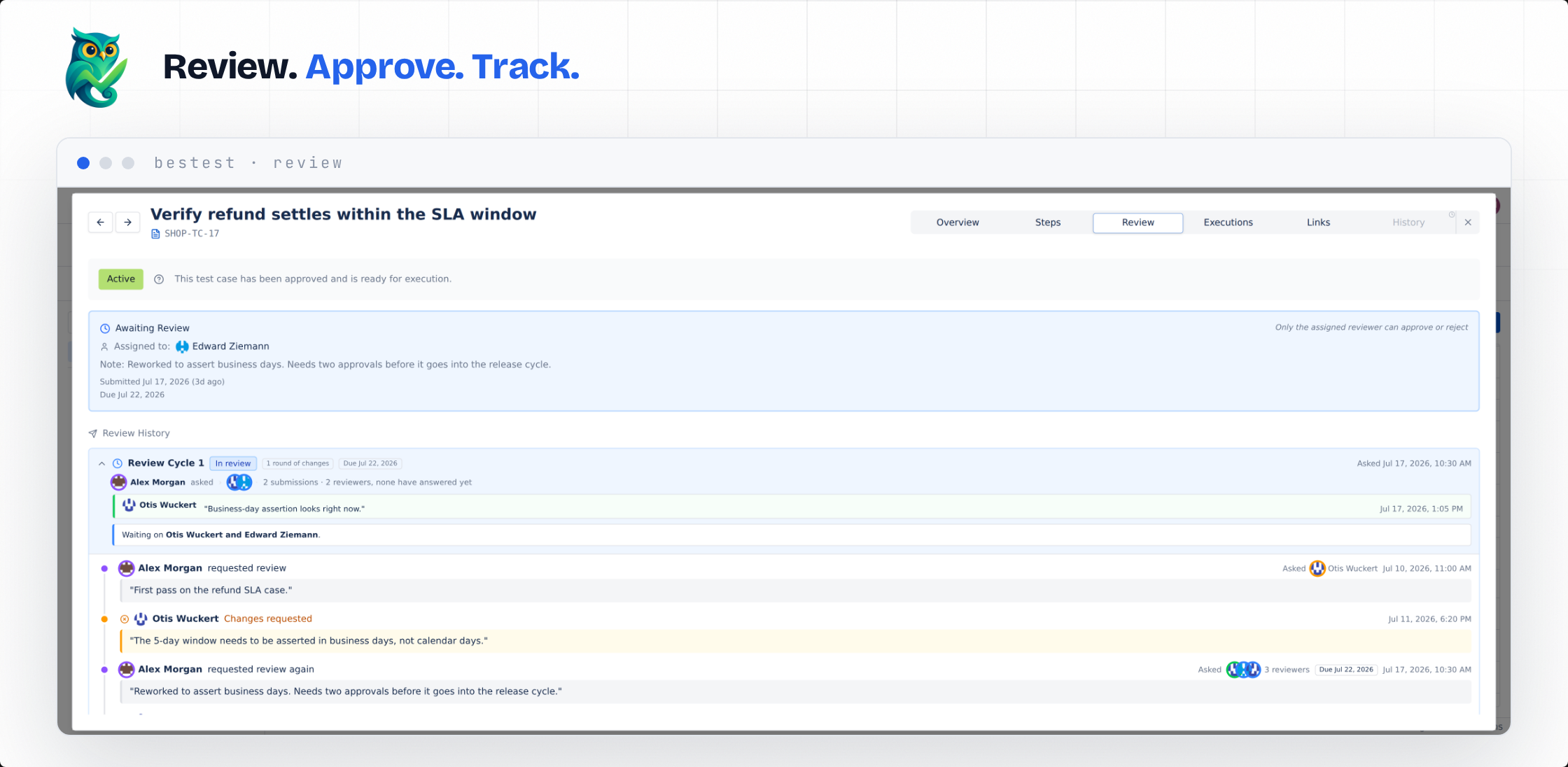
Approved means someone approved it.
Reviews for requirements and test cases, tuned per entity: off, optional, or required, approved by any reviewer, all reviewers, or at least the number you choose. The review audit trail keeps the record: who asked whom, who replied what.
Running UAT? This is home ground.
User acceptance testing is where BesTest teams live: business stakeholders execute in the guided test player, sign-off runs through reviews, and the reports carry the evidence. Start with the use case, or grab the free planning tools.
Frequently asked questions
Is manual testing fully available today?
Yes. Everything on this page is live: requirements, test cases, reviews for both, execution, coverage, and reporting. Free for up to 10 users, with every feature included at every tier.
Where does the work start: in Jira or in BesTest?
Wherever your team naturally starts. Open a Jira work item and create testing records from its panel, start from requirements and build coverage outward, or start from a test case library and link requirements later. The links keep everything connected regardless of the door you came in through.
Do test cases become Jira issues?
No, and that is deliberate. Test cases and requirements live in their own dedicated space, so a library of thousands never bloats your backlog or slows your Jira. You link them to work items instead of turning them into work items.
Can requirements be reviewed, or only test cases?
Both. Reviews are configurable per entity: off, optional, or required, with approval from any reviewer, all reviewers, or at least the number you set. The review audit trail keeps the full record of who requested review from whom and who replied what.
How does UAT sign-off work?
Business stakeholders run their scenarios in the guided test player, every execution is recorded, and approvals go through the review workflow with its review audit trail. Dashboard gadgets and reports give sign-off meetings their evidence. See the UAT use case for the full walkthrough.
Ready to Get Complete
Testing Visibility?
Start using BesTest today and experience complete testing visibility from requirements to release. Free to get started!
Available on the Atlassian Marketplace. Install in seconds, free for up to 10 users.
Start Free on Marketplace