Jira Test Management Features
Everything your team needs to manage testing inside Jira - from requirements to release
One source of truth.
Three ways to work.
A complete set of test-management tools your team uses by hand today - built so the same requirements, tests, and coverage can be driven by your CI pipeline and your AI agents next.
Manual & UAT testing
Create requirements and test cases, link them for coverage, and run manual or user-acceptance cycles step by step - then report and audit. All by hand, inside Jira.
- Manual & UAT cycles with business stakeholders
- Requirements ↔ tests ↔ executions linked
- Reviews, reporting and a review audit trail
Test automation
Connect your CI. Push results from your pipeline into the same coverage picture, and pull test data out through the REST API - manual and automated in one view.
- Full REST API for tests, runs & results
- Results flow in from every pipeline run
- Manual & automated, one coverage picture
 Playwright
 Cypress
 Selenium
 GitHub Actions
 GitLab CI
 Jenkins
 Postman
AI-supported testing
Your agent talks to the foundation over MCP: it reads requirements and coverage, generates automated tests, catches and re-runs flaky ones, and syncs results back.
- MCP server - bring any AI agent
- Requirements-aware test generation
- Detect, regenerate & re-run flaky tests
- Scoped to your permissions · code stays in your repo
 Claude
 OpenAI Codex
 Cursor
 GitHub Copilot
 Gemini
 Windsurf
 Atlassian Rovo
What your team gets.
The surfaces below mirror the BesTest UI, rendered live on this page - the dashboards are the app's actual components, the rest are faithful recreations of what you get after install. Scroll through all 6 core screens, or jump to any of them.
BesTest lives inside your Jira work item.
No separate tool to learn. Open any work item and the BesTest panel sits right inside it - every requirement, test case, cycle and execution linked to it, plus how to switch it on.
Apply a promo code at the payment step
 BesTestBesTest
- 1Switch it on onceOpen the Apps (...) menu on any work item and pick BesTest. The panel pins to the bottom of the work item - for the whole team.
- 2Release readiness, right hereOne bar for everything this item is covered by. Toggle in the coverage that arrives via its requirements, or roll up every child issue beneath it - the answer to "can we ship this?" without opening a report.
- 3Every linked object, liveRequirements, test cases, cycles and executions for this work item - each with its real status, recent runs and per-requirement coverage.
- 4Create or link in placeSpin up a requirement or test case inline, or Link existing ones - without leaving Jira.
Your whole test library, organized.
Folders on the left, your items in the middle - the same catalog for requirements, test cases, cycles, collections and campaigns. This is how everything is stored.
folder = "Authentication" AND (priority in (High, Highest) OR label ~ "regression")Apply12 resultsClear| Key | Name | Status | Priority | Owner | Updated | |
|---|---|---|---|---|---|---|
| PHX-TC-318 | Reset link expires after 24 hours | Active | High | MM. Lee | 2d ago | |
| PHX-TC-319 | Invalid email shows inline error | Active | Medium | MM. Lee | 3d ago | |
| PHX-TC-320 | Rate limit after 5 failed attempts | Changes Needed | High | DDana K. | 1d ago | |
| PHX-TC-150 | Session times out after idle period | Active | Medium | DDana K. | 5d ago | |
| PHX-TC-91 | Password complexity is enforced | In Review | Low | AA. Roy | 1w ago | |
| PHX-TC-204 | Remember-me persists for 30 days | Draft | Low | TT. Wong | 2w ago | |
| PHX-TC-377 | Account locks after repeated failures | Active | Critical | DDana K. | 4d ago | |
| PHX-TC-143 | MFA enrolment sends SMS code | Active | High | AA. Roy | 6d ago | |
| PHX-TC-161 | Reset token is single-use | In Review | High | PP. Costa | 3d ago | |
| PHX-TC-188 | Expired link shows resend option | Active | Medium | MM. Lee | 1w ago | |
| PHX-TC-205 | Reset disabled for SSO accounts | Archived | Low | SS. Varga | 1mo ago |
- 1Folder treeNested folders per project. Every object type - requirements, test cases, cycles, collections, campaigns - has its own catalog.
- 2BQL - query your tests like JQLHit Filter and write real queries - folders, fields and labels composed with AND/OR - or build the same rule visually. Built to scale to thousands of cases.
- 3Live statusesAtlassian-style lozenges show review and execution state at a glance.
- 4Act on many at onceSelect any cases and the floating bar appears - add them to a cycle, move folders, or archive your whole selection in one go.
Five objects. Each one first-class.
Open any item and the full viewer opens. The tabs change per object: requirements have Coverage, cycles have an Execution Dashboard, collections have Rules. Switch between them.
Run every test, step by step.
The manual test player: pick a result for each step, capture evidence, and raise a linked Jira defect without leaving the run. This is UAT and manual testing, done inside Jira.
Brute-force protection locks the account after repeated failures, and a locked account recovers cleanly.
A registered account with a known password; rate limiting enabled on staging.
Submit a wrong password 5 times in a row
user: demo@acme.io
Each attempt returns "invalid credentials"
Submit a 6th attempt
same user
Account is locked; a lockout message is shown
Sign in with the correct password after the lockout window
correct password
Access is granted; the failure counter resets
- 1Live cycle stats and timerExecution progress, the running timer and per-status counts stay pinned in the header while you work the cycle.
- 2Find your next test in secondsSearch keys, names and run notes, switch on My work, filter by status, bugs, notes, over time or tends to fail - then Next to do opens the next open test. Try the filter button.
- 3Result per stepPass, fail, block - or raise a Jira bug - right on the step, with the actual result recorded inline. Try it.
Release-readiness on your Jira dashboard.
Twenty configurable gadgets - coverage, execution status, trends, active cycles - right where your team already looks. Management gets the answer to "are we ready to release?"
Prove coverage, end to end.
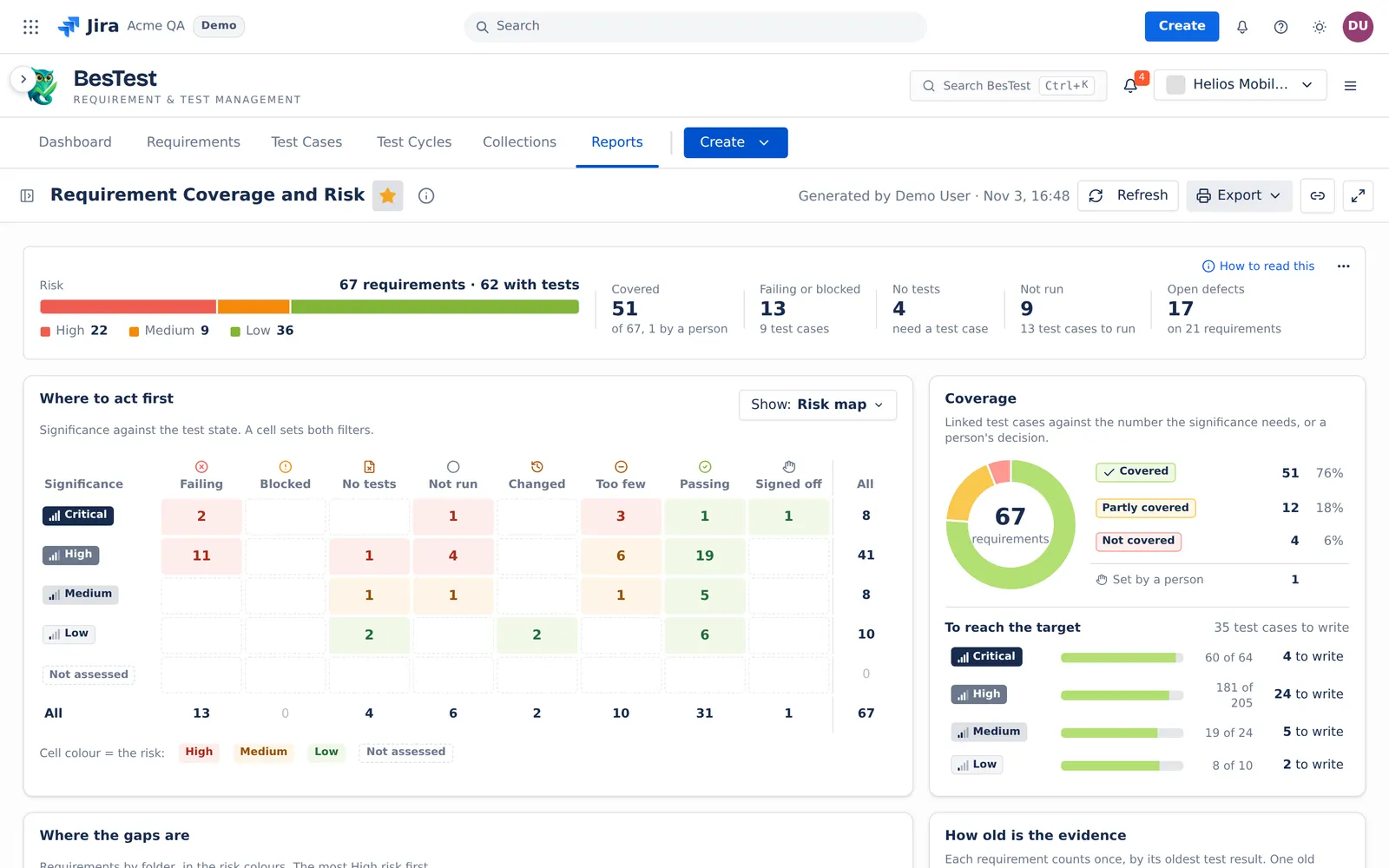
Requirement Coverage and Risk shows each requirement with its significance, its test state and its risk, so you see which requirements are not safe to ship and where to act first. It is one of seven built-in reports. Each one answers a real release question, and you can export it when the audit asks.
Requirements with Coverage Links
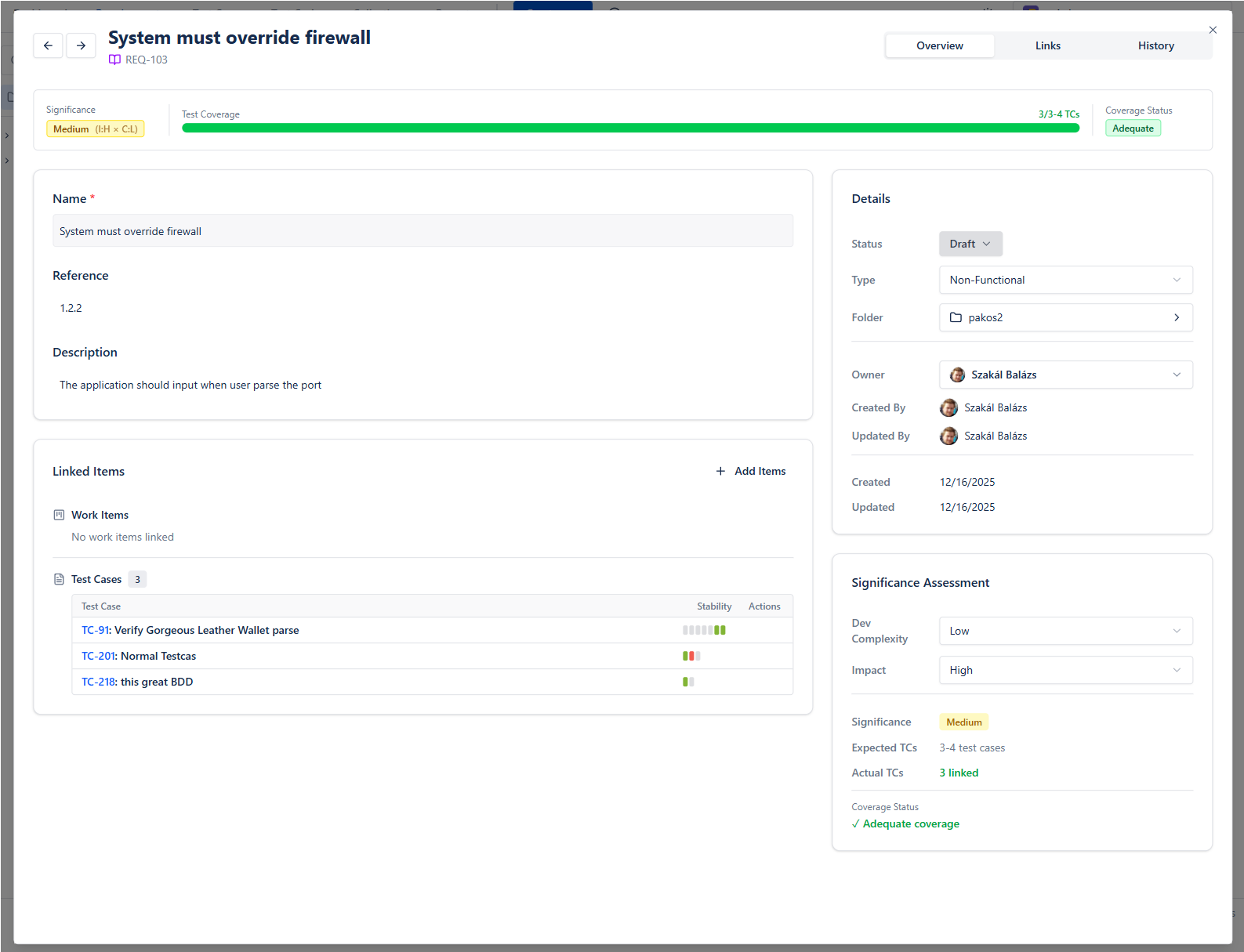
Link requirements to test cases and see at a glance which are Covered, Partly covered or Not covered - judged by each requirement's significance, with a one-click override. A stats bar shows readiness, coverage, test results and approval on every requirement.Learn more
All Features & Capabilities
Complete toolkit for Jira teams who want comprehensive testing workflow management
Dashboards & Gadgets
An in-app dashboard plus around 20 Jira dashboard gadgets: execution progress, pass rate, defects and requirement coverage, live.
Learn moreRequirements Management
Requirements with significance-weighted coverage (Covered, Partly covered, Not covered), a stats bar, approvals and bulk create.
Learn moreOrganized Test Cases
Nested folders, a keyboard-first step editor, BDD (Gherkin), bulk create and a built-in review workflow.
Learn moreTest Cycles
Run cycles in the Test Player with search, My work, filters and Next to do. Reruns, timer, and Done cycles that stay useful.
Learn moreSmart Collections
Filter rules, requirements and hand-picked test cases with default assignees that build test cycles automatically.
Learn moreBug Reporting
Create a Jira bug from a failed step, pre-filled with the step, test data and expected vs actual result, and linked back.
Learn moreComprehensive Reporting
Execution results, estimation vs actuals, defect analysis, a traceability matrix and release readiness, exportable to PDF.
Learn moreWork Item Panel
Release readiness and every linked requirement, test case and execution on the Jira work item, plus bulk create.
Learn moreWhy BesTest?
Inside Jira
Built on Atlassian Forge, BesTest opens inside Jira - from the Apps menu and the project menu bar. A Jira app, not a separate tool: no separate logins, no context switching. Your team stays exactly where they already work.
No Issue Bloat
BesTest uses its own storage for test cases and requirements - it doesn't create Jira issues. Your backlog stays clean, your issue count stays low, and your Jira instance stays fast.
Free for Small Teams
Up to 10 users free. Professional test management shouldn't be locked behind enterprise pricing. Start using BesTest today and upgrade only when you need to.
Ready to Scale
Host your data in the EU, US or India, keep every feature at every tier, and pay a per-user price that drops as you grow. From startups running smoke tests to large organizations managing regression suites, BesTest grows with you.
Ready to Streamline Your Testing?
Install BesTest from the Atlassian Marketplace and start managing your tests inside Jira in minutes. Free for teams up to 10 users - no credit card required.