


What Is a UAT Test Plan?
A UAT test plan is a document that defines how your team will conduct User Acceptance Testing before a software release goes live. It answers the essential questions: what will be tested, who will test it, when testing happens, and what "done" looks like.
Unlike ad-hoc testing or informal "just click around and see if it works" approaches, a UAT test plan provides structure. It ensures that:
- •Every business requirement gets validated by the right stakeholder
- •Entry and exit criteria are defined before testing starts - so there's no debate about whether you're ready to begin or ready to release
- •Roles and responsibilities are clear - testers know what's expected, and project managers know who to follow up with
- •Defects are handled systematically - not lost in email threads or forgotten in a spreadsheet
- •Sign-off is formal and documented - critical for compliance, audits, and stakeholder accountability
When do you need one?
You need a UAT test plan for any release that involves business stakeholders validating functionality. That includes:
- •Major feature releases or product launches
- •Regulatory or compliance-driven changes
- •System migrations or platform upgrades
- •Third-party integrations that affect business workflows
- •Any release where stakeholder sign-off is required before go-live
For small bug fixes or internal tooling changes, a lightweight checklist may suffice. But for anything customer-facing or business-critical, a formal UAT test plan is the standard.
UAT Test Plan vs. Regular Test Plan
A UAT test plan and a system/QA test plan serve different purposes. Confusing the two is one of the most common mistakes teams make.
| Aspect | QA/System Test Plan | UAT Test Plan |
|---|---|---|
| Purpose | Verify the software works correctly | Verify the software meets business needs |
| Written by | QA team | QA team with business stakeholder input |
| Executed by | QA engineers | Business users and subject matter experts |
| Language | Technical (API calls, edge cases, error codes) | Business language (workflows, scenarios, outcomes) |
| Scope | All functional and non-functional requirements | Business-critical requirements and workflows |
| Pass criteria | Software meets technical specifications | Software meets user expectations and acceptance criteria |
| Sign-off | QA lead | Business stakeholders, product owners, or compliance officers |
| Defect priority | Based on technical severity | Based on business impact |
The key distinction: A QA test plan asks "does it work?" while a UAT test plan asks "does it work for the business?"
A feature can pass every QA test and still fail UAT. For example, an invoice calculation might be technically correct but display results in a format that confuses the accounting team. QA would pass it; UAT would catch it.
Most releases need both a QA test plan and a UAT test plan. QA testing happens first to catch technical defects. UAT happens after, on a stable build, so business users aren't wasting time on software that crashes or has obvious bugs.
UAT Test Plan Template
Below is a complete UAT test plan template. Each section includes example content showing how to fill it in. Copy the structure and replace the examples with your project details.
### 1. Plan Overview
| Field | Details |
|---|---|
| Project Name | Horizon Billing Module v3.2 |
| UAT Plan Version | 1.0 |
| Prepared By | Sarah Chen, QA Lead |
| Date | 2026-04-07 |
| Status | Draft / Under Review / Approved |
| Distribution | QA Team, Product Owner, Finance Team, Project Manager |
Objective:
Validate that the Billing Module v3.2 release meets all business requirements defined in PROJ-201 through PROJ-215, with particular focus on multi-currency invoice generation, automated tax calculations, and the new payment reconciliation workflow.
Scope:
- •In scope: Invoice creation, tax calculation, payment reconciliation, billing dashboard, PDF export
- •Out of scope: Payment gateway integration (tested separately by partner team), historical data migration (covered in separate migration test plan)
### 2. Entry Criteria
Testing begins only when ALL of the following are met:
- •[ ] All user stories in the release scope have passed QA testing
- •[ ] The UAT environment is deployed with the release candidate build
- •[ ] Test data has been loaded (anonymized production data set v12)
- •[ ] All critical and high-severity QA defects are resolved
- •[ ] UAT test cases have been reviewed and approved by business stakeholders
- •[ ] All UAT testers have environment access and credentials
- •[ ] Rollback procedure has been documented and verified
### 3. Exit Criteria
UAT is complete when ALL of the following are met:
- •[ ] 100% of UAT test cases have been executed
- •[ ] Pass rate is 95% or higher
- •[ ] Zero open Critical or High severity defects
- •[ ] All Medium severity defects have been triaged (fix, defer, or accept)
- •[ ] Business stakeholders have provided formal sign-off
- •[ ] UAT summary report has been generated and distributed
### 4. Test Environment
| Component | Details |
|---|---|
| Environment URL | https://uat.horizon-app.example.com |
| Database | Anonymized production snapshot (2026-03-28) |
| Browser Support | Chrome 120+, Firefox 115+, Edge 120+ |
| Third-party Integrations | Tax API (sandbox mode), Email service (test mailbox) |
| Test Accounts | See Appendix A for credentials |
| Data Refresh Schedule | Nightly at 02:00 UTC (resets to baseline) |
No code deployments to the UAT environment during active testing without QA Lead approval. Hotfixes require re-execution of affected test cases.
### 5. UAT Schedule
| Phase | Start Date | End Date | Duration |
|---|---|---|---|
| UAT environment setup | Apr 14 | Apr 15 | 2 days |
| Tester briefing and walkthrough | Apr 16 | Apr 16 | 1 day |
| UAT execution - Round 1 | Apr 17 | Apr 23 | 5 days |
| Defect triage and fixes | Apr 24 | Apr 25 | 2 days |
| UAT execution - Round 2 (re-test) | Apr 28 | Apr 29 | 2 days |
| Sign-off and report | Apr 30 | Apr 30 | 1 day |
| Buffer | May 1 | May 2 | 2 days |
Total UAT window: 15 business days
Daily triage meeting: 09:30-10:00 UTC, Teams channel "Billing UAT"
### 6. Roles and Responsibilities
| Role | Name | Responsibilities |
|---|---|---|
| UAT Lead | Sarah Chen | Plan, coordinate, track progress, report status |
| Product Owner | James Park | Define acceptance criteria, prioritize defects, provide sign-off |
| Business Tester - Finance | Maria Lopez | Execute invoice and tax test cases (TC-001 through TC-025) |
| Business Tester - Accounting | David Kim | Execute reconciliation and reporting test cases (TC-026 through TC-040) |
| Business Tester - Operations | Lisa Wang | Execute billing dashboard and export test cases (TC-041 through TC-055) |
| QA Support | Tom Nguyen | Environment support, defect logging assistance, test data management |
| Dev Lead | Priya Sharma | Defect investigation and resolution |
| Project Manager | Alex Jordan | Stakeholder communication, schedule management, escalation |
### 7. Test Case Summary
| Test Case ID | Title | Priority | Assigned To | Requirement |
|---|---|---|---|---|
| TC-001 | Create invoice with single line item | High | Maria Lopez | PROJ-201 |
| TC-002 | Create invoice with multiple line items and discount | High | Maria Lopez | PROJ-201 |
| TC-003 | Multi-currency invoice (EUR to USD conversion) | Critical | Maria Lopez | PROJ-203 |
| TC-004 | Tax calculation - standard VAT 20% | Critical | Maria Lopez | PROJ-205 |
| TC-005 | Tax calculation - reduced rate items | High | Maria Lopez | PROJ-205 |
| TC-006 | Tax calculation - tax-exempt customer | Medium | Maria Lopez | PROJ-205 |
| TC-007 | Invoice PDF export with correct formatting | High | Maria Lopez | PROJ-208 |
| TC-026 | Payment reconciliation - exact match | Critical | David Kim | PROJ-210 |
| TC-027 | Payment reconciliation - partial payment | High | David Kim | PROJ-210 |
| TC-028 | Reconciliation report - monthly summary | High | David Kim | PROJ-212 |
| TC-041 | Billing dashboard - revenue overview widget | Medium | Lisa Wang | PROJ-214 |
| TC-042 | Billing dashboard - overdue invoices filter | High | Lisa Wang | PROJ-214 |
| TC-055 | Bulk export - 500+ invoices to CSV | Medium | Lisa Wang | PROJ-215 |
Full test case list: 55 test cases across 3 functional areas. See the linked test cycle for complete details.
Priority distribution:
| Priority | Count | % of Total |
|---|---|---|
| Critical | 8 | 14.5% |
| High | 27 | 49.1% |
| Medium | 15 | 27.3% |
| Low | 5 | 9.1% |
### 8. Defect Management
Defect logging process:
- •Tester identifies a failure during test execution
- •Tester logs a defect with: summary, steps to reproduce, expected vs. actual result, severity, screenshots
- •UAT Lead reviews and confirms the defect
- •Dev Lead triages and assigns for resolution
- •Fix is deployed to UAT environment
- •Original tester re-executes the failed test case
Severity levels:
| Severity | Definition | Target Resolution |
|---|---|---|
| Critical | Business workflow is completely blocked, no workaround | 24 hours |
| High | Major feature is broken, workaround exists but is impractical | 48 hours |
| Medium | Feature works but with issues (formatting, performance, usability) | Before sign-off or defer to next release |
| Low | Cosmetic issues, minor inconveniences | Defer to next release (with stakeholder approval) |
Defect escalation path:
- •Unresolved Critical defects after 24 hours: escalate to Project Manager
- •Unresolved High defects after 48 hours: escalate to Project Manager
- •Disagreement on severity or deferral: Product Owner makes final decision
### 9. Sign-Off Criteria and Process
UAT sign-off requires approval from all designated stakeholders:
| Stakeholder | Role | Sign-Off Status | Date | Comments |
|---|---|---|---|---|
| James Park | Product Owner | Pending | ||
| Maria Lopez | Finance Representative | Pending | ||
| David Kim | Accounting Representative | Pending | ||
| Lisa Wang | Operations Representative | Pending |
Sign-off options:
- •Approved - All acceptance criteria met, ready for production release
- •Approved with conditions - Approved for release with specific deferred items documented
- •Rejected - Critical gaps exist, additional testing round required
Sign-off procedure:
- •UAT Lead distributes the UAT summary report
- •Each stakeholder reviews results, open defects, and deferred items
- •Stakeholders provide their approval decision
- •All approvals are recorded with timestamp
- •UAT Lead compiles final sign-off document for the release record
### 10. Risks and Mitigation
| Risk | Impact | Likelihood | Mitigation |
|---|---|---|---|
| Business testers unavailable due to month-end close | UAT delayed | Medium | Schedule UAT to avoid first/last week of month; identify backup testers |
| UAT environment instability | Testing blocked | Low | Dedicated environment with nightly health checks; rollback procedure documented |
| High defect volume from Round 1 | Schedule overrun | Medium | 2-day buffer built into schedule; daily triage to prioritize fixes |
| Scope creep during UAT | Delayed sign-off | Medium | Scope is locked at plan approval; new findings logged as separate backlog items |
How to Customize the Template
The template above works for a mid-size release in a typical software company. Here's how to adapt it for different contexts:
For Agile / Sprint-Based Teams
- •Shorten the schedule to fit within a sprint (3-5 days for execution)
- •Focus test cases on the sprint's user stories only
- •Use the same entry/exit criteria but adjust pass rate thresholds (90% may be acceptable for iterative releases)
- •Run UAT as part of the sprint - not as a separate phase after multiple sprints
For Regulated Industries (Finance, Healthcare, Government)
- •Add a document control section: version history, review/approval log, document ID
- •Include regulatory references (SOX, HIPAA, FDA 21 CFR Part 11) in the objective
- •Strengthen sign-off requirements: require signatures, not just verbal approval
- •Add an evidence retention section specifying how long test evidence must be kept
- •Include validation protocol references (IQ/OQ/PQ for medical devices)
For System Migrations
- •Expand the test environment section to cover both old and new systems running in parallel
- •Add data migration validation test cases: record counts, field mapping, data integrity checks
- •Include rollback criteria: define what failures trigger a rollback to the old system
- •Extend the schedule - migration UAT typically needs 2-3x the time of feature UAT
For Third-Party Integrations
- •Add a section on partner responsibilities: who provides test credentials, who monitors the partner's sandbox
- •Include integration-specific test data requirements
- •Define how to handle defects in the partner's system vs. your system
- •Add network and connectivity requirements to the test environment section
For Small Projects (< 20 test cases)
- •Simplify the document: merge the schedule, roles, and risk sections into a single "logistics" section
- •Skip the formal sign-off table - an email approval thread may suffice
- •Use a single tester for execution instead of distributing across roles
- •Keep entry/exit criteria - these are valuable regardless of project size
Don't over-engineer your first UAT test plan. Start with the core sections (scope, test cases, entry/exit criteria, schedule, sign-off) and add formality based on what your stakeholders and auditors actually need.
UAT Test Plan Checklist
Use this checklist to validate that your UAT test plan is complete before sharing it with stakeholders. A missing section is easier to fix now than halfway through execution.
Planning and Scope
- •[ ] Project name, version, and release scope clearly defined
- •[ ] Objective states what business outcomes will be validated
- •[ ] In-scope and out-of-scope items are explicitly listed
- •[ ] All business requirements in scope have at least one linked UAT test case
Criteria
- •[ ] Entry criteria defined - including environment readiness and QA completion
- •[ ] Exit criteria defined - including pass rate threshold and defect resolution requirements
- •[ ] Sign-off requirements and approvers identified
People and Schedule
- •[ ] All UAT testers identified and confirmed available
- •[ ] Test case assignments distributed across testers
- •[ ] UAT schedule includes execution, triage, re-test, and buffer time
- •[ ] Daily triage meeting scheduled
- •[ ] Tester briefing/walkthrough session planned
Test Environment
- •[ ] UAT environment URL and access credentials documented
- •[ ] Test data loaded and verified
- •[ ] Environment freeze policy communicated to the development team
- •[ ] Third-party integration sandboxes configured and tested
Test Cases
- •[ ] All test cases written in business language (not technical jargon)
- •[ ] Test cases include specific steps, expected results, and test data
- •[ ] Test cases reviewed and approved by business stakeholders
- •[ ] Priority levels assigned to every test case
- •[ ] Traceability established: every test case links to a requirement
Defect Management
- •[ ] Defect logging process documented
- •[ ] Severity levels and target resolution times defined
- •[ ] Escalation path documented
- •[ ] Re-test process for fixed defects is clear
Sign-Off
- •[ ] Approvers identified with their roles
- •[ ] Sign-off options defined (approved, approved with conditions, rejected)
- •[ ] Sign-off procedure documented
- •[ ] Evidence retention requirements defined (if applicable)
Replace UAT Spreadsheets with Real Test Management
BesTest gives you structured UAT test cases, real-time execution tracking, requirements coverage, and stakeholder sign-off - all inside Jira. Free for up to 10 users, set up in under a minute.
Try BesTest FreeCommon UAT Test Plan Mistakes
After working with dozens of teams on UAT processes, these are the mistakes that derail plans most often:
Writing Test Cases in Technical Language
Business users are not QA engineers. When test case steps reference database queries, API endpoints, or error codes, testers get confused and either skip the test or mark it as passed without actually validating the outcome.
"Verify that POST /api/v2/invoices returns 201 and the response payload includes calculated_tax matching the tax_rate lookup table for the customer's jurisdiction_id."
Write this instead: "Create a new invoice for a UK customer. Verify the tax amount shows 20% of the subtotal."
Skipping Entry Criteria
Starting UAT on an unstable build wastes everyone's time. Business users hit bugs that QA should have caught, lose confidence in the process, and become reluctant to participate next time. Always gate UAT behind completed QA testing.
No Dedicated UAT Environment
Running UAT in staging while developers deploy changes is a recipe for confusion. Testers can't tell whether a failure is a real defect or a side effect of a deployment that happened mid-test. Dedicate an environment and freeze it.
Vague Exit Criteria
"UAT is done when stakeholders are satisfied" is not an exit criterion. Define measurable thresholds: 95% pass rate, zero Critical defects, all High defects resolved or formally deferred. This prevents the "are we done yet?" loop.
Assigning Tests Without Scheduling Time
Business users have day jobs. Assigning 30 test cases and saying "please complete by Friday" without blocking calendar time almost always results in a last-minute scramble. Schedule dedicated UAT sessions with a QA person available for support.
Treating All Defects Equally
Not every UAT defect should block the release. A missing icon is not the same as an incorrect calculation. Use severity levels and empower the Product Owner to make defer/fix decisions. Otherwise, a handful of cosmetic issues can delay a release unnecessarily.
No Formal Sign-Off Process
When sign-off is informal ("the team seemed happy in the meeting"), there's no accountability and no audit trail. If a post-release issue surfaces, no one can point to documented approval. Formal sign-off protects everyone - testers, developers, and stakeholders.
Creating the Plan After Development Is Done
By then, it's too late to influence what gets tested, get stakeholder input on acceptance criteria, or write proper test cases. Start planning UAT during sprint planning or at the beginning of the release cycle. Write test cases as acceptance criteria are defined, not after the code is deployed.
Managing UAT Plans in Jira with BesTest
A Word document or spreadsheet template gets the job done - until it doesn't. The problems start when:
- •Multiple testers need to update results simultaneously
- •Stakeholders want real-time progress updates
- •Defects need to link back to test cases and requirements
- •You need to re-run specific test cases after fixes
- •Audit asks for evidence six months later
This is where a Jira-integrated test management tool like BesTest replaces the manual template entirely.
Your UAT Test Plan Becomes a Living System
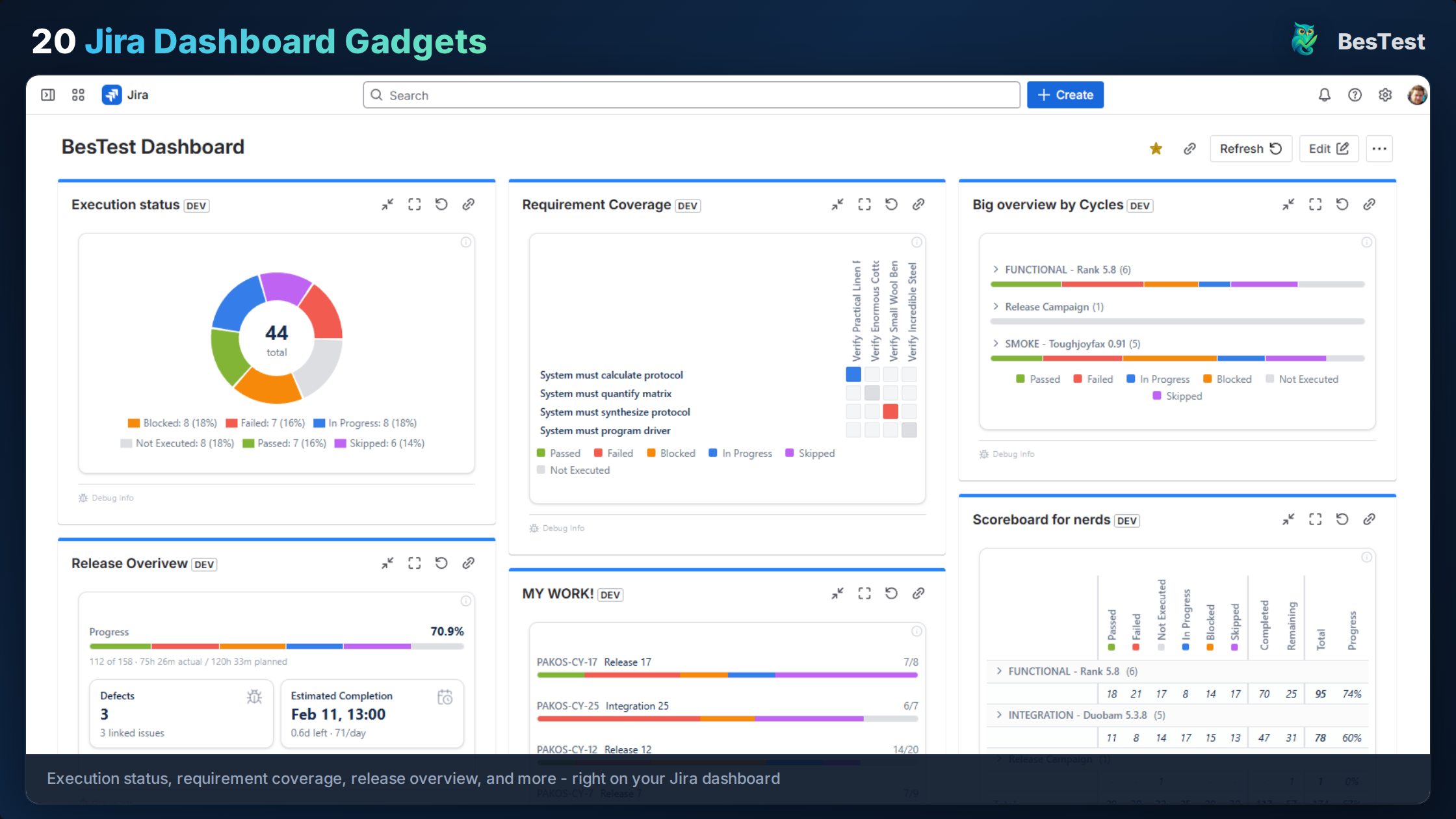
Instead of a static document, your UAT plan becomes a set of connected entities inside Jira:
- •Requirements with defined acceptance criteria, linked to Jira stories
- •Test cases with structured steps and expected results, linked to requirements
- •A test cycle that groups all UAT test cases, assigns testers, and tracks execution in real time
- •Dashboard gadgets that show pass/fail/blocked status at a glance
Coverage Tracking Replaces Manual Traceability
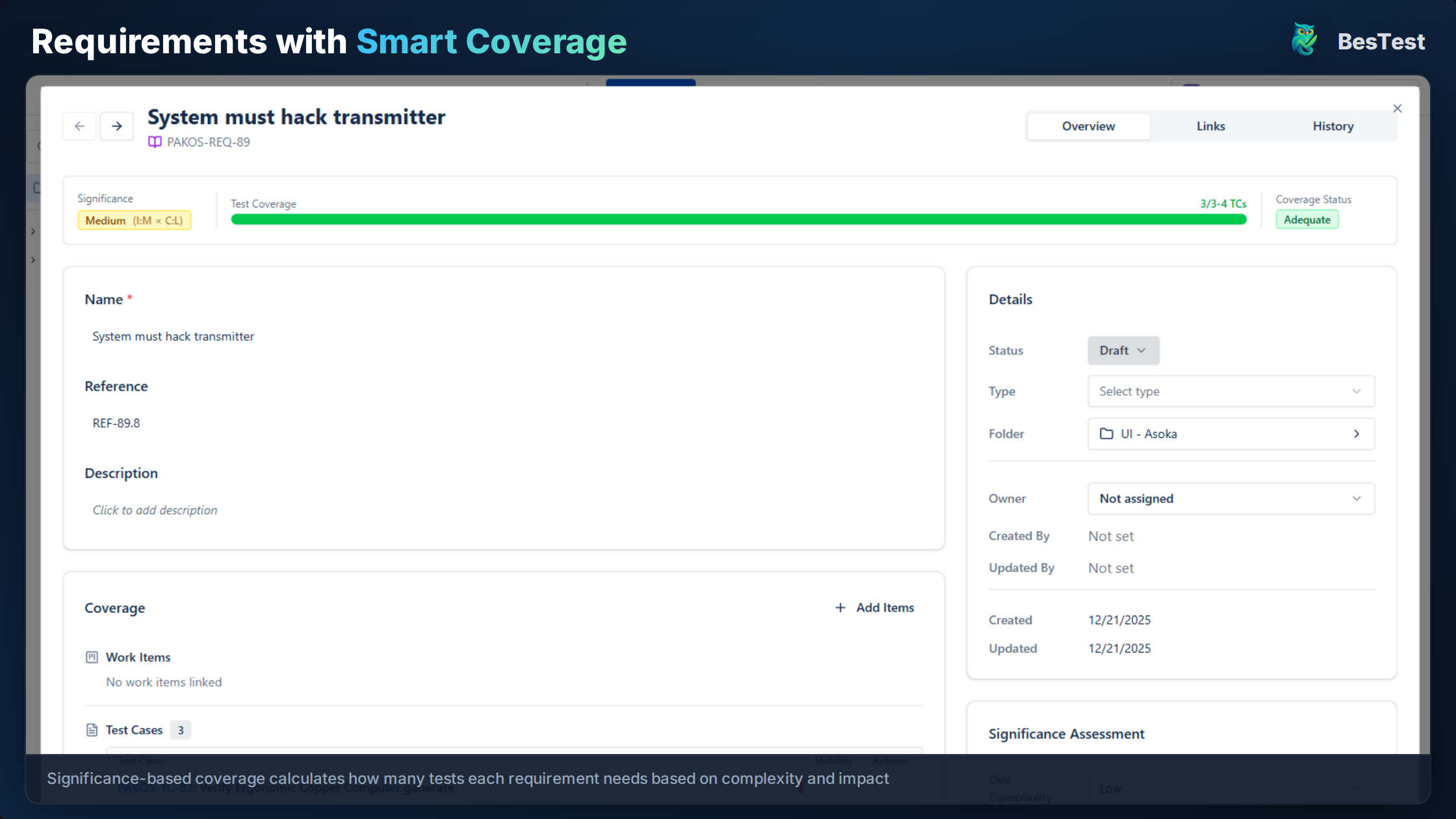
In BesTest, every requirement has a coverage status based on its significance (calculated from development complexity and business impact). You can instantly see which requirements have sufficient UAT test coverage and which have gaps - no spreadsheet cross-referencing needed.
Test Case Review Before Execution
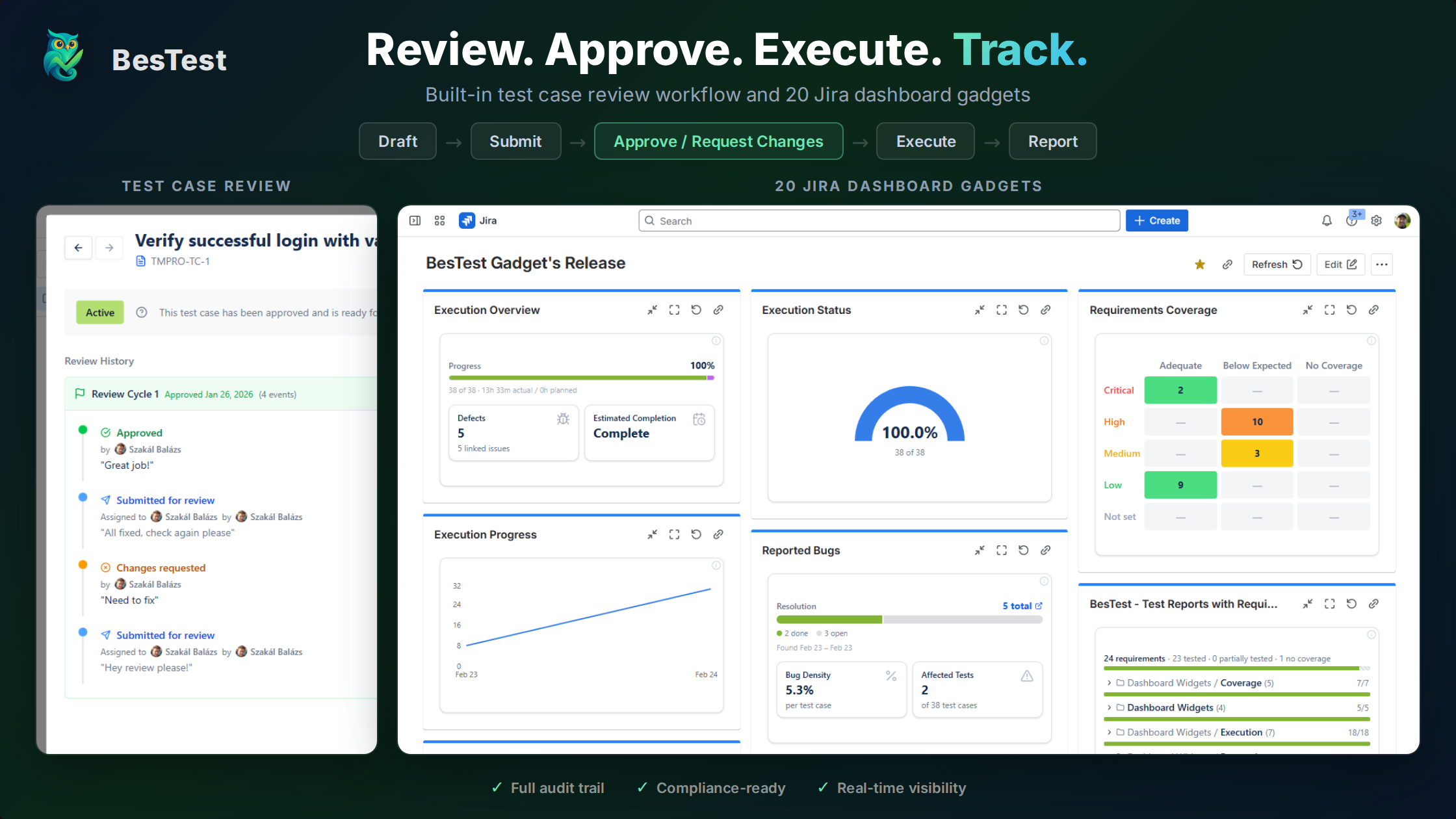
BesTest includes a review workflow where stakeholders can review and approve test cases before UAT execution begins. This replaces the "circulate the document for comments" step with an in-app review process that tracks approvals and change requests.
Smart Collections for UAT Organization
Smart Collections can automatically group test cases based on criteria like labels, linked requirements, or custom attributes. Create a collection rule like "all test cases tagged UAT linked to stories in Release 3.2" and it stays updated as you add test cases.
In-App Notifications Keep Business Users on Track
Business testers get notified when they have assigned tests, when defects are fixed and ready for re-test, and when sign-off is requested. No one needs to check a spreadsheet or ask for a status update.
What About the Template Sections?
Here's how each section of the template maps to BesTest:
| Template Section | BesTest Equivalent |
|---|---|
| Scope and Objectives | Requirement entities with acceptance criteria |
| Entry/Exit Criteria | Defined in your team's process (can reference in cycle description) |
| Test Environment | Documented in cycle description or preconditions |
| Schedule | Test cycle start/end dates |
| Roles and Responsibilities | Test case assignments within the cycle |
| Test Case Summary | Test cases linked to requirements with priority levels |
| Defect Management | Linked Jira issues created directly from failed test steps |
| Sign-Off | Stakeholder approvals tracked through the review workflow |
BesTest is free for up to 10 users and sets up in under a minute. If you're currently managing UAT with templates and spreadsheets, you can run your next UAT cycle in BesTest alongside your existing process - then compare the experience.
References
- •ISTQB Foundation Level Syllabus v4.0, 2023 - Section 2.4 covers acceptance testing as a distinct test level, including UAT objectives, test basis, and typical defects found during acceptance testing.
- •IEEE 829-2008, "Standard for Software and System Test Documentation" - Provides the industry-standard template structure for test plans, including the sections and fields used in the template above.
- •ISO/IEC/IEEE 29119-3:2021, "Software and Systems Engineering - Software Testing - Part 3: Test Documentation" - The updated international standard for test documentation, covering test plan content and structure applicable to UAT.
- •PMI, "A Guide to the Project Management Body of Knowledge (PMBOK Guide)" - Seventh Edition, 2021 - Section on quality management and acceptance criteria, relevant to formal UAT sign-off processes.
- •NIST, "The Economic Impacts of Inadequate Infrastructure for Software Testing," Planning Report 02-3, May 2002 - Documents the cost multiplier of post-release defects, reinforcing the value of structured UAT before production deployment.
Frequently Asked Questions
What should a UAT test plan include?
A UAT test plan should include: plan overview (project, scope, objectives), entry and exit criteria, test environment details, schedule and timeline, roles and responsibilities, a test case summary with priorities, defect management process, and sign-off criteria. The plan should be written in business language since UAT testers are typically stakeholders, not QA engineers.
Who is responsible for creating the UAT test plan?
The QA lead typically creates the UAT test plan, but business stakeholders must provide input on acceptance criteria, scope, and priorities. The product owner usually defines what "done" looks like from a business perspective, while the QA team structures that into a testable plan. Stakeholders should review and approve the plan before execution begins.
How long should UAT testing take?
UAT typically takes 5 to 15 business days depending on scope. Small releases with 20-30 test cases can complete in one week. Larger releases with 50-100+ test cases usually need two weeks, including time for defect triage, fixes, and re-testing. Always build in 2-3 buffer days for unexpected issues. The biggest time risk is business tester availability, so schedule dedicated testing sessions.
What is the difference between a UAT test plan and a UAT test case?
A UAT test plan is the overall strategy document that defines scope, schedule, roles, and processes for the entire UAT effort. A UAT test case is an individual scenario that a tester executes - with specific steps, expected results, and pass/fail criteria. The test plan contains or references many test cases. Think of the plan as the "how we will run UAT" and test cases as the "what we will actually test."
Can I use a UAT test plan template for Agile projects?
Yes, but scale it down. In Agile, UAT typically happens within each sprint rather than as a big-bang phase at the end. Use the same template structure but focus on the current sprint's user stories, shorten the schedule to 3-5 days, and keep the test case count manageable. The entry/exit criteria and sign-off sections are still valuable even in a sprint-based workflow.
How do I track UAT test plan progress in Jira?
Native Jira has no built-in UAT tracking. Most teams either use spreadsheets alongside Jira (which creates sync issues) or use a Jira test management plugin like BesTest that provides test cycles, execution tracking, and dashboard gadgets. With BesTest, you can see real-time pass/fail/blocked status, coverage against requirements, and defect counts directly in your Jira dashboard - free for up to 10 users.
Replace UAT Spreadsheets with Real Test Management
BesTest gives you structured UAT test cases, real-time execution tracking, requirements coverage, and stakeholder sign-off - all inside Jira. Free for up to 10 users, set up in under a minute.
Try BesTest Free