

Requirements Management with Coverage
Link requirements directly to test cases and see coverage at a glance
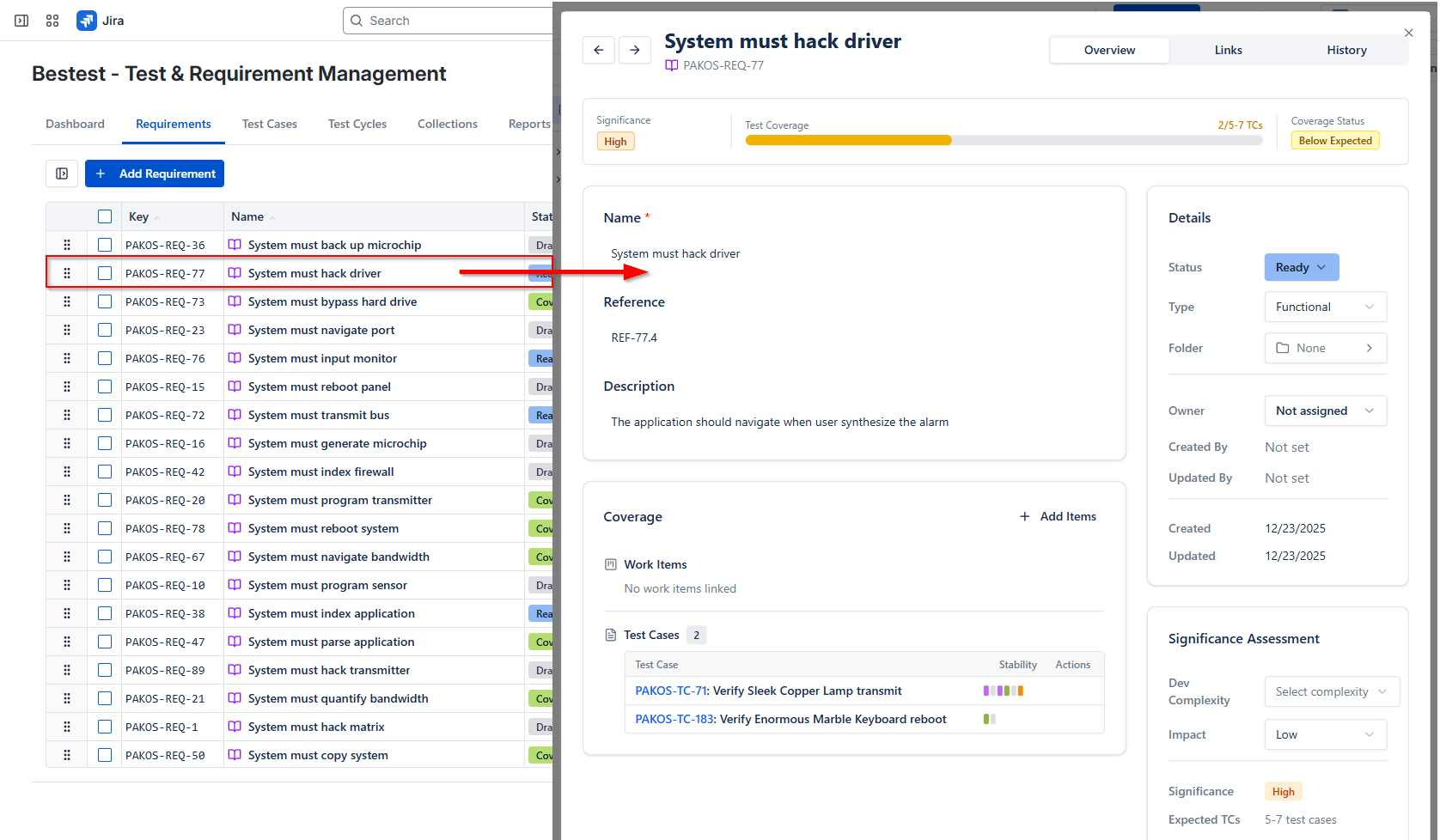
Link requirements directly to test cases and see coverage at a glance. Instantly know which requirements are fully tested, partially covered, or missing tests entirely. BesTest calculates coverage based on significance — a combination of dev complexity and impact — so "covered" means more than just "has a linked test case."
How It Works
Requirements management in BesTest gives your team a clear, real-time view of which requirements are fully tested and which still need attention. Each requirement has a dedicated Coverage section where you can link test cases and immediately see the coverage status. Unlike simple "linked or not" approaches, BesTest uses a significance model that factors in dev complexity and business impact to determine whether a requirement has enough test coverage.
This means a critical payment processing requirement with high complexity won't show as "covered" just because it has a single smoke test linked to it. The coverage model ensures that high-risk areas get the thorough testing they deserve, while lower-risk requirements can be adequately covered with fewer tests. Your team always knows where to focus testing effort for maximum risk reduction.
Requirements in BesTest are first-class entities stored in their own data model — they don't create Jira issues or bloat your backlog. Every requirement links bidirectionally to test cases, so you can navigate from requirement to test and back. The Links tab on each entity provides a unified view of all connections, making it easy to understand the full traceability chain from requirement through test case to execution result.
Key Benefits
Try Requirements Management with Coverage in BesTest
Install BesTest from the Atlassian Marketplace and start using requirements management with coverage inside Jira in minutes. Free for teams up to 10 users.
Try BesTest FreeRelated Resources
Regression Testing in Jira
Automate your regression test cycles with smart collections and traceability
User Acceptance Testing (UAT) in Jira
Validate that the software meets business requirements with stakeholder-driven testing
Sprint Testing in Jira
Integrate testing into your agile sprints with test cycles tied to sprint stories
Requirements Traceability
The ability to link and track requirements through design, development, and testing.
Test Coverage
A measure of how much of the software or requirements are tested by test cases.