Regression Testing in Jira

Automate your regression test cycles with smart collections and traceability

Regression testing ensures that new changes haven't broken existing functionality. Imagine your team just shipped v2.3 and needs to verify that the checkout flow, user authentication, and reporting dashboards all still work as expected. Without a structured approach, testers scramble through spreadsheets trying to remember which tests to run, which areas were affected by the latest code changes, and whether last sprint's hotfix introduced a subtle side effect. BesTest gives you the tools to organize, execute, and track regression tests efficiently within Jira, so your team spends less time figuring out what to test and more time actually finding defects before your users do.

The Challenge

Regression testing is time-consuming and error-prone when managed manually. As your product grows, the regression suite balloons in size, and teams quickly lose confidence in their ability to catch regressions before release. The pressure to ship fast compounds the problem, leading to corners being cut and defects slipping through. Teams commonly struggle with:

  • Identifying which tests to run after each change, especially when code modifications touch shared libraries or core modules that ripple across multiple features.
  • Maintaining an up-to-date regression suite that reflects the current state of the product, rather than carrying obsolete tests for features that have been redesigned or removed entirely.
  • Tracking historical results across releases to understand whether quality is trending upward or if certain areas are chronically unstable and need deeper investigation.
  • Ensuring consistent execution across team members, so that the same test produces the same result regardless of who runs it or what environment they use.
  • Reporting regression status to stakeholders in a way that is both accurate and easy to understand, without spending hours compiling data from multiple sources.
  • Deciding when to retire or archive tests that no longer provide value, versus tests that still catch real defects and deserve a permanent spot in the suite.
  • Coordinating regression testing across distributed teams working in different time zones, where handoffs between testers can lead to duplicated effort or missed coverage.
  • Balancing the depth of regression testing against release deadlines, since running the full suite may take days while stakeholders expect results in hours.

How BesTest Helps

BesTest transforms regression testing in Jira with powerful automation and organization tools. Instead of manually curating spreadsheets or maintaining wiki pages that go stale within a week, BesTest lets you define living regression suites that evolve alongside your product. Every test case is a first-class Jira entity, fully linked to requirements, stories, and defects, giving you end-to-end traceability without leaving the tools your team already uses.

Smart Collections

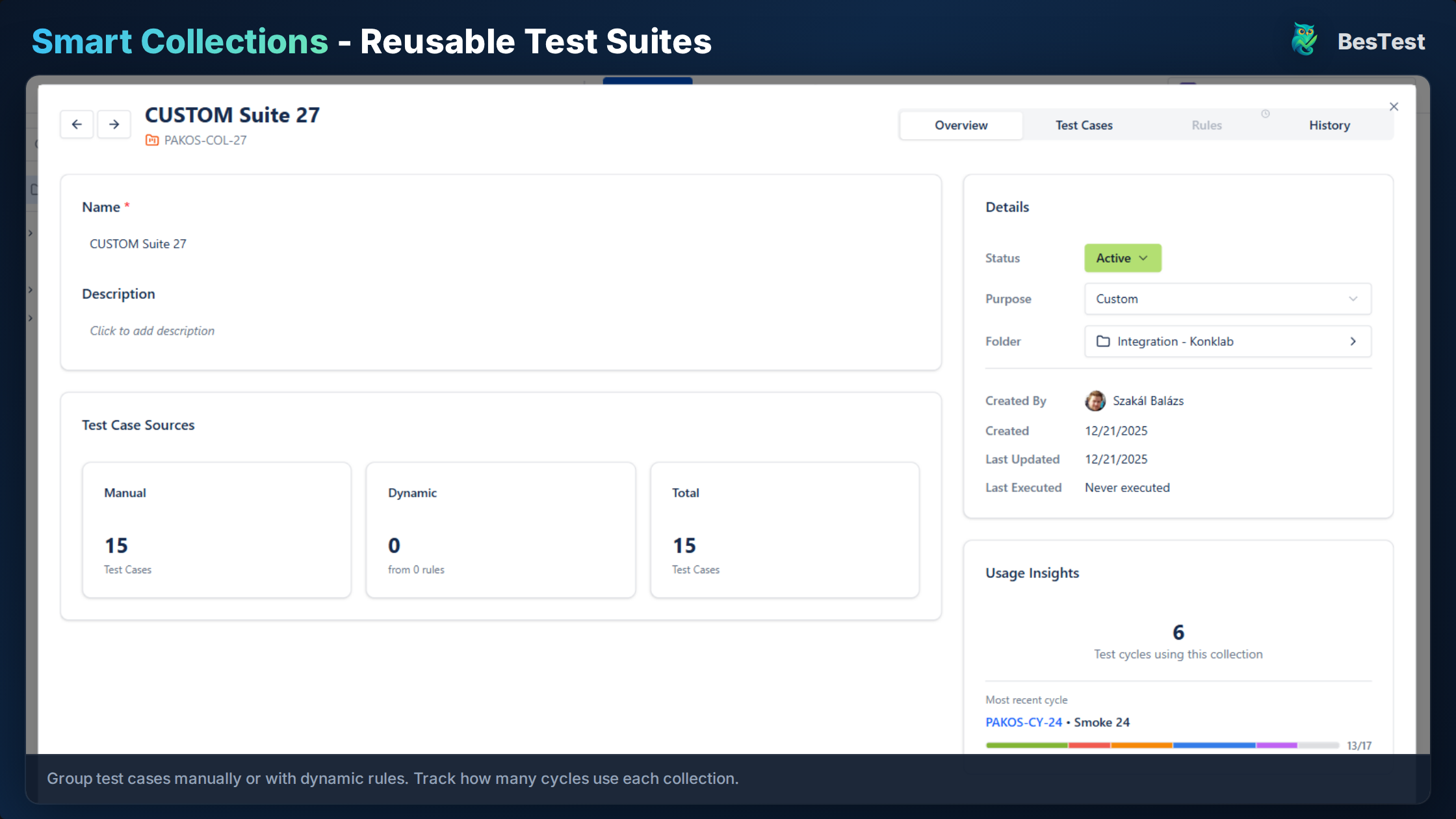
Define rules like "all tests tagged regression for the Login module" and the collection automatically updates as tests are added or modified. This means your regression suite is always current without manual curation. When a new test case is created and tagged appropriately, it appears in the collection instantly, and when a test is deprecated, it drops out just as seamlessly.

Test Case Organization

Structure regression tests in folders by feature, priority, or stability. The hierarchical folder system lets you mirror your product architecture, making it intuitive for testers to find and update tests quickly. You can also apply multiple tags to a single test, allowing it to appear in different views depending on whether you are looking at the suite by module, risk level, or automation status.

Execution Tracking

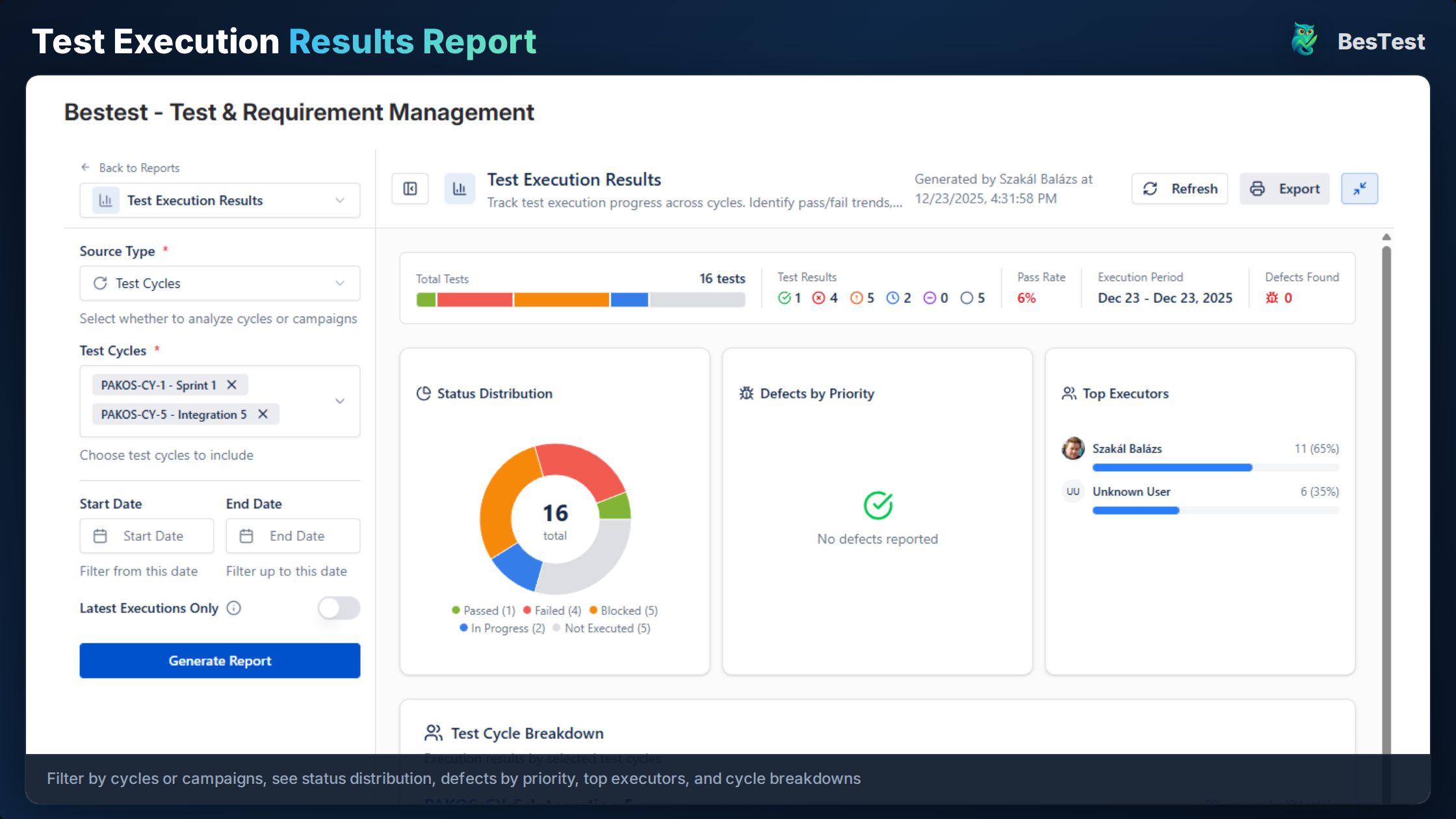
Run regression cycles with full visibility into progress, pass rates, and failures. The real-time dashboard updates as testers mark results, so test leads can monitor the cycle without interrupting the team. When a test fails, testers can create a linked defect directly from the execution screen, automatically populating it with the test steps, expected results, and environment details.

Requirements Traceability

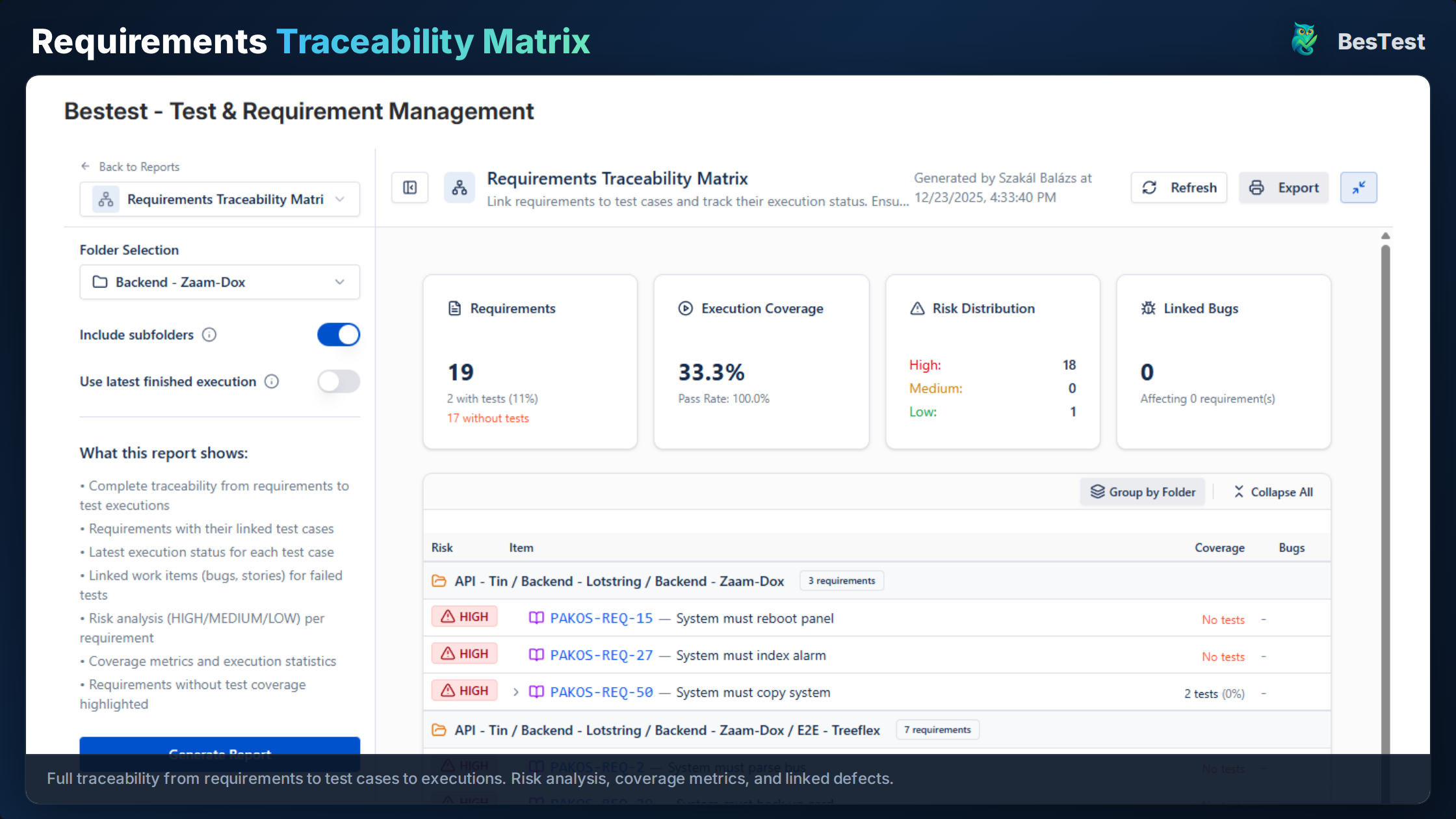
Know which requirements are covered by regression tests and which need attention. The traceability matrix gives you a bird's-eye view of coverage, highlighting requirements with zero test coverage in red so they stand out immediately. This is invaluable during release planning, when stakeholders ask whether a particular feature area has been regression-tested.

Historical Analysis

Compare results across releases to identify flaky tests and quality trends. BesTest stores every execution result, so you can pull up a test case and see its pass/fail history over the last ten releases. This historical perspective helps you spot patterns, such as a test that fails every third release due to a timing issue, or a module whose pass rate has been steadily declining.

Parameterized Regression Runs

Run the same regression suite across different environments or configurations without duplicating test cases. Define parameters like browser type, database version, or deployment region, and BesTest tracks results for each combination separately, giving you a comprehensive view of cross-environment stability.

Defect Escape Analysis

When a production defect is reported, trace it back to your regression suite to understand why it was missed. BesTest helps you identify whether the gap was a missing test, a test that was skipped, or a test that passed despite the defect being present, so you can strengthen your suite where it matters most.

Regression Testing in Jira in BesTest
BesTest in action: Regression Testing in Jira

Key Benefits

Reduce regression cycle setup time by 80% with Smart Collections that automatically assemble the right tests based on tags, modules, and priority levels.
Instant visibility into regression coverage and gaps through the traceability matrix, so you know exactly which features are protected and which are exposed.
Historical comparison across releases lets you track quality trends over time and present data-driven reports to leadership about product stability.
Automated test selection based on rules eliminates the manual effort of hand-picking tests for each cycle, freeing testers to focus on execution and analysis.
Jira-native experience means your team does not need to learn a new tool or switch contexts, reducing onboarding time and increasing adoption.
Linked defect creation from failed tests preserves full context, including test steps, expected vs. actual results, and environment details, so developers can reproduce issues faster.
Cross-release analytics help you identify flaky tests that waste execution time and team morale, so you can quarantine or fix them before they erode confidence in the suite.
Role-based dashboards let test leads, QA managers, and developers each see the regression data most relevant to them without building custom reports from scratch.

How to Implement

1

Organize Test Cases

Create a folder structure for regression tests (e.g., /Regression/Core, /Regression/Extended). Tag tests with priority and stability levels. Consider separating tests that cover critical revenue-impacting flows from those that cover edge cases or less frequently used features. A well-organized folder hierarchy pays dividends over time as the suite grows and new team members need to find their way around.

2

Create Smart Collection

Define a Smart Collection with rules: "Tag = regression AND Priority = High". The collection auto-updates as tests match. You can create multiple collections for different scenarios, such as a quick regression suite for hotfix deployments and a comprehensive one for major releases. The rules are flexible enough to combine tags, priorities, modules, and even custom fields specific to your workflow.

3

Link to Requirements

Ensure regression tests trace to requirements. The coverage dashboard shows what's protected by regression and highlights any requirements that lack coverage. This linkage is not just for reporting; it helps testers understand the business context behind each test and make informed decisions about which tests are most important to execute when time is short.

4

Execute and Track

Run the regression cycle before each release. Track progress in real-time and log defects for failures. The test player walks testers through each step, captures results, and timestamps every action. Test leads can monitor the overall cycle progress from the dashboard, reassign tests if someone is blocked, and identify bottlenecks before they delay the release.

5

Analyze and Improve

Review results, identify flaky tests, and refine the regression suite based on defect escape analysis. After each cycle, hold a brief review to discuss which tests added value and which consumed time without catching anything. Use the historical data to prune tests that have never found a defect and add new ones in areas where production issues have been reported.

Best Practices

  • Prioritize regression tests—not every test needs to run every time. Use risk-based selection to focus on the areas most affected by recent changes.
  • Keep regression tests stable; remove or fix flaky tests promptly. A flaky test that fails randomly trains the team to ignore failures, which defeats the purpose of regression testing.
  • Update regression suite when requirements change. A test for a feature that was redesigned three sprints ago is not protecting anything; it is wasting execution time.
  • Run critical regression on every build; full regression before releases. This tiered approach gives you fast feedback on builds while still providing comprehensive coverage at release gates.
  • Use Smart Collections to automate test selection rather than relying on tribal knowledge about which tests to include.
  • Tag tests with the components and modules they cover so you can quickly assemble targeted regression suites when a specific area of the code has changed.
  • Schedule periodic regression suite reviews with the whole QA team to share knowledge about which tests are most valuable and which should be retired.
  • Track the execution time of your regression suite over time. If it keeps growing, you need to invest in parallelization, automation, or smarter prioritization.
  • Document the rationale behind each test in the regression suite so that future team members understand why it exists and can make informed decisions about its continued relevance.

Ready to Improve Your Regression Testing?

BesTest provides all the tools you need—requirements traceability, smart collections, review workflows, and a Jira-native experience. Free for up to 10 users.

Try BesTest Free