

Risk-Based Testing
Prioritize testing effort based on risk - focusing on the features most likely to fail and most damaging when they do.
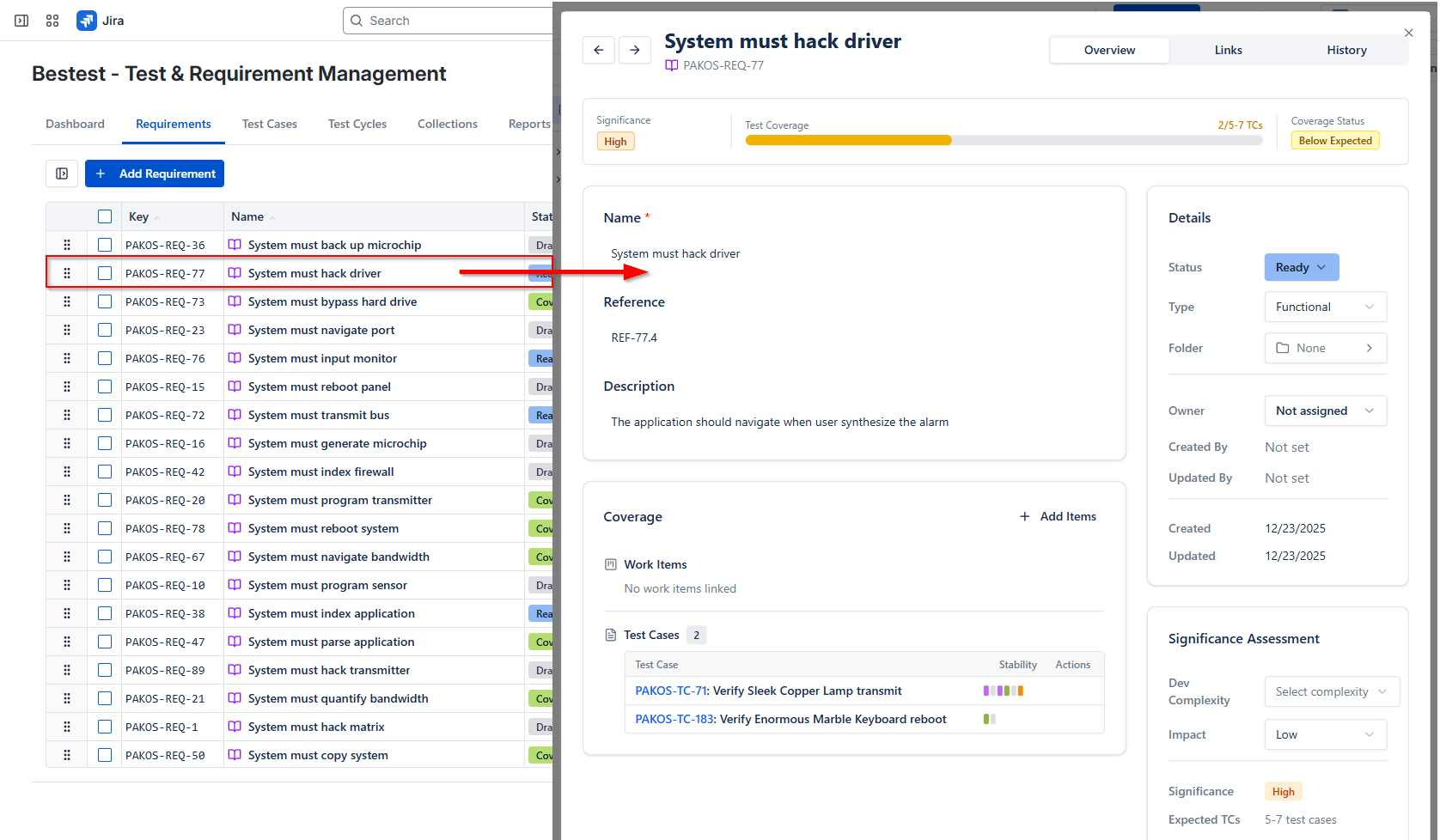
BesTest's coverage model calculates significance as dev complexity multiplied by business impact - the same formula risk-based testing uses to prioritize effort. High-significance requirements need more test coverage to be considered "covered," so risk gaps surface automatically.
Implement Risk-Based Testing with BesTest
Set significance on each requirement
Open a requirement in BesTest and set its dev complexity and business impact scores. BesTest multiplies them into a significance value. A payment processing requirement with high complexity and high impact scores higher than a cosmetic label change - and will require more test cases to reach "covered" status.
Sort the coverage report by highest gaps
Open the requirements coverage report and sort by significance descending. Requirements at the top with insufficient coverage are your highest-risk gaps. This is your prioritized testing backlog - no risk assessment spreadsheet needed, because the data already lives in BesTest.
Prioritize test creation for uncovered high-significance requirements
Start writing test cases for the highest-significance uncovered requirements first. Use the Coverage section on each requirement to see exactly how many test cases are linked and whether coverage is sufficient. Each test case you add moves the requirement closer to "covered."
Use Smart Collections to auto-include high-priority tests
Create a Smart Collection with rules that filter by priority or module. When you run a risk-focused test cycle before a release, the collection assembles the right tests automatically. As new high-priority test cases are created, they appear in future cycles without manual intervention.
Review coverage before release
Before signing off on a release, review the coverage report with stakeholders. High-significance requirements should show full coverage. If any critical requirement is still under-tested, the team knows exactly where the risk is - and can make an informed go/no-go decision with data, not gut feel.
Built for Risk-Based Testing
Significance = dev complexity x business impact. This is the core risk-based testing formula, built into every requirement - no plugins, no custom fields.
The Coverage section on each requirement shows linked test cases and whether coverage is sufficient relative to significance. Under-tested high-risk areas stand out visually.
Coverage reports give stakeholders transparent visibility into where testing effort is concentrated and where gaps remain, supporting data-driven release decisions.
Smart Collections assemble test suites from priority tags, modules, or JQL rules - creating targeted risk-based test cycles without manual curation.
Related Resources
How to Write Test Cases: The Complete 2026 Guide
Learn the art and science of writing test cases that catch bugs, are easy to maintain, and provide clear documentation. This guide covers everything from basic structure to advanced techniques used by professional QA teams.
Test Management in Jira: The Complete 2026 Guide
A comprehensive guide to test management in Jira - from native options to dedicated tools. Learn how to organize test cases, execute tests, track coverage, and report on quality within the Jira ecosystem.
Regression Testing in Jira
Automate your regression test cycles with smart collections and traceability
Smoke Testing in Jira
Quick sanity checks to verify critical functionality after deployments
Security Testing Management in Jira
Organize and track security test cases and vulnerability verification
Test Coverage
A measure of how much of the software or requirements are tested by test cases.
Requirements Traceability
The ability to link and track requirements through design, development, and testing.
Test Plan
A document outlining the testing approach, scope, resources, and schedule for a project or release.
Test Strategy
A high-level document defining the organization's overall testing approach, standards, and guidelines.
Regression Testing
Testing that verifies existing functionality still works after code changes.
Smoke Testing
Quick testing of critical functionality to verify the build is stable enough for further testing.
Test Scenario
A high-level description of a possible user situation or functionality to be tested.
Ready to try BesTest?
Apply risk-based testing with a tool that supports your methodology natively inside Jira. Free for up to 10 users.
Get BesTest Free