


Why Requirements Management in Jira Is Challenging
Jira is the most popular project management tool for software teams. But here is the uncomfortable truth: Jira was not designed for requirements management. It was designed for issue tracking.
Jira gives you issues, stories, epics, tasks, and bugs. What it does not give you is a formal "requirement" entity with:
- •A dedicated structure for acceptance criteria, priority, and coverage status
- •Built-in traceability from requirement to test case to defect
- •Coverage metrics that tell you which requirements are tested and which are not
- •A significance model that weighs requirement importance against test depth
The result? Teams that need to manage requirements in Jira end up improvising. They use labels, custom fields, naming conventions, Confluence pages, or spreadsheets - and each approach comes with trade-offs.
This matters because requirements are the foundation of quality. If you cannot answer "which requirements are fully tested?" at any given point, you are shipping on hope rather than evidence.
| What Jira Has | What Requirements Management Needs |
|---|---|
| Stories and epics | Formal requirement entities with metadata |
| Issue links | Bidirectional traceability with coverage tracking |
| Custom fields | Structured attributes (significance, complexity, impact) |
| Dashboards | Coverage reports and gap analysis |
| JQL search | Requirements filtering by coverage status |
This guide walks through every approach - from simple native setups to dedicated plugins - so you can choose what fits your team's maturity and compliance needs.
4 Approaches to Requirements in Jira
There is no single right way to handle requirements in Jira. The best approach depends on your team size, regulatory environment, and how seriously you need traceability. Here are the four main options, ranked from simplest to most capable.
Approach 1: Native Jira (Stories and Epics as Requirements)
Use Jira's built-in issue types to represent requirements:
- •Epics represent high-level features or capabilities
- •Stories represent individual requirements
- •Acceptance criteria on stories define "done"
- •Issue links connect stories to related test tasks
Epic: User Billing Module
  ├── Story: As a user, I can view my invoice history
  ├── Story: As a user, I can download invoices as PDF
  ├── Story: As an admin, I can generate manual invoices
  └── Story: As a user, I can update my billing address
Pros: Free, no plugins needed, familiar to every Jira user
Cons: No coverage tracking, no traceability reports, acceptance criteria are just text fields with no structure, stories mix requirements with development tasks in the same backlog
Works for small teams (under 5 developers) with no compliance requirements. Falls apart when you need to answer "which requirements are fully tested?" because Jira has no way to calculate that natively.
Approach 2: Confluence + Jira
Write requirements in Confluence pages (or a Product Requirements Document), then link those pages to Jira issues:
- •PRD or requirements specification lives in Confluence
- •Individual requirements are sections or table rows in the document
- •Jira issues are linked from the Confluence page using macros
- •Test status is tracked in separate Jira issues or spreadsheets
Pros: Better documentation, supports rich formatting and diagrams, familiar to product managers
Cons: Traceability is manual and fragile, links break when pages are restructured, no automated coverage reporting, two tools to maintain
Better than pure Jira for documentation quality, but traceability is manual. Suitable for teams that prioritize written specs over automated tracking. Common in organizations that already use Confluence heavily.
Approach 3: Dedicated Requirements Plugin (Recommended)
Use a Jira plugin that adds a proper requirements module with:
- •Dedicated requirement entities (separate from Jira issues)
- •Linking requirements to test cases
- •Automated coverage calculation based on significance
- •Traceability views and reporting
- •Import from Jira issues (link existing stories and epics)
Pros: Full traceability, coverage tracking, no issue bloat in your Jira backlog, built for the purpose
Cons: Requires a plugin (though many are free for small teams)
The best balance of capability and simplicity. Requirements live in a purpose-built module, linked to Jira issues and test cases, with automated coverage reporting. This is what BesTest provides - a built-in requirements module directly within Jira, with data stored on the secure Forge platform rather than as Jira issues.
Approach 4: External Tools (DOORS, Polarion, Helix RM) + Jira Sync
Enterprise organizations sometimes use dedicated requirements management tools outside Jira, with synchronization connectors:
- •Requirements live in a specialized tool (IBM DOORS, Siemens Polarion, Perforce Helix RM)
- •A sync connector pushes or pulls data between the external tool and Jira
- •Test management may live in yet another tool
Pros: Industrial-grade requirements management, deep regulatory compliance features, handles thousands of requirements
Cons: Expensive (often $100+/user/month), complex integration, context switching between tools, sync conflicts, significant setup effort
Only justified for highly regulated industries (aerospace, medical devices, automotive) with thousands of requirements and strict compliance mandates like DO-178C or IEC 62304. Overkill for most software teams.
How to Add Requirements in Jira: Step by Step
Here is a practical walkthrough for setting up requirements management in Jira using a dedicated plugin approach. This example uses BesTest, but the concepts apply to any requirements tool.
Enable Requirements on Your Project
In BesTest, requirements management is built in. Enable it on your Jira project - this takes about a minute:
- •Navigate to your Jira project
- •Open BesTest from the top menu bar
- •Requirements are available immediately - no configuration needed
Create Your First Requirement
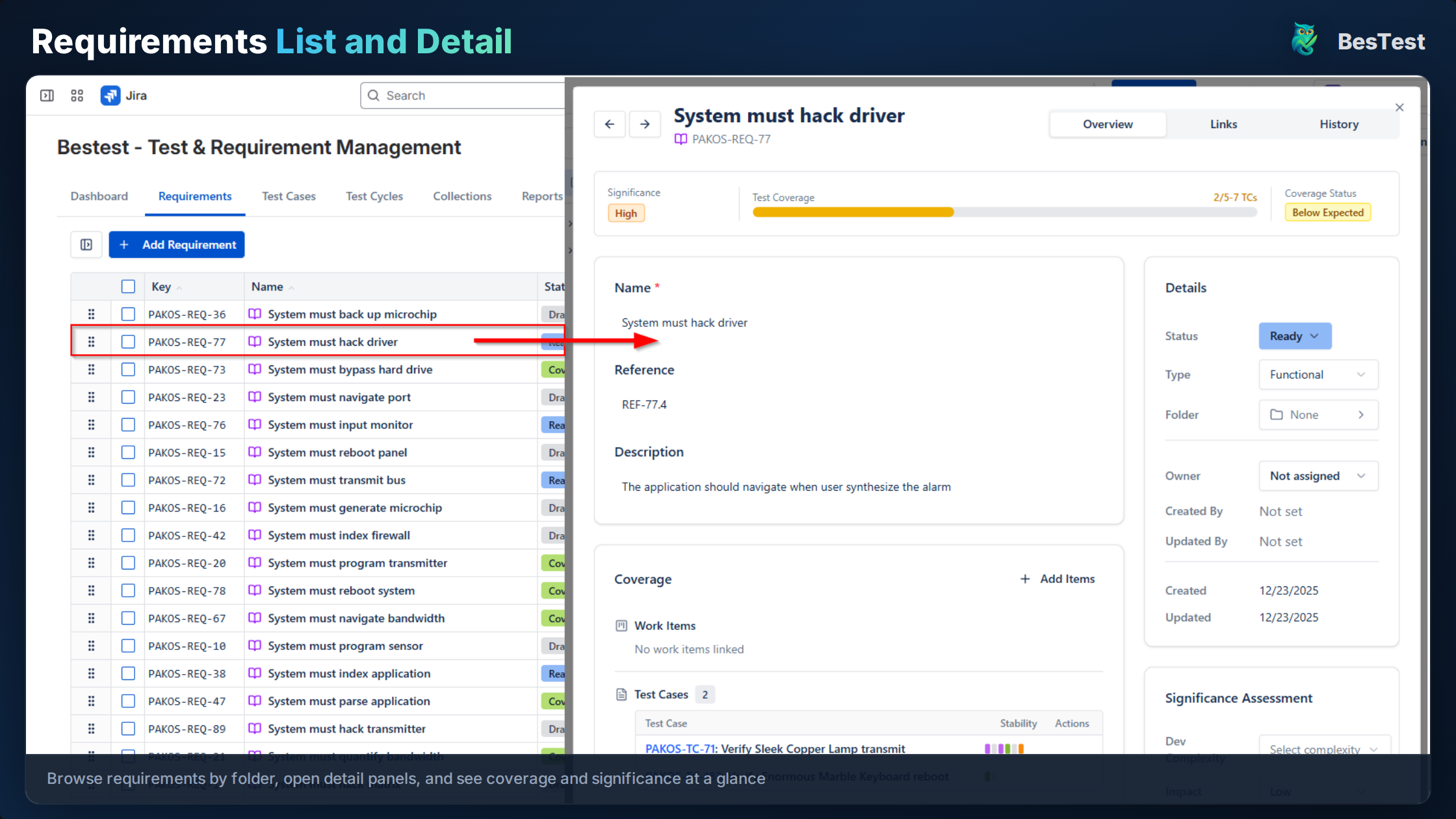
Each requirement in BesTest is a dedicated entity with structured fields:
Title: Invoice PDF generation supports all tax formats
Description: The system must generate PDF invoices that correctly
             display tax calculations for VAT, GST, and sales tax
             formats based on the customer's region.

Dev Complexity: Medium
Impact: High
Significance: Calculated automatically (complexity x impact)
Key fields to define for each requirement:
- •Title - Clear, testable statement
- •Description - Detailed specification
- •Dev Complexity - How hard is this to build? (Low / Medium / High)
- •Impact - How important is this to the business? (Low / Medium / High)
- •Significance - Calculated automatically from complexity and impact
Import Existing Jira Issues as Requirements
Already have stories and epics in Jira that represent requirements? You do not need to recreate them:
- •Open the Links tab on any requirement
- •Search for existing Jira issues
- •Link them - the Jira issue is now associated with the requirement
- •You can also create requirements from existing Jira issues
This lets you keep your existing Jira workflow intact while adding a requirements layer on top.
Link Requirements to Test Cases
Each requirement has a Coverage section that shows:
- •Which test cases are linked to this requirement
- •The coverage status based on significance
- •Whether more tests are needed for adequate coverage
To link a test case to a requirement:
- •Open the requirement's Coverage section
- •Search for existing test cases or create a new one
- •The coverage calculation updates automatically
Review Coverage
Once requirements and test cases are linked, you get an instant view of:
- •Covered requirements - enough test cases based on significance
- •Partially covered - some tests, but not enough for the requirement's importance
- •Uncovered - no linked test cases at all
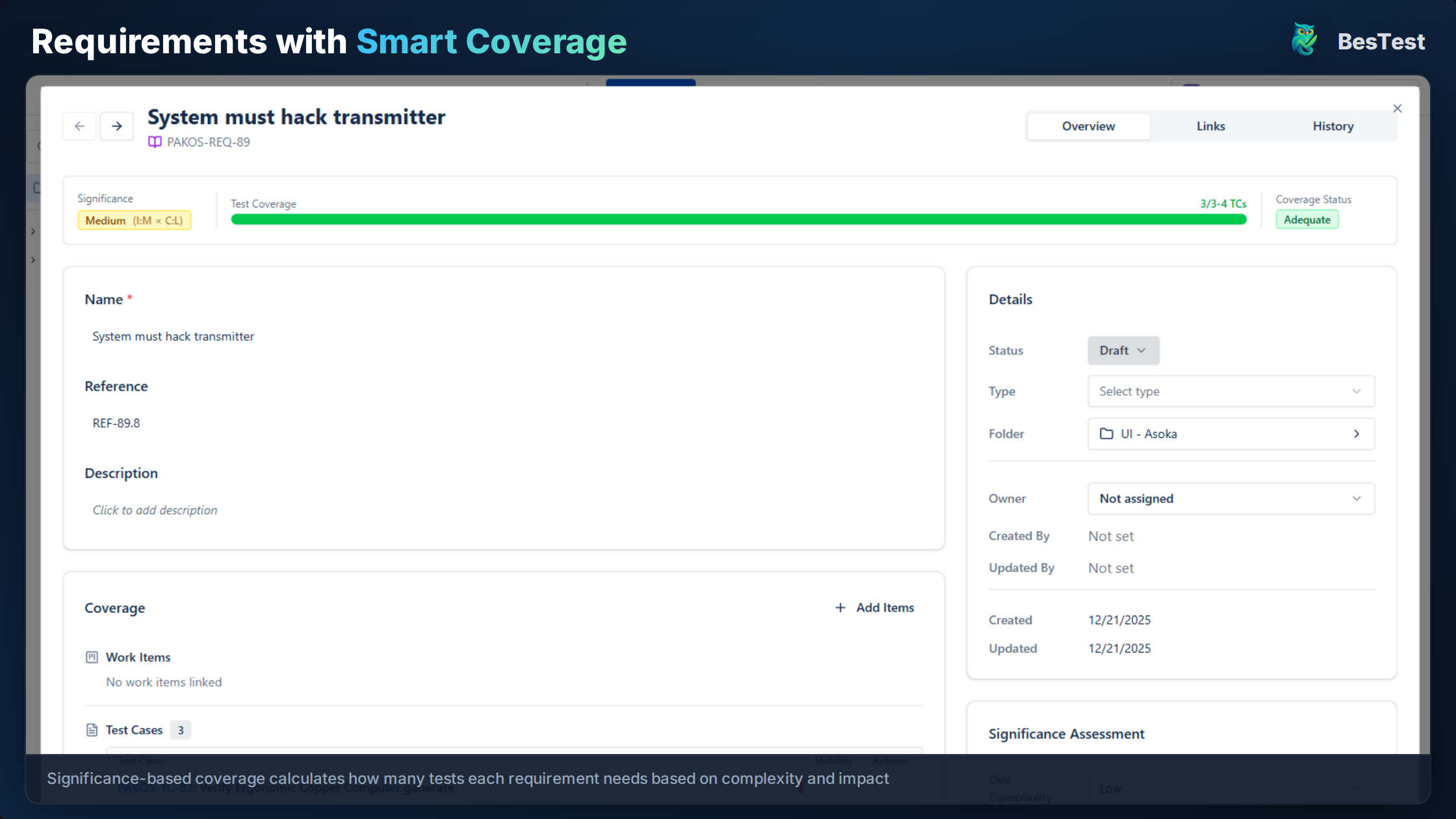
This is fundamentally different from simple "has a linked test case" tracking. A high-significance requirement needs more thorough testing than a low-significance one - and BesTest's coverage model reflects that.
Requirements Structure and Hierarchy
How you organize requirements matters as much as what you write. Here are three common structures, each suited to different team sizes and project types.
Structure 1: Flat List
REQ-001: User can log in with email and password
REQ-002: User can reset forgotten password via email
REQ-003: User can enable two-factor authentication
REQ-004: Admin can deactivate user accounts
REQ-005: System locks account after 5 failed login attempts
Best for: Small projects with fewer than 50 requirements. Simple to manage, easy to search. No hierarchy to maintain.
Structure 2: Grouped by Feature or Module
Authentication Module
  ├── REQ-001: User can log in with email and password
  ├── REQ-002: User can reset forgotten password
  └── REQ-003: User can enable two-factor authentication

User Management Module
  ├── REQ-004: Admin can deactivate user accounts
  ├── REQ-005: Admin can assign roles to users
  └── REQ-006: System locks account after 5 failed attempts

Billing Module
  ├── REQ-007: User can view invoice history
  ├── REQ-008: User can download invoices as PDF
  └── REQ-009: Admin can generate manual invoices
Best for: Medium projects with 50-500 requirements. Groups requirements logically, making it easier to assess coverage per module.
Structure 3: Hierarchical (Epics > Features > Requirements)
Epic: Secure Access Control
  Feature: Authentication
    ├── REQ-001: Email/password login
    ├── REQ-002: Password reset flow
    └── REQ-003: Two-factor authentication
  Feature: Authorization
    ├── REQ-004: Role-based access control
    ├── REQ-005: Permission inheritance
    └── REQ-006: API key authentication
Best for: Large projects, regulated industries, or organizations that need to map business goals down to testable requirements. Mirrors the structure of a formal requirements specification.
Practical Tips for Requirement Organization:
| Tip | Why It Matters |
|---|---|
| Use consistent naming conventions | Makes search and filtering reliable |
| Keep requirements atomic | One testable statement per requirement - not "the system should do X and Y and Z" |
| Write requirements as testable statements | If you cannot write a test case for it, it is not a good requirement |
| Assign significance early | Coverage metrics only work if significance is set before test planning |
| Review and refine regularly | Requirements change - stale requirements create false coverage metrics |
Bad: "The system should be fast"
Good: "Search results load within 2 seconds for queries returning up to 1,000 results"
Bad: "The UI should be user-friendly"
Good: "A new user can complete the checkout process without help within 3 minutes"
If the requirement does not have a clear pass/fail condition, it is not testable - and untestable requirements cannot be meaningfully covered.
Linking Requirements to Test Cases
The real value of managing requirements in Jira comes when you connect them to test cases. This linkage creates requirements traceability - the ability to trace every requirement to the tests that validate it, and every test back to the requirement it covers.
Why Linking Matters:
- •Coverage visibility - instantly see which requirements have no tests
- •Impact analysis - when a requirement changes, know exactly which tests need updating
- •Audit compliance - prove that every requirement was tested and by whom
- •Release confidence - ship only when coverage thresholds are met
How Linking Works in Practice:
Every entity in BesTest has a Links tab where you can view and add connections to other entities:
- •Requirement to Test Case - the primary link. Shows which tests validate this requirement.
- •Requirement to Jira Issue - connects the formal requirement to the story or epic it originated from
- •Test Case to Jira Issue - links tests to bugs or tasks for evidence and defect tracking
The Coverage section on each requirement provides a summary view:
Requirement: Invoice PDF generation supports all tax formats
Significance: High (complexity: Medium, impact: High)
Coverage Status: Covered

Linked Test Cases:
  TC-045: Verify VAT calculation on PDF invoice .......... Passed
  TC-046: Verify GST calculation on PDF invoice .......... Passed
  TC-047: Verify sales tax calculation on PDF invoice .... Passed
  TC-048: Verify tax-exempt invoice generation ........... Not Run
The Significance-Based Coverage Model:
This is a critical distinction. BesTest does not simply check "does this requirement have at least one linked test case?" Instead, coverage is calculated based on significance:
- •Significance = Dev Complexity x Impact
- •A high-significance requirement (complex to build, high business impact) needs more thorough test coverage
- •A low-significance requirement may be adequately covered by a single test case
This prevents teams from gaming coverage metrics by linking one trivial test to each requirement and calling it "100% covered."
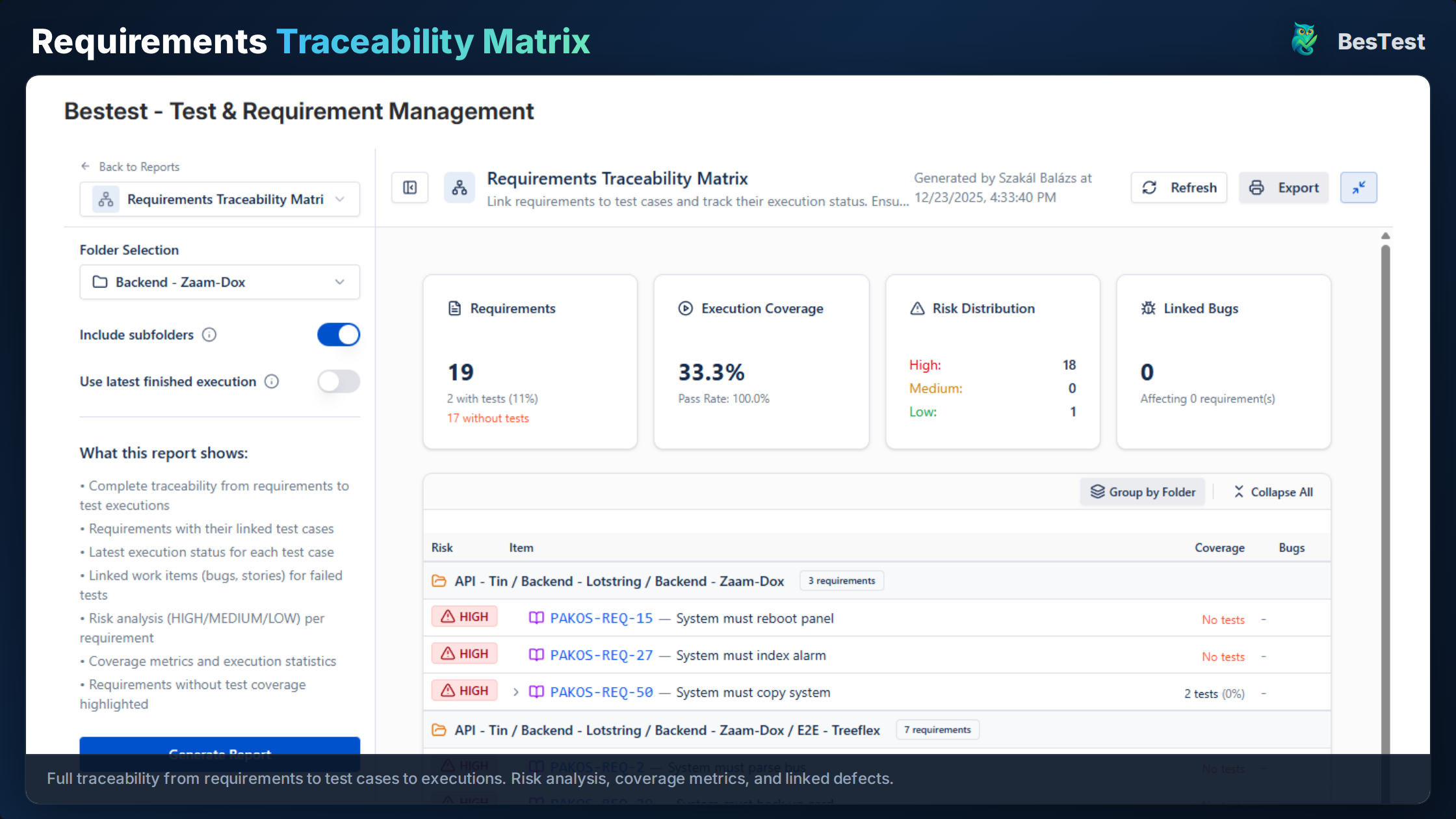
For a deeper dive into building and maintaining a full traceability matrix, see our Requirements Traceability Matrix guide.
Requirements Coverage and Reporting
Coverage reporting answers the question every stakeholder asks before a release: "Are we done testing?"
Without a coverage report, the answer is a guess. With one, it is data.
Key Coverage Metrics:
| Metric | What It Tells You | Target |
|---|---|---|
| Overall coverage % | Percentage of requirements with adequate test coverage | 90%+ for critical releases |
| Uncovered requirements | Requirements with zero linked test cases | 0 for regulated projects |
| Partially covered | Requirements with some tests, but not enough for their significance | Review before release |
| Pass rate | Percentage of linked tests that have passed | 95%+ for production readiness |
| Execution progress | How many linked tests have been run vs. total | 100% before sign-off |
Building a Coverage Dashboard:
BesTest provides Jira dashboard gadgets that show coverage status in real time. You can track:
- •Coverage distribution across modules or features
- •Requirements by status (covered, partially covered, uncovered)
- •Trend over time - is coverage improving sprint over sprint?
- •Requirements at risk - high significance but low coverage
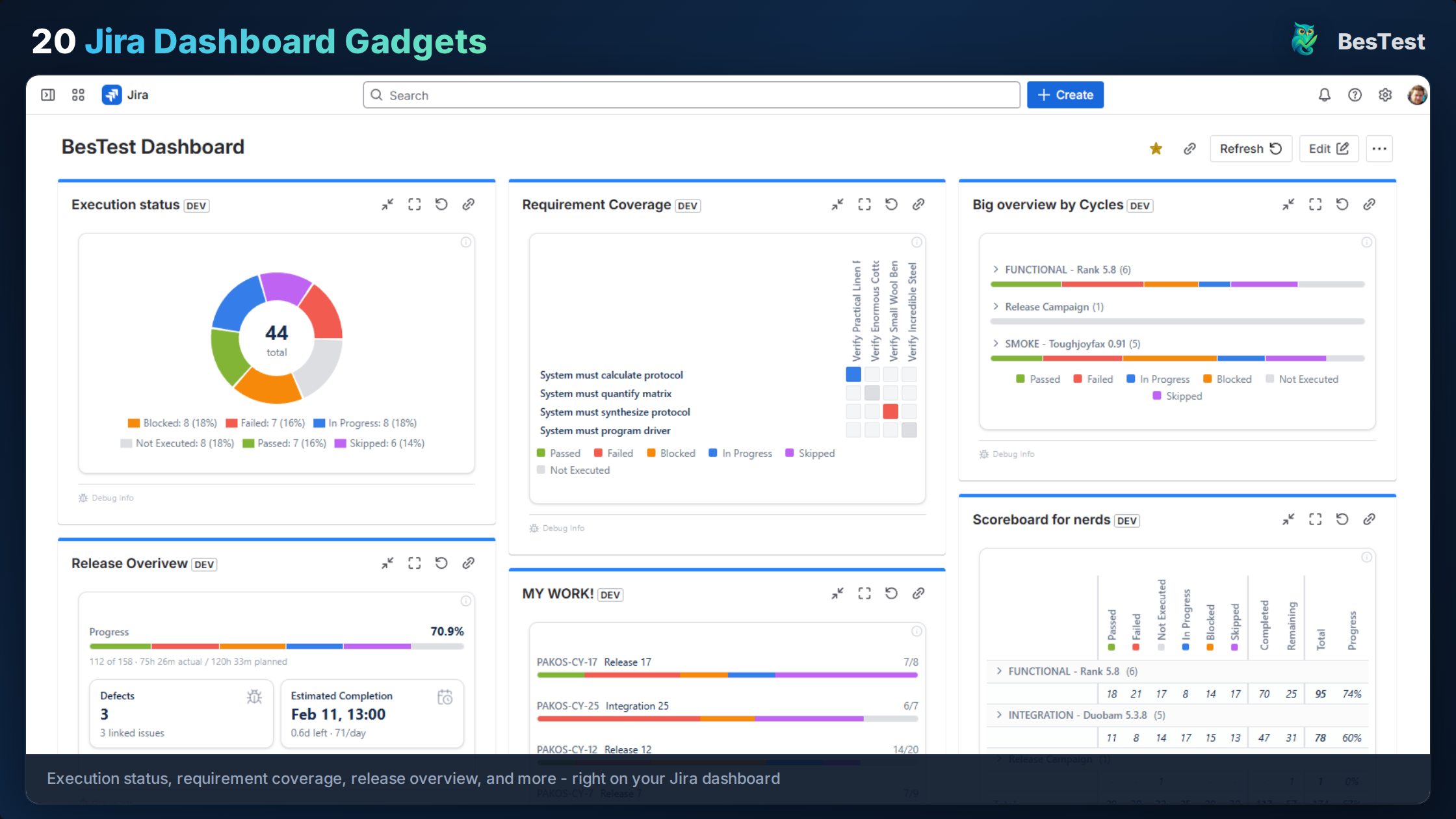
This visibility matters for several audiences:
- •QA leads use it to plan test effort and allocate resources
- •Product owners use it to understand what is validated and what is not
- •Release managers use it as a go/no-go criterion
- •Auditors use it as compliance evidence
Using Coverage for Release Decisions:
A practical release readiness checklist based on requirements coverage:
Release Readiness Checklist:
[x] All high-significance requirements have "Covered" status
[x] No critical requirements are uncovered
[x] Pass rate for covered requirements > 95%
[x] All failed test cases have linked defects
[x] All blocking defects are resolved
[ ] Stakeholder sign-off obtained90% coverage sounds good, but it is meaningless if the 10% uncovered requirements include your most critical business logic. Always weight coverage by significance. BesTest does this automatically - a high-significance uncovered requirement is flagged as a bigger risk than a low-significance one.
Manage Requirements Directly in Jira
BesTest includes a built-in requirements module with significance-based coverage tracking, full traceability to test cases, and Jira dashboard reporting. Set up in under a minute, free for up to 10 users.
Try BesTest FreeJira vs. Confluence for Requirements: Which Should You Use?
This is one of the most common questions teams ask: should requirements live in Jira, in Confluence, or somewhere else? The answer depends on what you need from your requirements.
Confluence for Requirements:
Confluence excels at documentation - writing, formatting, and sharing long-form specifications:
- •Product Requirements Documents (PRDs)
- •Feature specifications with diagrams and mockups
- •Business requirements with context and rationale
- •Stakeholder-facing documents that need rich formatting
Confluence Strengths:
+ Rich text editing with tables, images, diagrams
+ Page hierarchy for organizing specs
+ Easy sharing with non-technical stakeholders
+ Commenting and review workflows
+ Templates for PRDs and specs

Confluence Weaknesses:
- No traceability to test cases or defects
- Requirements are embedded in page text, not structured data
- No coverage metrics
- Manual linking to Jira issues (links break when pages move)
- No way to query "show me all untested requirements"
Jira for Requirements:
Jira (with plugins) excels at tracking and traceability - managing requirements as structured data with links to tests and defects:
Jira + Plugin Strengths:
+ Requirements are structured data with fields and metadata
+ Direct linking to test cases and Jira issues
+ Automated coverage calculation
+ Queryable (filter by status, significance, coverage)
+ Single tool for requirements, tests, and defects

Jira + Plugin Weaknesses:
- Less suitable for long-form documentation
- Not ideal for early-stage brainstorming or diagramming
- Stakeholders need Jira access
The Practical Answer: Use Both
The best teams use Confluence and Jira together, each for what it does best:
| Phase | Tool | Purpose |
|---|---|---|
| Discovery and planning | Confluence | PRDs, feature specs, user research, diagrams |
| Requirement definition | Jira plugin (e.g., BesTest) | Formal, testable requirement statements |
| Test planning | Jira plugin | Link requirements to test cases, plan coverage |
| Execution and tracking | Jira plugin | Execute tests, track coverage, report status |
| Stakeholder review | Confluence + Jira dashboard | Specs in Confluence, coverage dashboards in Jira |
The key is knowing when to transition: once a requirement moves from "being discussed" to "needs to be tested," it should exist as a structured, trackable entity in Jira - not just a paragraph in a Confluence page.
A common mistake is maintaining requirements in both Confluence and Jira and trying to keep them in sync. This creates a maintenance burden that nobody sustains. Pick one system of record for each requirement's lifecycle stage, and make the hand-off clean.
Jira Requirements Management Best Practices
These ten practices separate teams that manage requirements effectively from teams that struggle.
Define "Requirement" for Your Team
Before anything else, agree on what counts as a requirement. For some teams, a Jira story is a requirement. For others, requirements are formal statements that stories implement. Define this clearly so everyone uses the same language.
Keep Requirements Separate from Development Tasks
Requirements describe what the system should do. Tasks and stories describe how to build it. Mixing them in the same backlog creates confusion. Use a dedicated requirements module (like BesTest) or at minimum, a dedicated issue type.
Write Atomic, Testable Requirements
Each requirement should describe one testable behavior:
- •Atomic: one statement per requirement, not compound
- •Testable: has a clear pass/fail criterion
- •Independent: can be validated without depending on another requirement's state
- •Unambiguous: means the same thing to every reader
Set Significance Before Writing Test Cases
Coverage metrics only work if significance is assigned before test planning. Otherwise, teams write the same number of tests for trivial features and critical ones. Assign dev complexity and impact as soon as the requirement is created.
Link Early, Link Often
Create links between requirements, test cases, and Jira issues as soon as they exist - not after the sprint ends. Late linking means gaps go unnoticed until it is too late.
Use Coverage Gaps to Drive Test Planning
Instead of writing tests based on what is easy or familiar, use coverage reports to identify gaps. Focus testing effort on uncovered high-significance requirements first.
Review Requirements Before Sprint Planning
Include a requirements review in your sprint planning process:
- •Are new requirements properly documented?
- •Are existing requirements still accurate?
- •Are significance ratings up to date?
- •Are there uncovered requirements that need tests this sprint?
Do Not Store Requirements Data as Jira Issues
Creating a custom Jira issue type for requirements seems logical but causes problems at scale:
- •Clutters the backlog with non-actionable items
- •Mixes requirements with bugs, tasks, and stories in queries
- •Creates issue bloat that slows down Jira
- •Custom fields add noise to every issue creation screen
A dedicated requirements module avoids these issues. BesTest stores requirements data on the Forge platform, keeping your Jira backlog clean.
Establish Traceability as a Team Habit
Traceability is not a one-time setup - it is an ongoing practice. Make it part of your Definition of Done: "requirement is linked to test cases" should be as non-negotiable as "code is peer-reviewed."
Use Requirements Reviews as a Quality Gate
Before a requirement goes into development, review it:
- •Is it clear enough for a developer to implement?
- •Is it clear enough for a tester to validate?
- •Does the team agree on the acceptance criteria?
- •Is the significance rating appropriate?
Read each requirement and ask: could someone who just joined the team write a test case for this requirement without asking clarifying questions? If not, the requirement needs refinement.
Should You Create a Custom Jira Requirement Issue Type?
Many teams considering requirements management in Jira ask whether they should create a custom "Requirement" issue type. It is a reasonable idea - but it comes with trade-offs worth understanding.
How to Create a Requirement Issue Type in Jira:
- •Go to Jira Settings > Issues > Issue Types
- •Click "Add Issue Type"
- •Name it "Requirement" and choose a standard type
- •Add custom fields: Description, Priority, Dev Complexity, Impact, Status
- •Add it to your project's issue type scheme
- •Configure workflows for the requirement lifecycle
Jira Requirements Example Using a Custom Issue Type:
Issue Type: Requirement
Key: PROJ-REQ-001
Summary: System sends email notification when order status changes
Description: When an order transitions to "Shipped", "Delivered",
             or "Cancelled", the system must send an email to the
             customer with order details and the new status.
Priority: High
Dev Complexity: Medium
Impact: High
Status: Approved
Linked Stories: PROJ-142, PROJ-143
Linked Test Cases: (manually linked via issue links)
Why This Approach Has Limits:
While this works for small projects, it creates several problems at scale:
| Problem | Impact |
|---|---|
| Backlog pollution | Requirements mix with stories, bugs, and tasks in every board and filter |
| No coverage calculation | Jira cannot compute "is this requirement adequately tested?" |
| Manual traceability | Issue links exist, but there is no automated matrix or coverage view |
| Field sprawl | Every issue type in the project inherits requirement fields or you need complex field configurations |
| Reporting gaps | JQL can filter requirements, but cannot calculate coverage percentages |
The Better Alternative:
A dedicated requirements module (like BesTest's built-in requirements) gives you all the structure of a custom issue type without the downsides:
- •Requirements do not clutter your Jira backlog
- •Coverage is calculated automatically based on significance
- •Traceability views are built in
- •Data lives on the Forge platform, avoiding issue bloat
- •You can still link to Jira issues for full bidirectional context
If you already have a custom requirement issue type and want to migrate, BesTest lets you import existing Jira issues as requirements - so nothing is lost.
References
- •IREB, "Handbook of Requirements Engineering Fundamentals," 2022 - international standard for requirements engineering practices, covering elicitation, documentation, and management.
- •IEEE 29148:2018, "Systems and Software Engineering - Life Cycle Processes - Requirements Engineering" - defines requirements engineering processes across the system and software lifecycle.
- •ISTQB Foundation Level Syllabus v4.0, 2023 - Section 1.4 on traceability between test basis (including requirements) and test cases.
- •Atlassian, "Jira Issue Types," Atlassian Documentation - official documentation on Jira issue types and their intended use.
- •Karl Wiegers & Joy Beatty, "Software Requirements," 3rd Edition, Microsoft Press, 2013 - industry-standard reference on writing, organizing, and managing software requirements.
Frequently Asked Questions
How do I manage requirements in Jira?
You have four main options: (1) use native Jira stories and epics as requirements - simple but limited; (2) write requirements in Confluence and link to Jira issues - better documentation but manual traceability; (3) use a dedicated Jira requirements plugin like BesTest that provides structured requirements with automated coverage tracking; (4) use external tools like DOORS or Polarion with Jira sync - enterprise-grade but complex. For most teams, a dedicated plugin offers the best balance of capability and simplicity.
How do I add requirements in Jira?
With a dedicated requirements plugin like BesTest, you create requirements directly in the plugin's requirements module - not as Jira issues. Each requirement has structured fields including title, description, dev complexity, and impact. You can also import existing Jira stories or epics as requirements by linking them. Without a plugin, the simplest approach is to create a custom "Requirement" issue type, though this has limitations around coverage tracking and backlog clutter.
How do I track requirements in Jira?
Native Jira offers basic tracking through issue statuses and JQL filters, but cannot calculate coverage metrics. For proper requirements tracking, use a dedicated plugin that provides: coverage status per requirement (covered, partially covered, uncovered), significance-based coverage calculation, traceability from requirements to test cases and defects, and dashboard gadgets showing real-time coverage status.
How do I create requirements in Jira?
There are two approaches: (1) Create a custom issue type called "Requirement" with fields for priority, complexity, and impact - this works but clutters your backlog. (2) Use a Jira plugin with a built-in requirements module where requirements are stored separately from Jira issues. The second approach lets you create requirements with structured fields and automatic significance calculation, while keeping your Jira backlog clean.
Should I use Jira or Confluence for requirements?
Use both, each for what it does best. Confluence is ideal for early-stage documentation: PRDs, feature specs, and stakeholder-facing documents with rich formatting. Jira (with a requirements plugin) is ideal for structured, testable requirements that need traceability to test cases and defects. Write your specs in Confluence during discovery, then create formal, trackable requirements in Jira once they are ready for development and testing.
What is the best Jira requirements management plugin?
Look for a plugin that provides: dedicated requirement entities (not just Jira issue types), significance-based coverage calculation, bidirectional traceability to test cases, Jira dashboard integration, and a secure platform. BesTest offers all of these with a built-in requirements module on Atlassian Forge, free for up to 10 users. The key differentiator is coverage that accounts for requirement significance - not just whether a test case is linked.
Can I create a requirements traceability matrix in Jira?
Native Jira has no built-in traceability matrix. You can approximate one using JQL and issue links, but this requires manual maintenance and cannot calculate coverage metrics. Dedicated plugins like BesTest generate traceability automatically by linking requirements to test cases, executions, and defects. For a complete guide on building and maintaining an RTM, see our Requirements Traceability Matrix guide.
Manage Requirements Directly in Jira
BesTest includes a built-in requirements module with significance-based coverage tracking, full traceability to test cases, and Jira dashboard reporting. Set up in under a minute, free for up to 10 users.
Try BesTest Free