

Jira Dashboard Gadgets
Bring your testing data directly into Jira dashboards
Bring your testing data directly into Jira dashboards. Track requirement coverage, test execution progress, and release readiness without leaving Jira — right where your team already works. BesTest gadgets integrate natively with Jira dashboards so your testing metrics sit alongside your project data.
How It Works
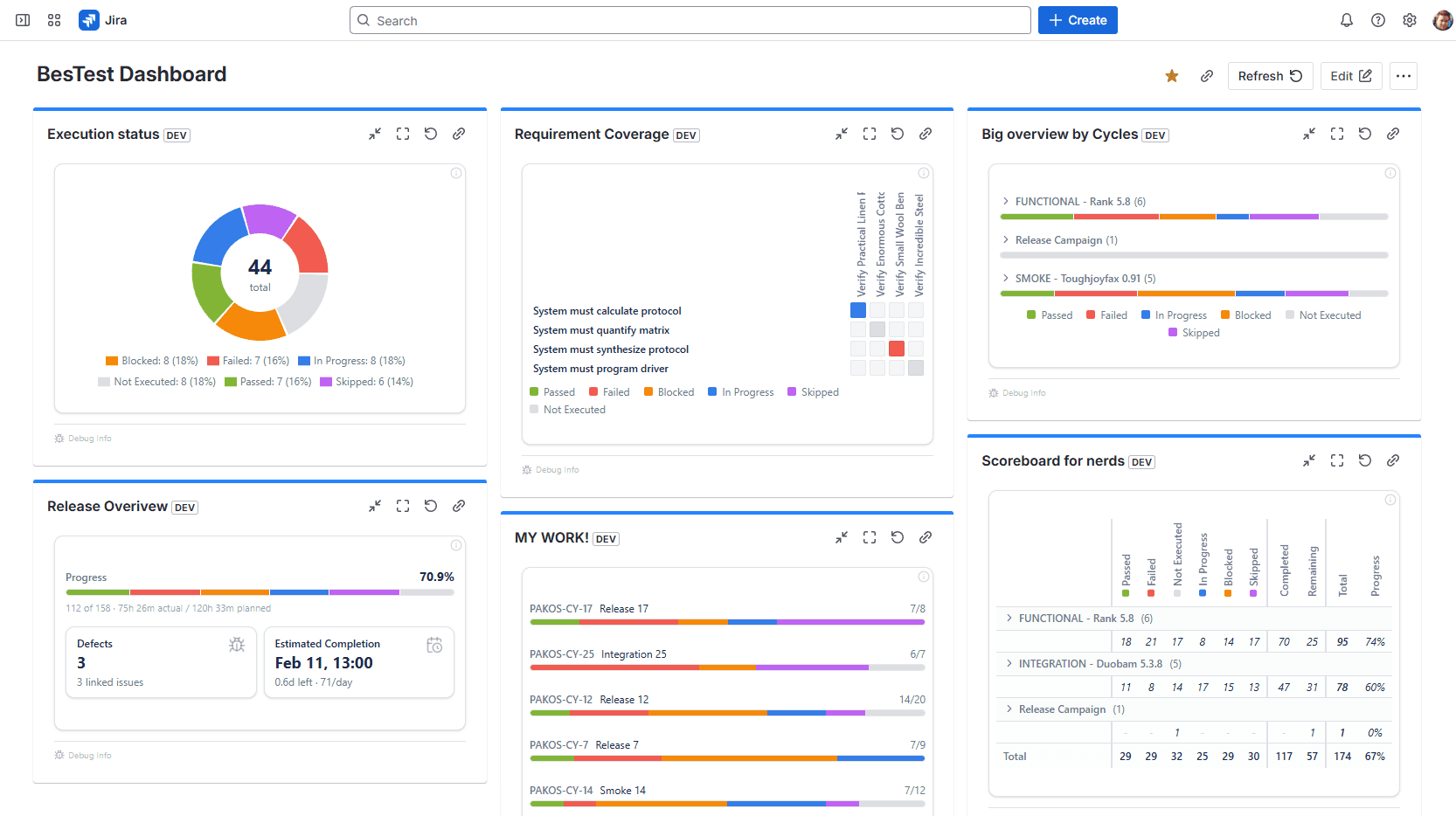
Jira Dashboard Gadgets bring BesTest's testing data directly into the dashboards your team already uses every day. Instead of requiring managers and stakeholders to navigate to a separate testing tool, BesTest gadgets display requirement coverage, test execution progress, and release readiness metrics right alongside your existing Jira gadgets — sprint burndowns, issue statistics, and activity streams.
Each gadget is configurable: you can scope it to a specific project, a set of test cycles, or a particular time period. A project manager might add a requirement coverage gadget to their project dashboard to monitor testing completeness throughout the sprint. A QA lead might create a dedicated "Testing Command Center" dashboard with multiple BesTest gadgets showing execution progress, failure rates, and coverage gaps across all active projects. An engineering director might use a high-level gadget that aggregates readiness metrics across the entire portfolio.
Because the gadgets are native Jira dashboard components, they respect Jira's permission model and load with the rest of the dashboard. There's no extra login, no iframe embedding, and no external dependencies. The data updates in real time as testers execute tests and coverage changes, so the dashboard always reflects the current state of quality across your projects.
Key Benefits
Try Jira Dashboard Gadgets in BesTest
Install BesTest from the Atlassian Marketplace and start using jira dashboard gadgets inside Jira in minutes. Free for teams up to 10 users.
Try BesTest FreeMore Features
Requirements Management with Coverage
Link requirements directly to test cases and see coverage at a glance
Test Case Management with Folder Hierarchy
Organize your test catalog in an intuitive folder structure
Test Execution with Test Player
Run through test cases step by step with the built-in test player
Related Resources
Test Management in Jira: The Complete 2026 Guide
A comprehensive guide to test management in Jira - from native options to dedicated tools. Learn how to organize test cases, execute tests, track coverage, and report on quality within the Jira ecosystem.
Regression Testing in Jira
Automate your regression test cycles with smart collections and traceability
Sprint Testing in Jira
Integrate testing into your agile sprints with test cycles tied to sprint stories
Test Report
A document summarizing test execution activities, results, and quality assessment for stakeholders.
Test Coverage
A measure of how much of the software or requirements are tested by test cases.