

Test Case Management with Folder Hierarchy
Organize your test catalog in an intuitive folder structure
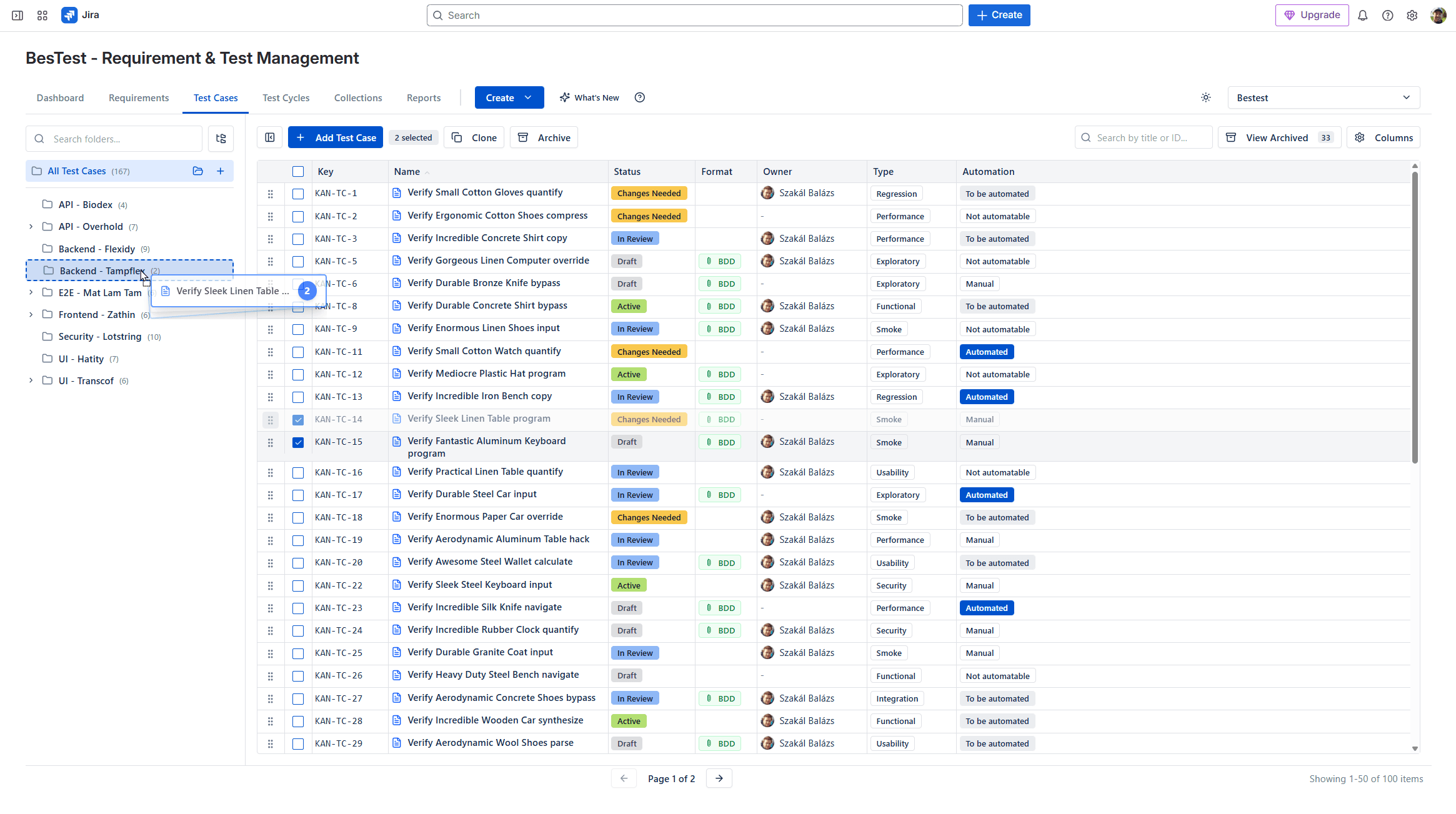
Organize your test catalog in an intuitive folder structure. Drag and drop test cases, create nested hierarchies, and keep even the largest test suites manageable. BesTest stores test cases in its own data model, so your Jira backlog stays clean and fast.
How It Works
Test case management in BesTest is built around an intuitive folder hierarchy that lets your team organize even the largest test catalogs. You can create nested folders that mirror your product's architecture — for example, a top-level "Payments" folder with sub-folders for "Checkout," "Refunds," and "Subscriptions." Drag and drop makes reorganization effortless as your product evolves.
Each test case is a structured entity with preconditions, numbered steps, and expected results. This consistent format ensures that any tester can pick up and execute a test case without ambiguity. Test cases support multiple tags, so a single test can belong to different logical groupings — tagged as both "regression" and "payments" — enabling flexible filtering and automatic inclusion in Smart Collections.
Critically, BesTest stores test cases in its own data model rather than creating Jira issues. This means your Jira backlog stays clean, your issue count stays low, and your instance performance is not degraded by thousands of test case issues. Test cases still link bidirectionally to Jira issues (stories, bugs, requirements) for full traceability, but they don't pollute your project's issue list.
Key Benefits
Try Test Case Management with Folder Hierarchy in BesTest
Install BesTest from the Atlassian Marketplace and start using test case management with folder hierarchy inside Jira in minutes. Free for teams up to 10 users.
Try BesTest FreeRelated Resources
How to Write Test Cases: The Complete 2026 Guide
Learn the art and science of writing test cases that catch bugs, are easy to maintain, and provide clear documentation. This guide covers everything from basic structure to advanced techniques used by professional QA teams.
Test Management in Jira: The Complete 2026 Guide
A comprehensive guide to test management in Jira - from native options to dedicated tools. Learn how to organize test cases, execute tests, track coverage, and report on quality within the Jira ecosystem.
Regression Testing in Jira
Automate your regression test cycles with smart collections and traceability
Sprint Testing in Jira
Integrate testing into your agile sprints with test cycles tied to sprint stories
Test Case Review Workflow
Implement quality gates for test cases with built-in review and approval
Test Case
A documented set of conditions and steps used to verify that a software feature works as expected.
Test Suite
A collection of test cases grouped together for a specific testing purpose.