

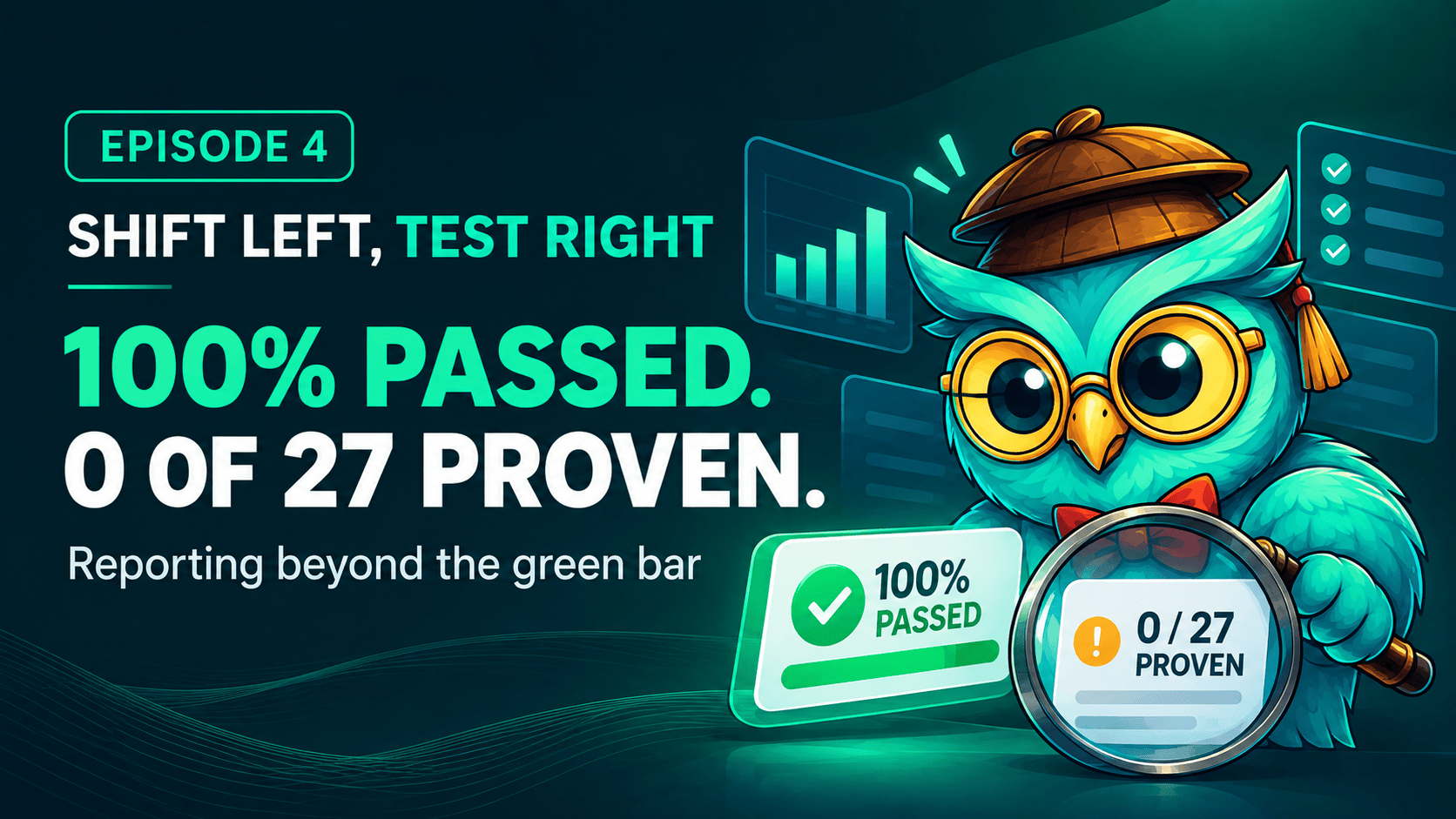
At the end of Chapter 3 I asked the catalogue which test cases have found the most defects, and which ones fail most often. This chapter is where I got to ask my own reports, on our own work, for the first time.
Right now we are delivering the next big thing after reporting: a redesign of every viewer in BesTest, with a new place for attachments and for history. In Jira it is one work item, BEST-731, with 26 subtasks under it. The subtasks are managed by our agents, and they go through a basic Jira workflow.
Under the subtasks sits the BesTest panel. On 13 November it said: Release Readiness, 100% passed. 369 test cases, one green bar.
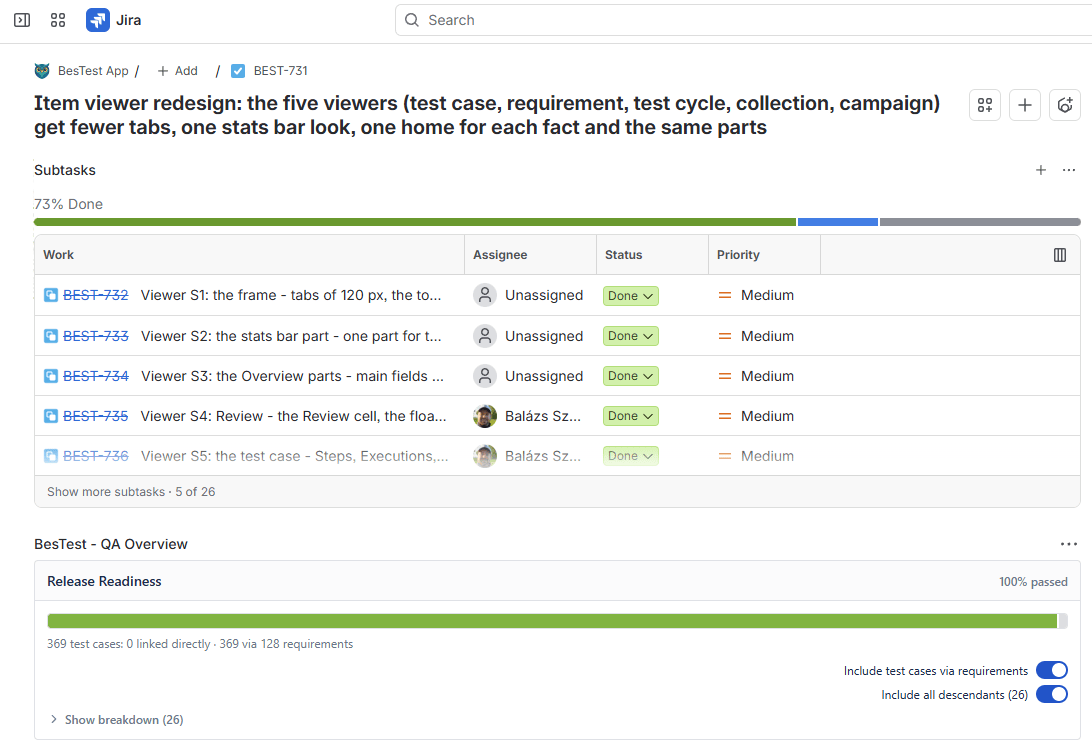
Is it all green? Yes. Is it release ready? No.
The panel talks about the connected tests. Everything that is started is tested, and everything that is tested passed, so the number is true. But some subtasks are not even started. Read the panel together with the progress bar above it, 73% done, and you get the real sentence: it is all green, for what is done so far.
If you want to know more than that, you go to reporting. We released it at the start of November. It was never in production before, so this is the first sprint where I can use my own reports on my own work. I am live beta testing my own reporting, and this chapter is what I found. The short version: 100% passed, and 0 of 27 work items proven.
First we made it easy to put data in
We created BesTest first as a test management tool that was ideal for manual testing. We knew this was not enough. Manual testing is still the core of the highly standardized and governed industries, like automotive and medical, and a good manual tester is valuable everywhere. But software teams also need a way to upload automated testing, and now there is agentic testing: the new trending thing, which nobody really knows how to do efficiently yet.
One thing is important here. We are not building our own AI into the app. I don't think we should resell models. I think it is a dead end to try to be a better tester than the customer. Customers should bring their own model, with their own context, and the outcome should land in our app. I wouldn't let another company's AI design my mission-critical test cases, so we don't do it for others either.
I believe we should be the place where people store their decisions about requirements, and their valuable assets, which we call test cases. Those two tell you how you validate that your product works and meets the requirements. Around them we give you the Test Player for manual testing, and the REST API and the MCP server for every other way of getting your data in. Chapter 3 was about that door.
So putting data in became easy, and with agents writing and running the tests, we have more and more data. We even built it into our development flow: testing is delivered together with the feature, as an expected outcome. We have an agentic workflow for this and it works great. Part of that workflow is to deliver reality into the test management tool. We don't just store test cases, have requirements and link them together. We actually execute the test cases, and these test cases sometimes fail.
What a good tester is worth
Now we have tons of new test cases. Part of testing expertise is to know which test cases are more valuable and which are less. The best testers can write very few test cases that test a product very effectively.
This is a big value today, because you can write an infinite amount of code and an infinite amount of tests. Executing them gets very expensive or very long, especially on the higher levels, and then there is the maintenance cost. A tester who can reduce the infinite amount of possible test cases to the few that matter saves the company a lot of time and effort.
Think about the end of a delivery. We have working code, the requirements are covered with test cases, and the test cases are executed. Maybe some of them failed first and passed on the second run, because we needed to fix something. I am not talking about the newly written red-first tests. It is logical that those fail first. I am talking about the test cases we run to verify that the application works as expected.
Knowing that some test cases were actually helpful is a very useful and underutilized value. Some test cases are better than the others. And some might not be that valuable: they passed through their whole lifecycle, maybe they were redundant to something else, and they caught no bugs ever. Only knowing this about your testing assets helps you tremendously to cut them, merge them or rework them.
A test that fails and then passes can also be just flaky. We tell the two apart by the code. If a test failed and later passed on the same code, it is flaky, and our workflow switches on Flaky, a custom field we added to our test cases. If the code changed in between, the test caught something.
This is how I see AI in testing today: AI is just a smart CI that labels stuff. All that labelled stuff needs a place where a human can overview it. That place is reporting.
Two schools of reporting
If all the data is in, you can choose from two schools.
The first one says: there is your data, download it and make your Excel. AI has become better and better, so maybe it is not a big deal anymore to ask your AI to make a valuable report from that Excel. The flexibility is real, you can do anything with your data, and with BesTest you can do it through the API and the MCP. But that report will be a bit different each time you make it, and there can be oversights and mistakes in it.
The second school starts from what I see around me: most people have a hard time asking the good questions. So in BesTest we came up with an idea. How about we list all the good questions we have ever asked, and build reports that answer them?
I just press all the buttons
I am the guy who presses all the buttons, very quickly, and this is especially true for reporting. I don't want to read the report and its settings. I am a visual learner: I look at it and decide if it makes sense, if I can understand it, if I can process it. Then I want to click on stuff and dig deep.
This is the thing I missed in most testing tools. I had reports, but I could not really dig deep, and I could not properly get answers to my questions.
So we made the reports in a different way. They are not redundant. Each one approaches the whole bunch of data you delivered into the system from a different perspective:
- •Test Execution Explorer: every run, with its steps. Ask a question and open the run.
- •Test Execution Results: the progress across cycles, from the status and the result perspective.
- •Test Execution Time: how long the testing has gone on, and which test cases overran their expected time.
- •Defect Analysis: how many bugs you found, what you broke, and what is blocking you the most.
- •Requirement Coverage and Risk: which requirements are not safe to deliver, and why.
- •Traceability Matrix: a matrix that can contain everything, from Jira work items to requirements, test cases, executions and even the reported bugs, with custom fields and every important value.
- •Work Item Traceability: pick one work item or a set of them, the way people really do releases, and get real answers. Are they finished in Jira with all their subtasks? Do they have proper testing connected? Did the test cases pass? It doesn't matter if you use requirements in BesTest or not, because you can connect test cases to work items directly.
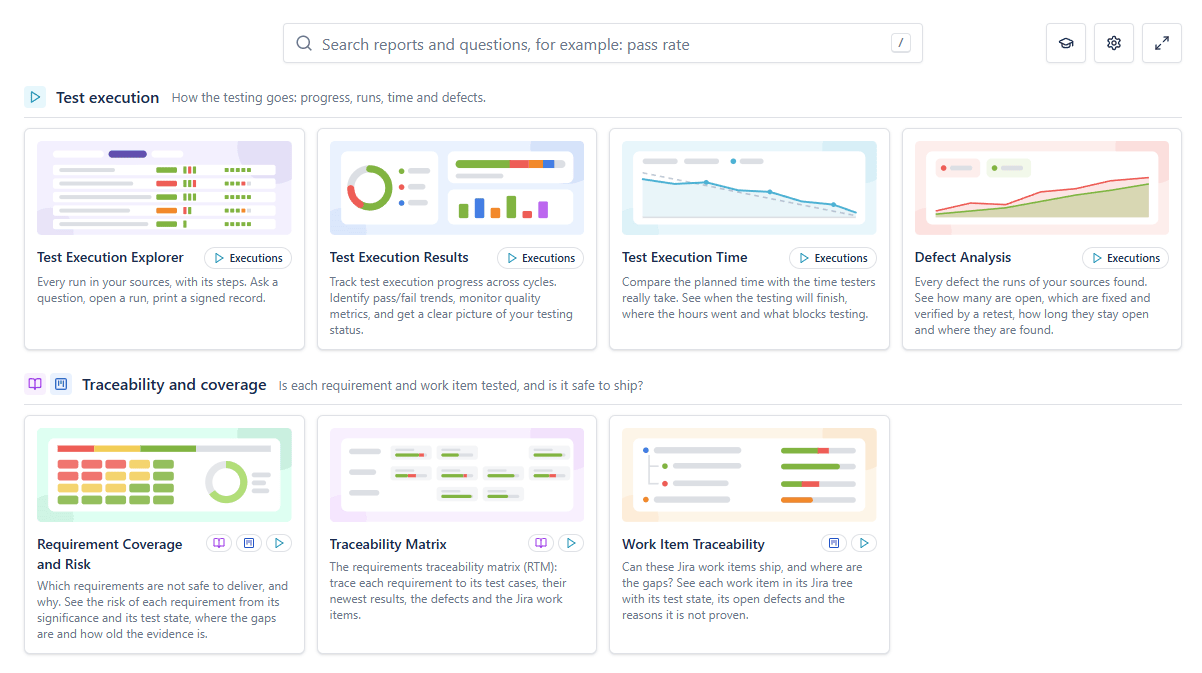
One detail I like: the execution report loads your latest cycle, so you are one click away from seeing a report with your real data.
Live preview - this is the real BesTest UI
All green is not the same as release ready.
BesTest keeps requirements, test cases and every run in one place inside Jira, and its reports come with the questions already written. Free for up to 10 users.
View on the Atlassian MarketplaceThis sprint, in three questions
Does Jira agree with the tests?
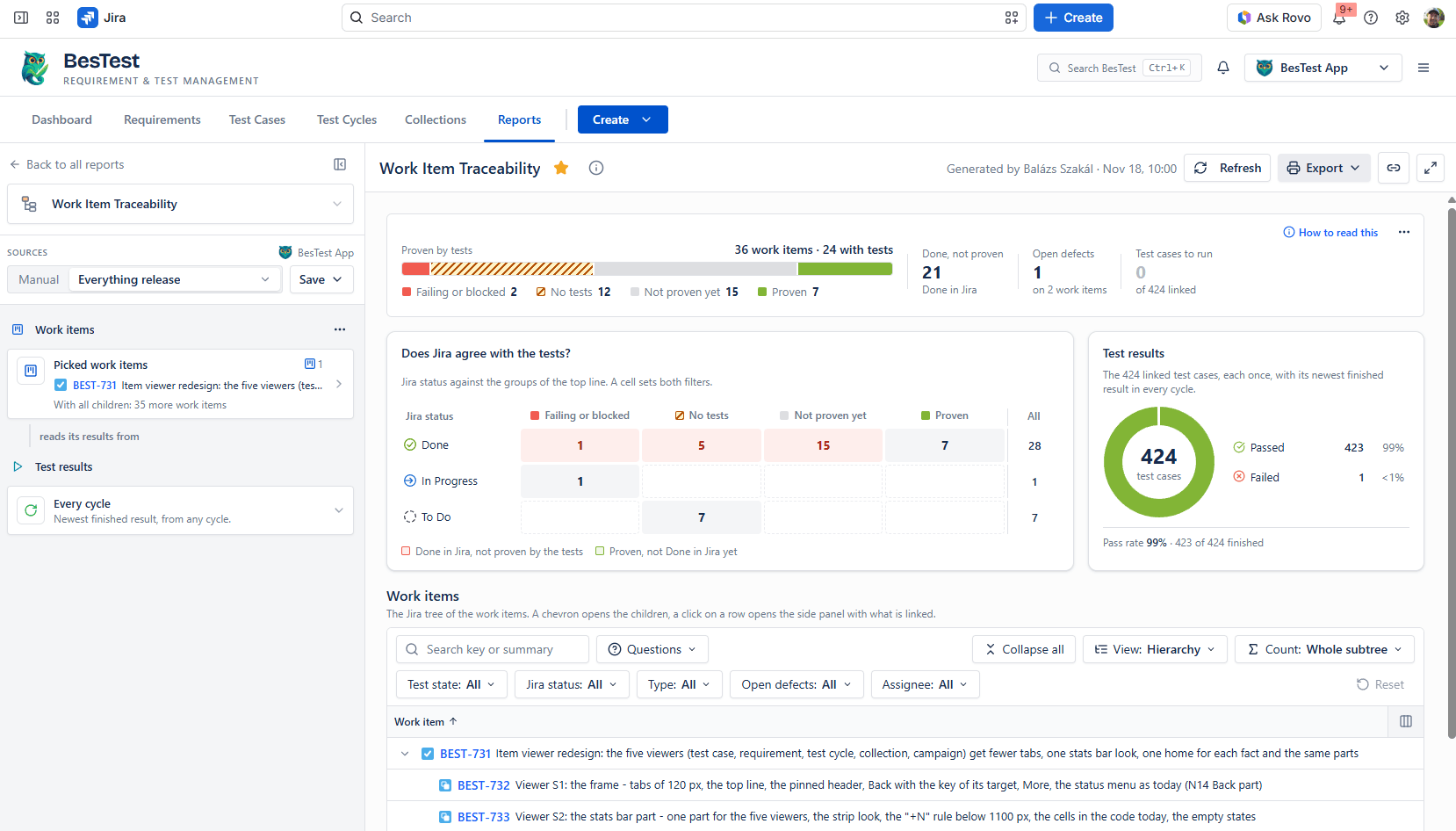
This is the title of a card in the Work Item Traceability report, and it is the question the green panel could not answer. I picked BEST-731 with all its children: 27 work items.
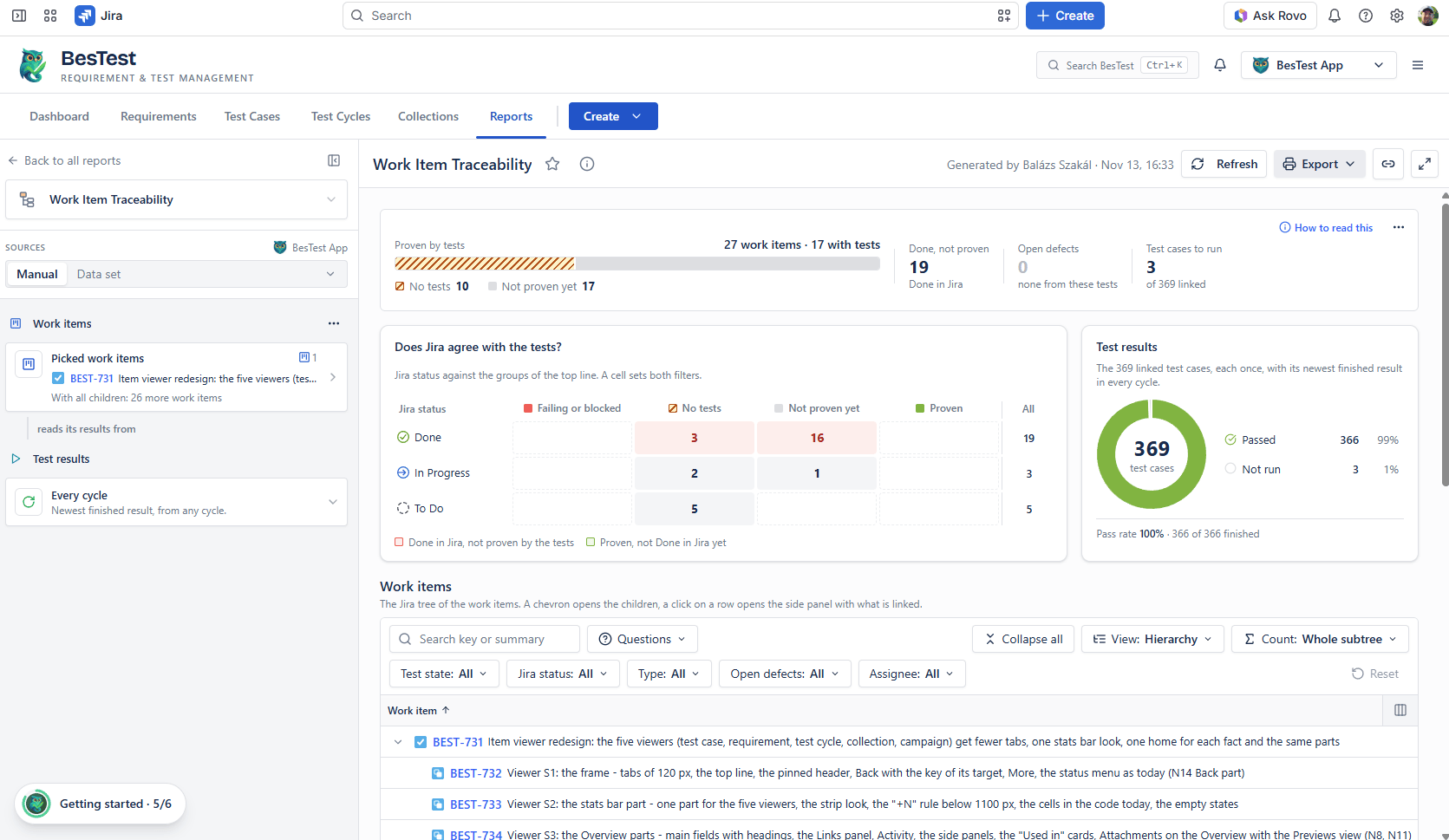
The test results are the same as on the panel: 369 linked test cases, 366 passed, 3 not run, nothing failed. But the report asks a harder thing than "did it pass". It asks if the work item is proven, and on this screen not one of the 27 is.
10 work items have no tests at all. 5 of those are still To Do, which is fine. 3 of them are Done in Jira, which is not. The other 17 have tests, and the report still says "not proven yet".
In total, 19 work items are Done in Jira and not proven by the tests. The panel was all green the whole time.
For the day to day I also use the Test Execution Results report. There I see if the last status of everything is passed, and if not, what the open bugs are.
Why "not proven yet"?
A work item with tests is not proven for one of three reasons: a test is not run yet, there are too few tests for how important the requirement is, or the requirement changed after its test ran. The next report, Requirement Coverage and Risk, counts them on the 115 requirements in the BEST-731 folder: 3 not run, 21 too few, 65 changed. Two of these I did not expect.
First, "too few" depends on the significance field. At first I filled it only in some cases, so the report had nothing to measure against. Now every requirement has a significance, and the same report tells me that the Critical requirements still need 55 more test cases.
Second, requirements are moving after testing. 65 of the 115 requirements changed after their test ran. The report is strict about this: that result tested the old text. This shouldn't be a thing. In my workflow it made sense, because the requirements get sharper while the subtasks are built. But it is a finding I only realized from the reports. It contributes to the risk, and the risk is something I manage, not the AI.
There is no shortcut for this. A person can sign off a requirement that has no test case, but a requirement that changed after its test is proven only by a new run. So we ran the tests again, many of them, and their newest results now test the new text.
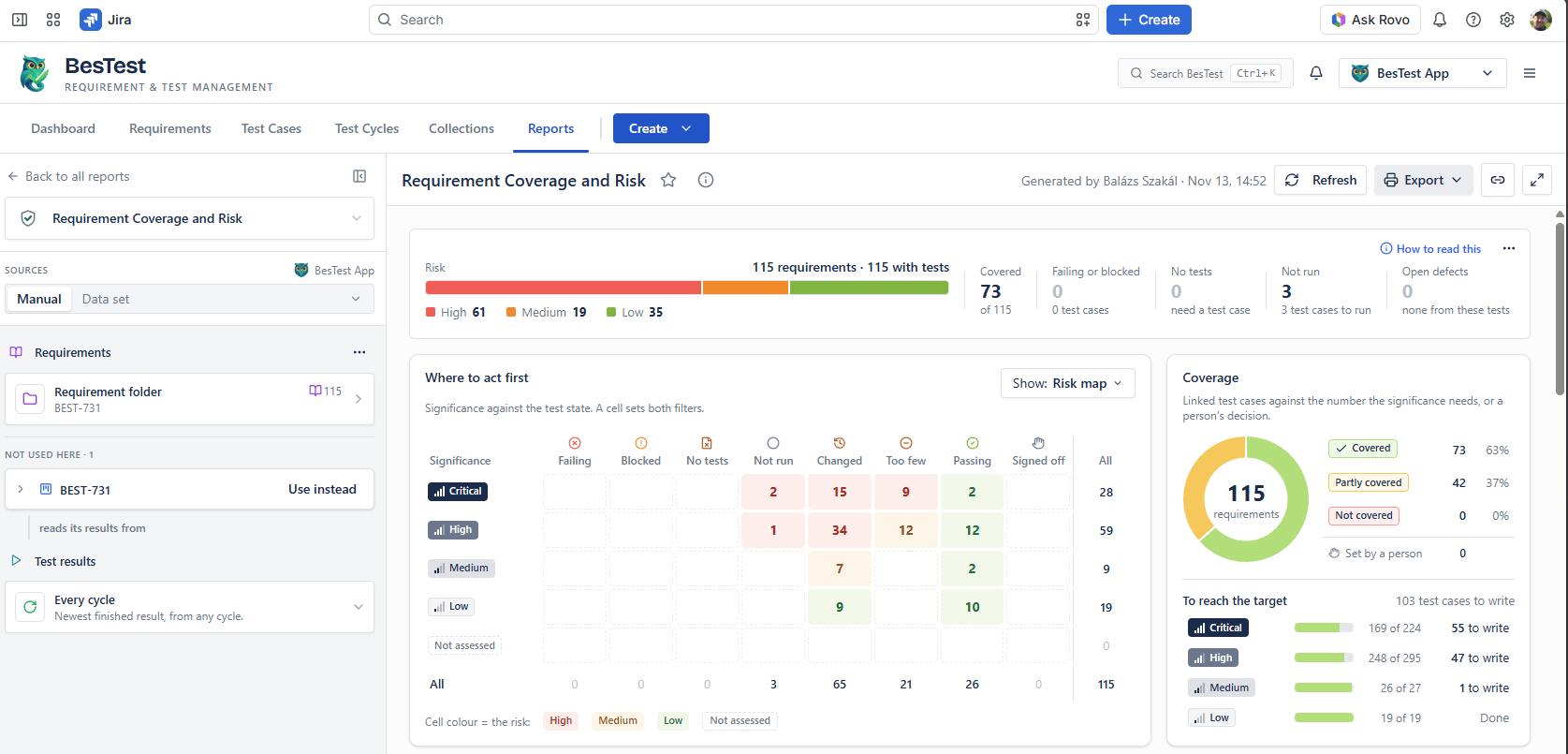
Then we went through the "too few" ones and checked why the report called them that. Where the tests we had were enough, a person set the coverage to Covered. Where they were not, we added new test cases. The work items started to turn green.
Five days later the same report shows 7 proven work items. We also made new tasks while we worked, so the tree grew to 36 work items: more green, and more in the works. 21 are Done and not proven yet. And the report already shows the next red: 1 test case failing, with an open defect on it.
Why can't I resize this table?
Before a release I do manual and exploratory testing. This time I found a table in the reports where I could not make a column narrower. In every other report I could.
I found this one by hand, not in a report. The reports came after, to tell me how it got through.
I asked the AI for the root cause, and it gave a good one: 13 of our 14 resizable report tables are built in one of two ways that work, and this one table, in the Work Item Traceability report, is built in neither.
AI can analyze the root cause. What it can't decide is what the finding means. For that I use the evidence in BesTest, which is clear about what has been tested and what the expectation was. Which task was responsible for developing this? Which test cases covered that task at the end? Then I can see the pattern:
- •Was it a misunderstanding? Then I can do better next time.
- •Was it a missing requirement? Then nobody asked for it, and that is why it is not there.
- •Was it insufficient testing?
- •Or did I find two specifications that say the opposite? That one has to be resolved by a human.
This one was insufficient testing, and it was also an exception: the table did not reuse the shared part that the other 13 tables use. That is a nice catch. The task that built it had test cases for what the table shows, and none for resizing. Column resizing is a common behaviour, so it should be tested once, as one thing, for every resizable table. That gives me the next questions: why is it not unified, why is there a difference, and is there anything else around this area?
So the bug came from exploratory testing, and the reports told me why it got through. That is how I go from one finding to a rule.
What reporting told me about how we work
We only reported passing executions. That is good as evidence: yes, there really are test cases and they really are executed. But hiding the failed runs makes every report just green, and that is not reality.
The last 25 cycles we uploaded before 12 November hold one failed run in total. Then we started to upload every attempt. In the first two days there were 33 attempts with a failure in them, and 45 failed runs. Of the 33 attempts, 20 caught something real, none was flaky, and 13 are not classified yet. By 17 November it was 54 failed runs out of 1,524.
You don't see these failures on the green screenshots above. Those reports show the newest result of each test case, and after the fix the newest result is a pass. The failures stay in the history, run by run.
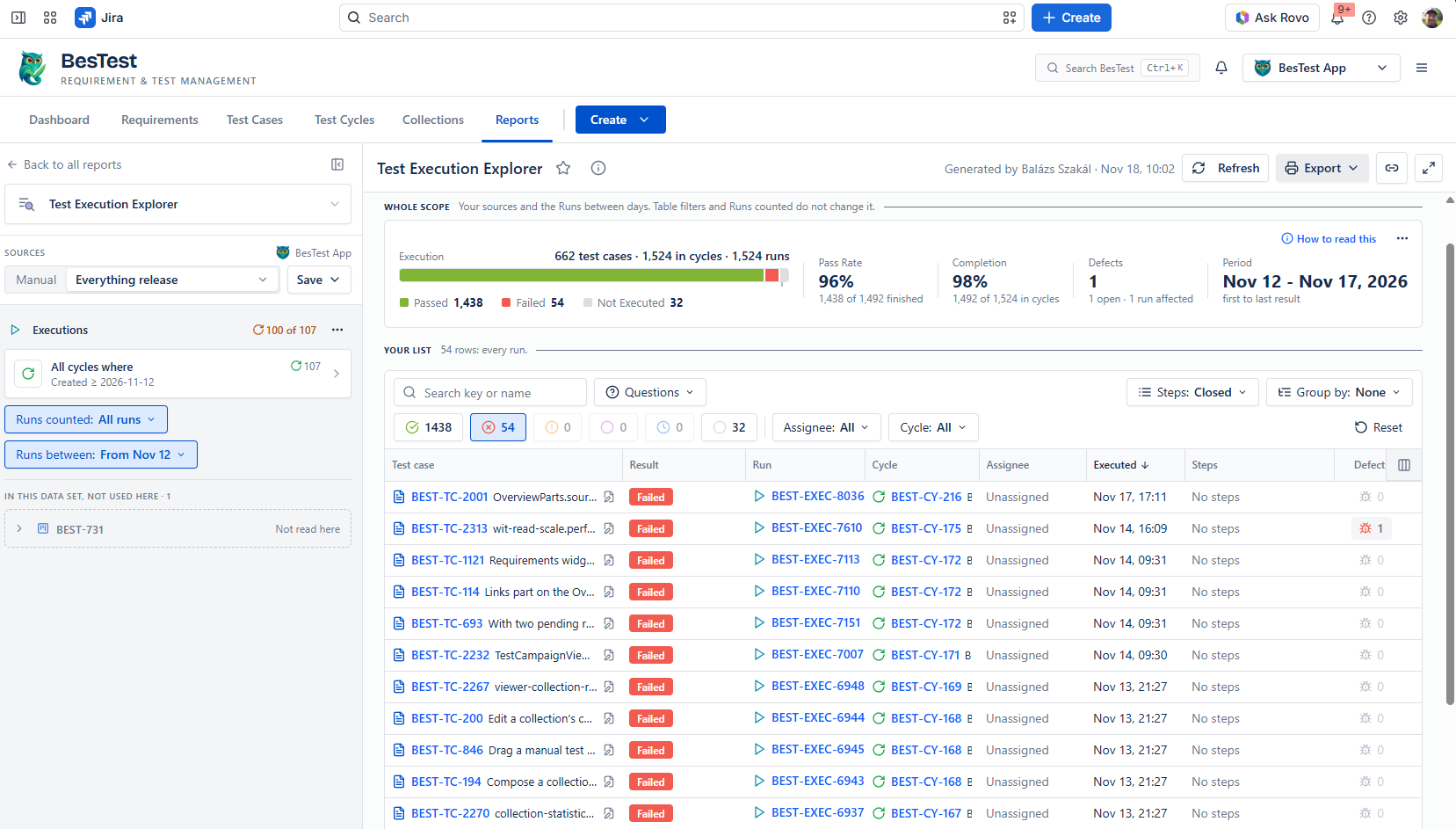
Those 20 test cases earned their place. Not right away, but in the long term, the ones that never fail are the first I will look at when we cut or merge test cases.
We are not administering these failures as bugs in Jira. For us a bug is something we delivered, and after delivering it doesn't work as expected. What is not working before the release is just something we need to fix ASAP. So these failing test cases are not reporting bugs. They help us keep the control, the quality and the confidence.
We also started to use test campaigns, which made reporting massively easier. All the cycles connect to a campaign, so I open the same saved report over and over again, and I can clearly track how the implementation work progresses. It handles hundreds of requirements and thousands of executions in the same view, which I am really happy to see.
What reporting gave me
By building this way I don't just trust my AI workflow more. I believe a workflow that includes the steps of software testing is more sustainable and maintainable: the test cases are always updated, every test is supposed to run, and every run is uploaded.
What reporting gave me the most is confidence. I can trust that I did all the steps a software development process requires. It answers the questions I came up with, and it helps me to ask them in the first place. Some of them would never have come to my mind.
What is not good enough yet:
- •The panel on the work item counts only the connected tests. All green there means all green so far.
- •Reruns are not supported through the MCP yet, so every attempt is its own cycle.
- •Flaky is a custom field that our own workflow sets. The app does not detect a flaky test for you.
The next release brings the new viewers, attachments, history, reruns through the MCP, and the Rovo connection to BesTest. Rovo is Atlassian's own AI in Jira. So we still don't sell you a model: you ask your BesTest data with the AI you already use, with your own Jira context, and it will help you answer even more advanced questions.
If you try the reports on your own data, I would like to hear which question surprised you. Tell me in the comments of the LinkedIn post.
Frequently Asked Questions
Does BesTest have AI built in?
No. BesTest does not build in or resell a model. You bring your own agent, with your own context, through the MCP server or the REST API, and the results land in BesTest as requirements, test cases and runs. Reporting then shows you what that work proves. The next release connects BesTest to Rovo, Atlassian's own AI in Jira, so you can ask your BesTest data with the AI you already use.
Why upload failed test runs if they are not bugs?
Because a report built only from passing runs is always green, and that is not reality. A test case that failed and passed after a fix caught something, so it earned its place. A test case that never failed in its whole life may be redundant. You can only see the difference if the failures are recorded.
How do you tell a flaky test from a test that caught a bug?
Compare the code of the failed run and of the passed run. When a test fails and passes later on the same code, it is flaky. When the code changed in between, the test caught something. Both facts are worth keeping on the test case, because a test that never fails in its whole life may be redundant.
What does 'changed after test' mean?
The requirement text was edited after the test that covers it ran, so that result tested the old text. BesTest does not count such a requirement as proven. The Requirement Coverage and Risk report counts it in its Changed column, and the Work Item Traceability report shows the work item as not proven yet.
All green is not the same as release ready.
BesTest keeps requirements, test cases and every run in one place inside Jira, and its reports come with the questions already written. Free for up to 10 users.
View on the Atlassian Marketplace
Balázs Szakál
Founder & QA Lead at BesTest
Founder of BesTest and QA professional with extensive experience in software testing, test management, and Jira administration. Built BesTest to give testing teams complete visibility from requirements to release.
More about the team →