
Custom reports: build the test report your release needs
Build your own report from the 20 widgets of the BesTest Jira dashboard gadget. Give each widget a source from a data set and place it on a canvas. Then share the report with your space, star it or print it.
- Reads
- A data set: the saved rules of your cycles, requirements and Jira work items. Or the sources you pick by hand.
- Answers
- 20 widgets in 3 groups: Executions 11, Requirements 5, Space 4. Each one in size S, M or L.
- Takes out
- Print (PDF). A link and a star.
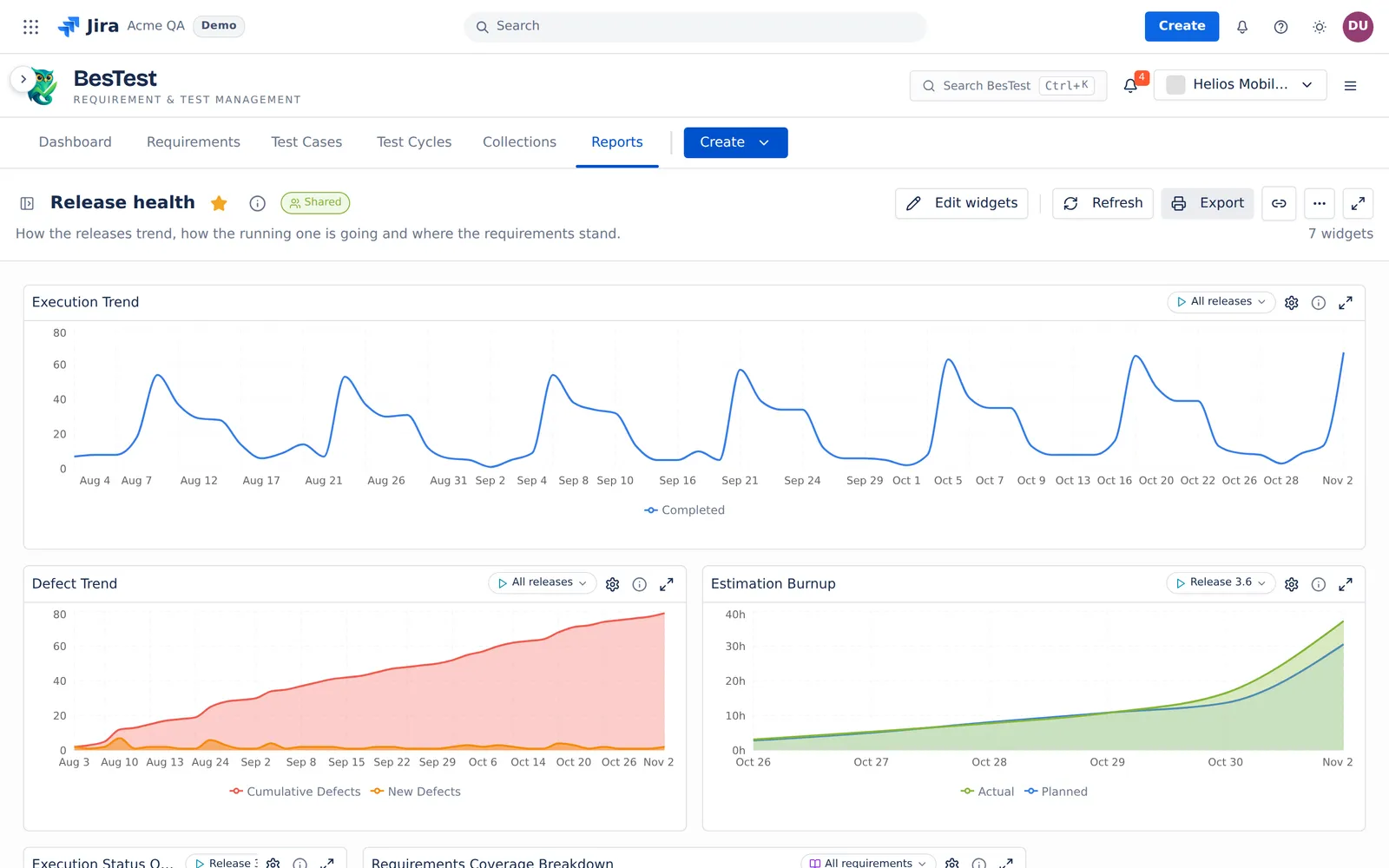 1234
- 1Release healthA custom report, shared with the space. A new report is private until you share it.
- 2Edit widgetsOpens the palette of 20 widgets.
- 3A source per widgetEach widget reads one source of the data set. Here All releases.
- 4The trendsExecution Trend and Defect Trend read All releases. Estimation Burnup reads Release 3.6.
Drag a widget in. Give it a source.Done.
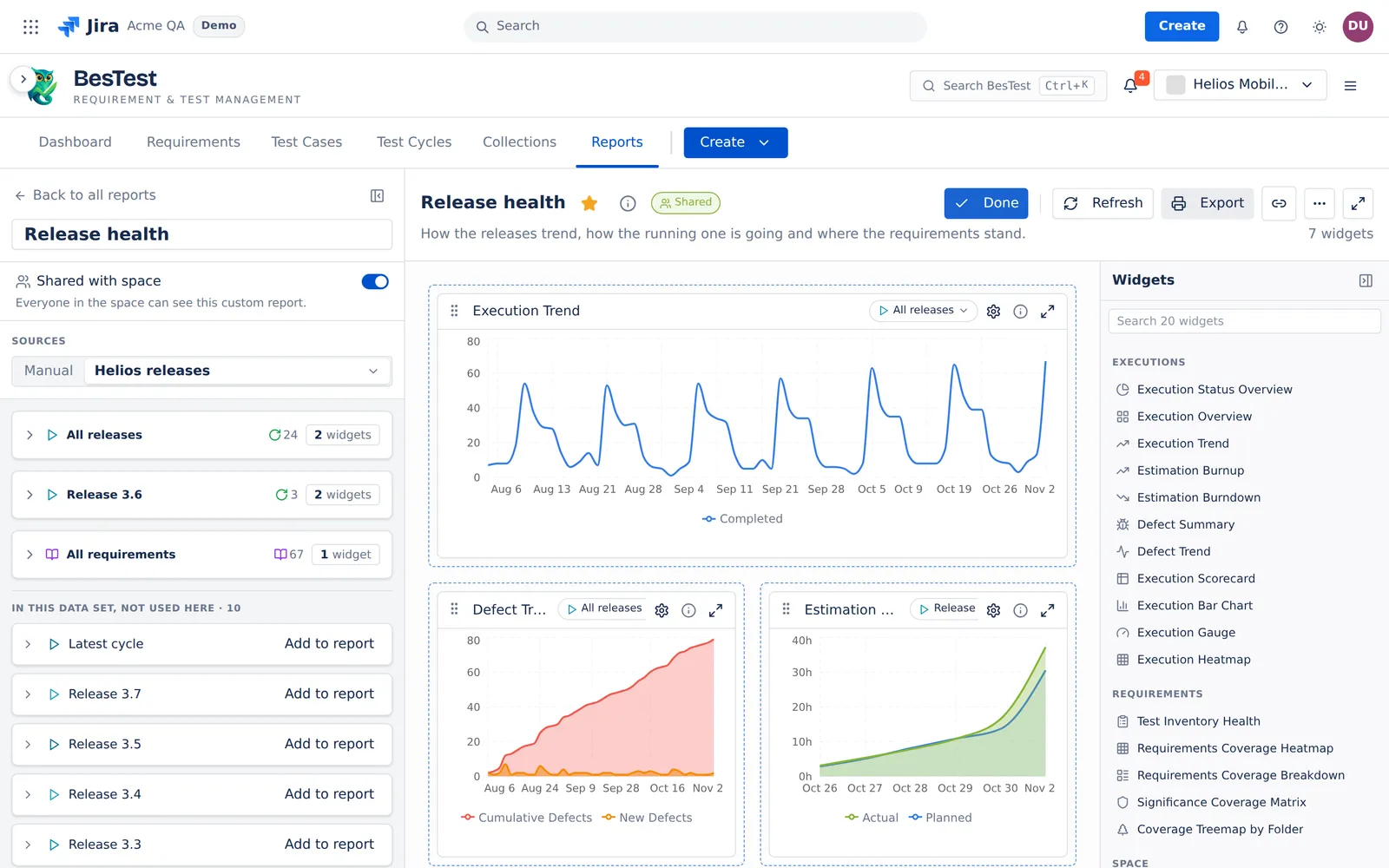 12345
- 1A custom reportRelease health, shared with the space. A new report is private until you share it.
- 220 widgetsThe palette holds the 20 widgets of the Jira dashboard gadget, in 3 groups: Executions, Requirements, Space.
- 3Sources from a data setHere Helios releases: All releases, Release 3.6 and All requirements, each with the widgets that read it.
- 4Drag to moveSize S, M or L. Open any widget full size.
- 5A source per widgetThe trends read All releases. The burn-up reads Release 3.6.
The same widgets as the Jira dashboard gadget
Executions · 11
How the runs go.
- Execution Status Overview
- Execution Overview
- Execution Trend
- Estimation Burnup
- Estimation Burndown
- Defect Summary
- Defect Trend
- Execution Scorecard
- Execution Bar Chart
- Execution Gauge
- Execution Heatmap
Requirements · 5
What the tests cover.
- Test Inventory Health
- Requirements Coverage Heatmap
- Requirements Coverage Breakdown
- Significance Coverage Matrix
- Coverage Treemap by Folder
Space · 4
Your work, the reviews and the tests that fail.
- Active Cycle Progress
- My Assigned Work
- Pending Reviews
- Top Failing Tests
Save the scope once.Every report can read it.
A data set saves the rules of your scope, not a copy of the rows. New cycles or work items that match its rules appear the next time you open it or select Refresh. Every built-in report and every custom report can run on it.
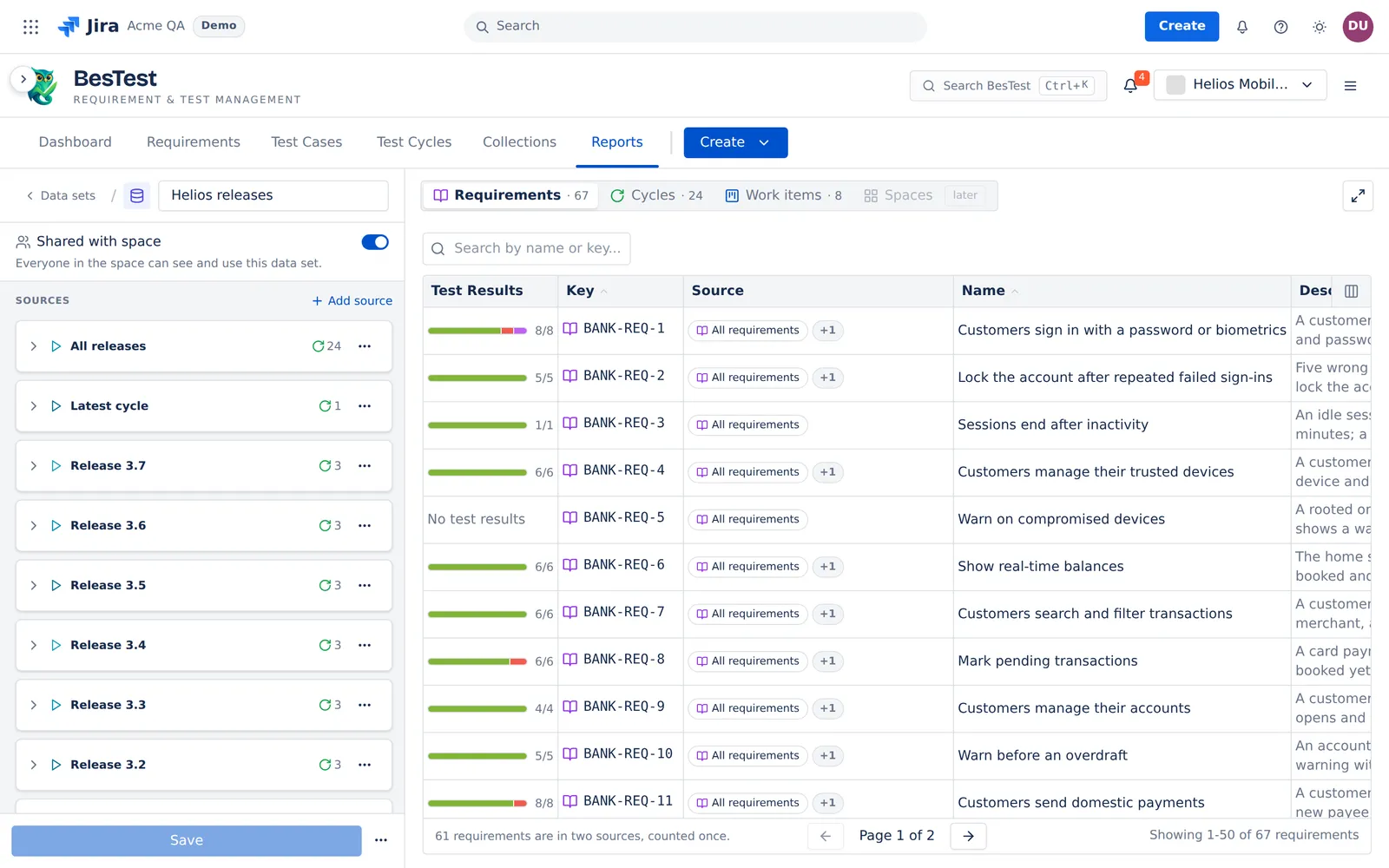 1234
- 1Shared with spaceEveryone in the space can see and use it. A new data set is private.
- 2Rules, not rowsAll releases is a rule: 24 cycles today, and the next cycle that matches.
- 3Latest cycleThe cycle that went in progress last. It moves on by itself.
- 4Three kinds of sourcesRequirements, cycles and Jira work items.
Private until you share it.
Private. A new custom report is private. Only you see it.
Shared. Share it with the space, and everyone in the space sees it. Only you change it.
Admins. A project admin can make a shared report private again, or delete it.
Duplicate. Anyone who can write in the space can duplicate it.
Links. A star or a link opens the same report on the same saved data set. A link never gives access: the server checks the rights.
Questions people ask
Can I build custom test reports in Jira?
Yes. In BesTest, create a custom report, pick a data set and drag widgets from the palette of 20. Give each widget a size, S, M or L, and a source.
Do I need a BI app for test reports?
For test reports, often not: trends, custom reports and exports are built in. There is no BI connector and no API for report numbers, so a BI app still has a place when you chart data from many tools.
What is a data set?
A data set saves the rules of your scope: cycles, requirements and Jira work items. It saves rules, not rows, so a new cycle that matches shows the next time you open it. It is private until you share it, and every report can run on it.
Are the widgets the same as on the Jira dashboard gadget?
Yes. A custom report uses the same 20 widgets as the BesTest Jira dashboard gadget, in the same 3 groups.
Who can see and change a custom report I build?
A new report is private: only you see it. When you share it, everyone in the space sees it, and only you change it. A project admin can make it private again or delete it. Anyone who can write in the space can duplicate it.
Build your first custom report in Jira.
Install BesTest from the Atlassian Marketplace. It is free for teams of up to 10 users. Or try the report first in the live demo, on the Helios demo data.
Read how custom reports work