
Data sets and sources
What a report reads: Manual sources or a saved data set, the three kinds of source, which source each report reads, and how to share a data set.
A report reads sources: which runs, which requirements, which Jira work items. Pick them by hand for one report, or save them once as a data set and use it in every report. A data set saves the rules, not a copy of the rows. A new cycle that matches the rules joins the reports at the next open or Refresh.
Manual or a data set
Over the sources of every report, the Sources switch has two sides: Manual on the left, a data set on the right.
- Manual: you pick the sources in the report sidebar, for this browser tab. Manual starts with one source, Latest cycle, which the four execution reports read. Requirement Coverage and Risk, Work Item Traceability and the Traceability Matrix start empty.
- A data set: click the right side of the switch. The list shows Yours and Shared with space. The report reads the sources of that data set.
The sources that the report reads show under the switch. A source of the data set that the report does not read waits under In this data set, not used here. Click Use instead to read that source. A source of a kind that the report cannot read says "Not read here".
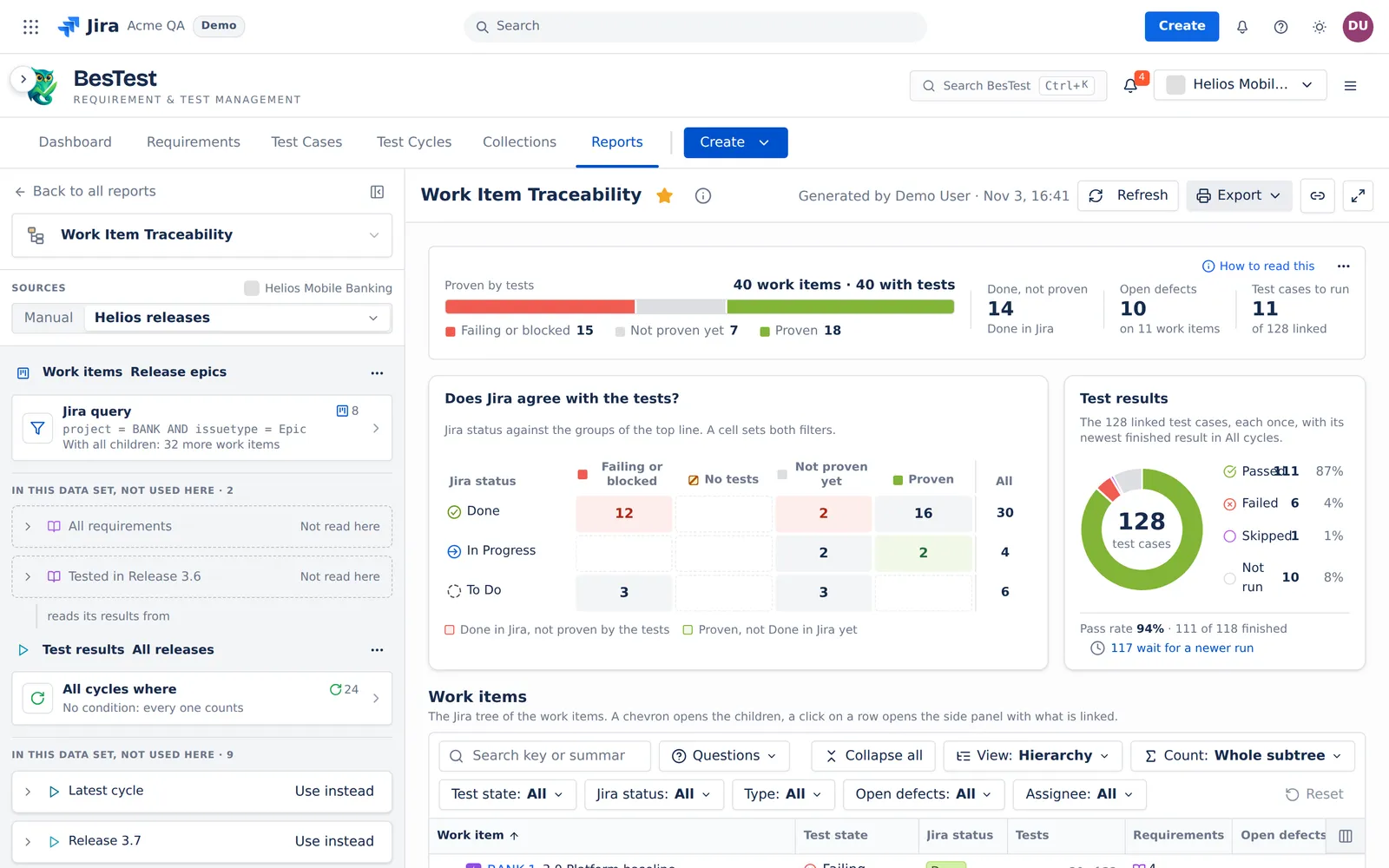
In this screen, Work Item Traceability reads the data set "Helios releases". The work items come from the source "Release epics", a Jira query with all children. The results come from "All releases". Two requirement sources say "Not read here", and 9 more run sources wait with Use instead.
The three kinds of source
| Kind | It says | Scopes |
|---|---|---|
| Executions | Which runs the report reads | Latest cycle, Cycles you pick, a Cycle folder, a Campaign, All campaigns, All cycles, with conditions on the cycle fields |
| Requirements | Which requirements the report lists | A Requirement folder (with or without its subfolders), All requirements with conditions, Tested in some cycles or campaigns |
| Work items | Which Jira work items the report lists | Work items you pick, a pasted JQL query, or a saved Jira filter, each with all its children |
- Latest cycle is "The cycle that went in progress last". A cycle that is not Done wins over a Done one. It moves by itself when the next cycle starts. A Draft that nobody started is never the latest cycle. A Latest cycle scope takes no conditions.
- Tested in lists the requirements with a test case that has a run in those cycles or campaigns. Their results still come from the Test results source.
- Two or more scopes join with Or ("A run can match any scope.") or with And ("A run must match every scope."). The conditions of a scope apply only to that scope.
- A rule scope "checks again each time it reads, so a new cycle that matches comes in. It reads the newest 100."
- A saved Jira filter: "The source keeps the filter, not a copy of its query. When the team changes the filter in Jira, the report follows."
- You can also write a source as BQL text. Visual and BQL edit the same rules.
An executions source also holds Runs counted (Latest result or All runs) and Runs between (see Runs between). Test Execution Time and Defect Analysis do not read Runs counted.
Which source each report reads
| Report | Reads |
|---|---|
| Test Execution Results, Test Execution Explorer, Test Execution Time, Defect Analysis | One executions source |
| Requirement Coverage and Risk | A requirements or work items source, and an executions source for the results (Every cycle by default) |
| Traceability Matrix | A requirements source, and an executions source for the results (Every cycle by default) |
| Work Item Traceability | A work items source, and an executions source for the results (Every cycle by default) |
| A custom report | One source per widget, from the data set of the report |
On a data set, a report reads the first source of each kind that it needs. Use instead picks another one. The pick stays for this report in this tab, and in a link that you copy. When a data set has no executions source, the Test results card stays at Every cycle.
Build a data set
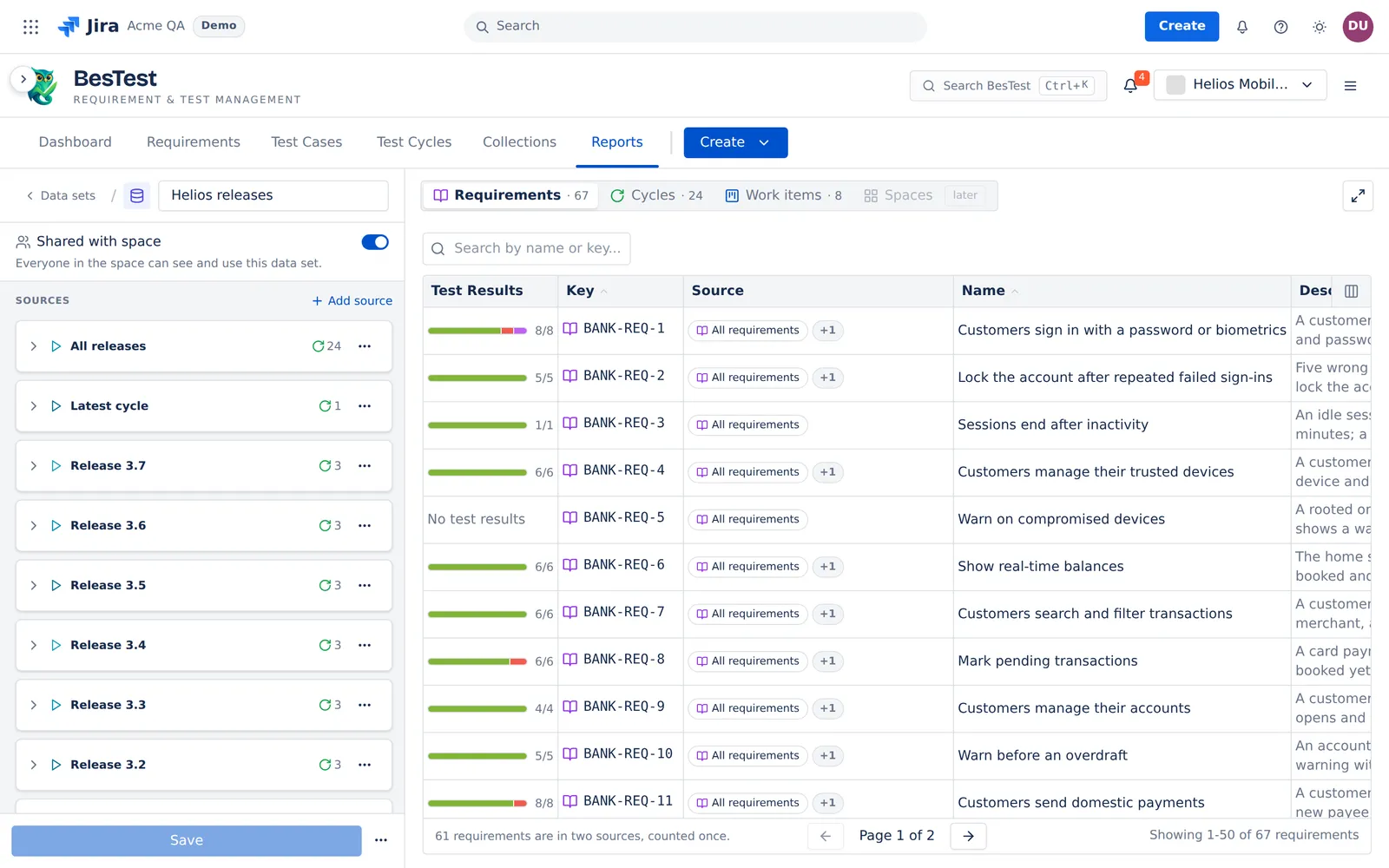
- Open Reports and select Data sets.
- Click + New data set and type a name.
- Add a source: Executions, Requirements or Work items. Open its ⋯ menu and select Edit source. Pick the scopes, then click Apply.
- Add more sources with Add source if necessary.
- Read the tables on the right: Requirements, Cycles and Work items. The Source column says which source adds each row. A row in two sources counts once, and the note under the table says so, for example "61 requirements are in two sources, counted once."
- Click Save.
You can also save the sources of a report. On a data set, change a source, then open Save: Save changes, Save as new data set… or Discard changes. In Manual, open the data set list and click Save these sources as a data set….
"count unavailable" means that the app could not count that part. It does not mean zero.
Campaigns and data sets
A test campaign collects the cycles of a release. Point a source at the campaign, and each new cycle of the release joins the reports with no change to the source. The report stays steady when an AI agent or a CI job starts many cycles.
Share, star, link
- A new data set is private: "Only you can see this data set." Share with space shows it to everyone in the space.
- A data set that a teammate shared is read-only for you. Click Duplicate to make your own copy.
- A space admin can make a teammate's shared data set private.
- A star or a copied link opens the same report on the same data set.
- A link never gives access. A teammate sees only what the space and the sharing already let them see. When they cannot read the data set, the report opens in Manual with "The data set in this link is not available."
- A link copied in Manual "does not carry the sources you picked. The receiver sees their own sources."
- When you delete a data set, the app says how many starred reports use it. Those stars then open with the sources picked in the report.