
Create Bulk Test Cases

If you need to create multiple testcase names without the fine details of steps, you can create multiple test cases from the Test Cases menu.
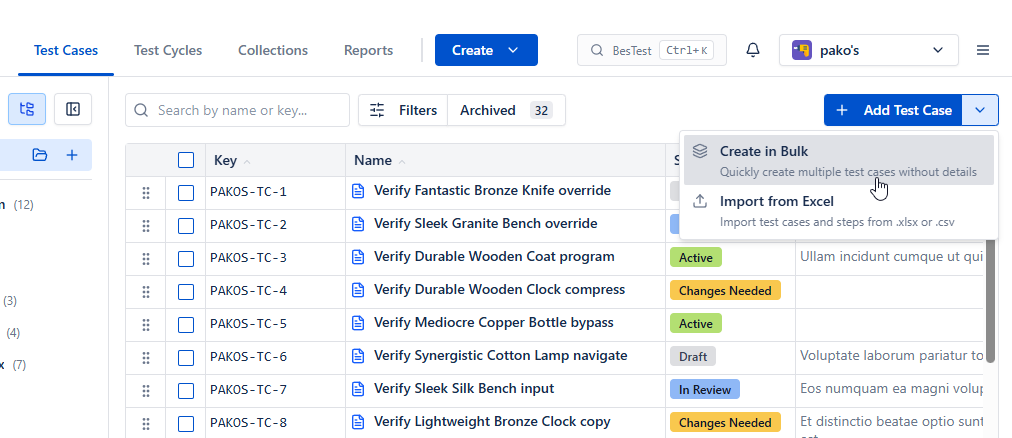
If you need to create multiple testcase names without the fine details of steps, you can create multiple test cases from the Test Cases menu.

Create Bulk Test Cases

In the dialog, every line will be created as a single test case. Folder is required.
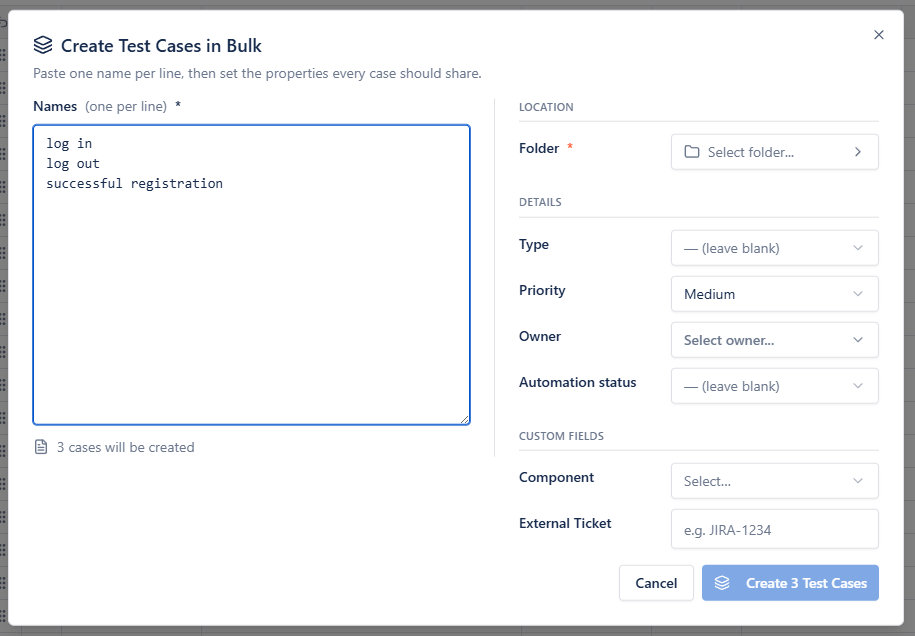
Create Bulk Test Cases
Getting started

Live in about a minute.

  1. ~30 seconds
    1.Install from the Marketplace

    One click on "Get it now" - no sales call, no signup form, no separate login.

  2. ~1 minute
    2.Enable it on a project

    Flip it on in project settings. BesTest shows up in the project menu, where your team already works.

  3. right away
    3.Run your first test

    Create a requirement, link a test case, hit run. No training course required.

Host your data in the EU, US, or IndiaNo Jira issue bloat - your library stays out of Jira’s wayBuilt on Atlassian Forge