
MCP
Connect Claude, Cursor, Codex, Copilot or any MCP client to your BesTest requirements, test cases, cycles and executions, and work with them in plain English. Open beta, self-service tokens.
The BesTest MCP server puts your testing data in front of an AI agent. Connect any MCP client and your requirements, test cases, cycles and executions become something you can ask about and change in plain English, without leaving the tool you already work in.
MCP is in open beta. Create a token from the app menu in BesTest and connect, with no request form and no waiting. The tools and their shapes can still change while we are in beta; we will tell you before anything breaks.
What you can do with it
The agent sees the same data you see, with your permissions, in one Space. What teams do first:
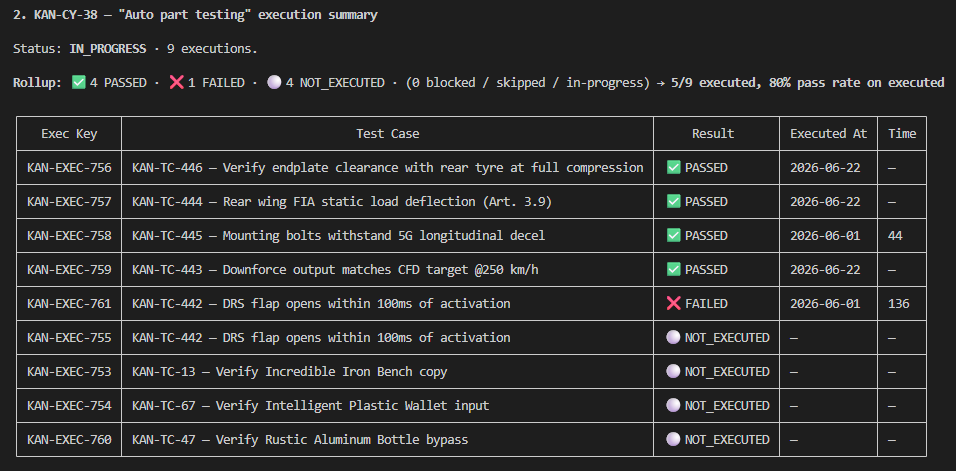
- Ask what the state of testing actually is. "Summarise the executions in KAN-CY-38 as a table." "Which test cases have failed in every run this month?" "What is still not run in the release cycle?"
- Draft test cases and requirements at scale. Describe what you need or paste a spec, and have the agent draft the cases with their steps and link them to the right requirements. Reviewing 40 drafts is faster than typing 40 test cases.
- Migrate from a spreadsheet or another tool. Point the agent at an export in whatever shape it arrived and let it map the columns, rather than bending your data to fit an importer. It can create records in batches of up to 100 per call.
- Work out the blast radius of a change. "This requirement changed; which test cases are linked to it, and when did each last pass?"
- Build the report nobody built for you. Pull the numbers you care about into whatever shape you want, once, without waiting for a feature.
Using BesTest, summarise the executions in KAN-CY-38 in a table: test case, result, who ran it, when.What it is not
Worth being straight about, because it saves an afternoon:
- It is not a second copy of your data. The agent reads and writes the same records the app shows. There is no sync and nothing to reconcile.
- It is not a way around permissions. A token reaches one Space at one access level, and never more than its owner already has. A read-only token cannot be talked into writing.
- It does not see Jira. The BesTest MCP server serves BesTest data. If you also want the agent to read Jira work items, add Atlassian's own MCP server alongside it. Agents handle several MCP servers at once, and the combination is where the interesting questions live: Jira knows what is in the sprint, BesTest knows what is tested.
- It does not reach everything in the app. Review and approval decisions, the coverage and report views, and notifications stay in the app during the beta. The agent can still work out a lot from the raw data, such as which requirements have linked test cases and how those last ran.
What the agent actually gets
The first thing you see your agent do is not what a page about natural language leads you to expect, so here it is.
Connect, and the server offers your agent four tools:
| Tool | What the agent uses it for |
|---|---|
describe_schema | Learning what exists in your Space: which entities, which fields, what your custom fields are called, with ready-made examples. |
filter_help | Learning the filter syntax and each entity's filterable fields, so it can ask precise questions instead of fetching everything. |
graphql_query | Reading your data. |
graphql_mutation | Creating, updating and deleting. It can create up to 100 records in one call, and a parent with its children (a test case with its steps) in one atomic call. |
So when your agent announces it is running a graphql_query, nothing has gone wrong. You ask in English; the agent uses these tools to answer. The two discovery tools are why it can work with your Space, custom fields and all, rather than a generic idea of a test tool: it asks what is there before it asks anything about it.
Two practical consequences:
- A read-only token cannot write, whatever the agent tries.
graphql_mutationis still listed, but every change it attempts is refused by the server. The guarantee is enforced by BesTest, not by the agent's good behaviour, which is the assurance worth having. Give an agent a read-only token unless you want it to make changes. - The agent sees only what you can see, in the one Space the token reaches.
How it connects
The server is remote and hosted by us, so there is nothing to install or run locally. Your client connects over streamable HTTP to your region's /mcp endpoint and authenticates with a bearer token in an Authorization header:
| Your data region | MCP endpoint |
|---|---|
| Europe | https://prod-eu.getbestest.com/mcp |
| North America | https://prod-us.getbestest.com/mcp |
| India | https://prod-in.getbestest.com/mcp |
BesTest MCP authenticates with a bearer token in a header. It does not support OAuth yet. Most MCP clients handle header authentication natively, but a few, including the claude.ai web app, are built around OAuth, and connecting them takes an extra step or is not possible yet. Connect an MCP client tells you where each client stands, so you find out before you start, not after.
Requests from the agent count against the same rate limits as your REST API calls. For everyday agent work you will not notice them.
Get connected
- Create a token: app menu → API & MCP tokens → Create token. Pick the Space, and pick Read only unless you want the agent to make changes. Give it a name like
Claude Desktopso you know later what it is for. - Follow the guide for your client: Claude Code, Claude Desktop, Cursor, VS Code, Codex, Windsurf, Cline, and a generic recipe for everything else.
- Ask it something only BesTest can answer, to prove the connection: "Using BesTest, list the test cycles in this Space."
Related
- Connect an MCP client - step-by-step setup per client
- API tokens - create, rotate and revoke
- REST API - the same data for scripts and pipelines
- AI-supported testing - use cases in more depth
- What is MCP? - a plain-English primer