
Test Execution Time
How Test Execution Time compares planned and actual time, how the finish date is made, and why a cycle with no date is named with its reason.
Test Execution Time shows "planned time against the time testers really take, and when the testing will finish." For a tour of the report, see the report page.
Questions this report answers
Will we finish on time?
On All reports, this question opens the report: "planned and spent time, the forecast". Test Execution Time has no Questions menu. Its table has ready filters (see The ready filters).
- The question sets: no filter. The report opens on the sources of Answer for (see Reports).
- The rule: the Estimated finish card gives the date from the pace of the last 5 working days. See The finish date.
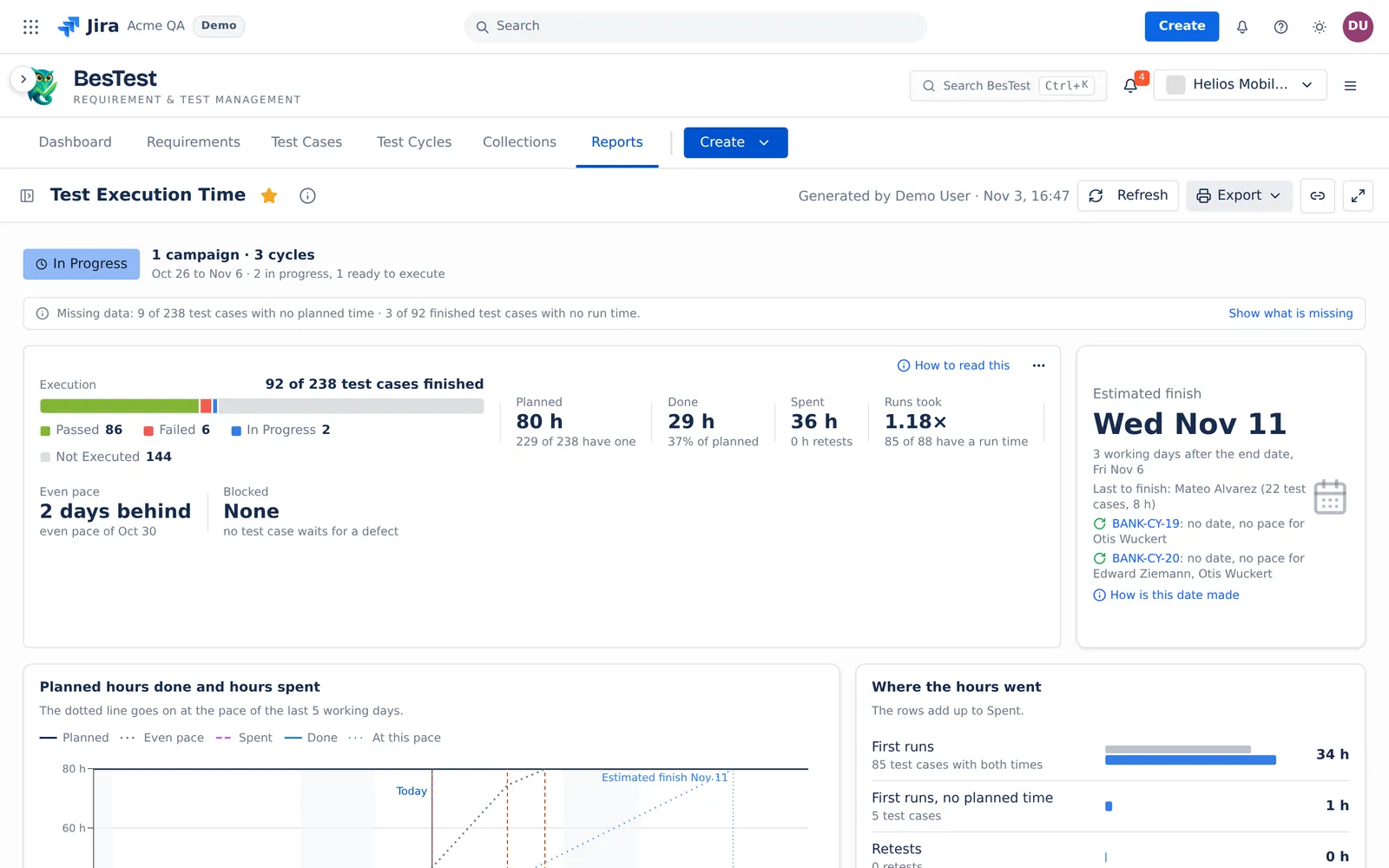
- In the demo data: 1 campaign with 3 cycles, 92 of 238 test cases finished, Estimated finish Wed Nov 11.
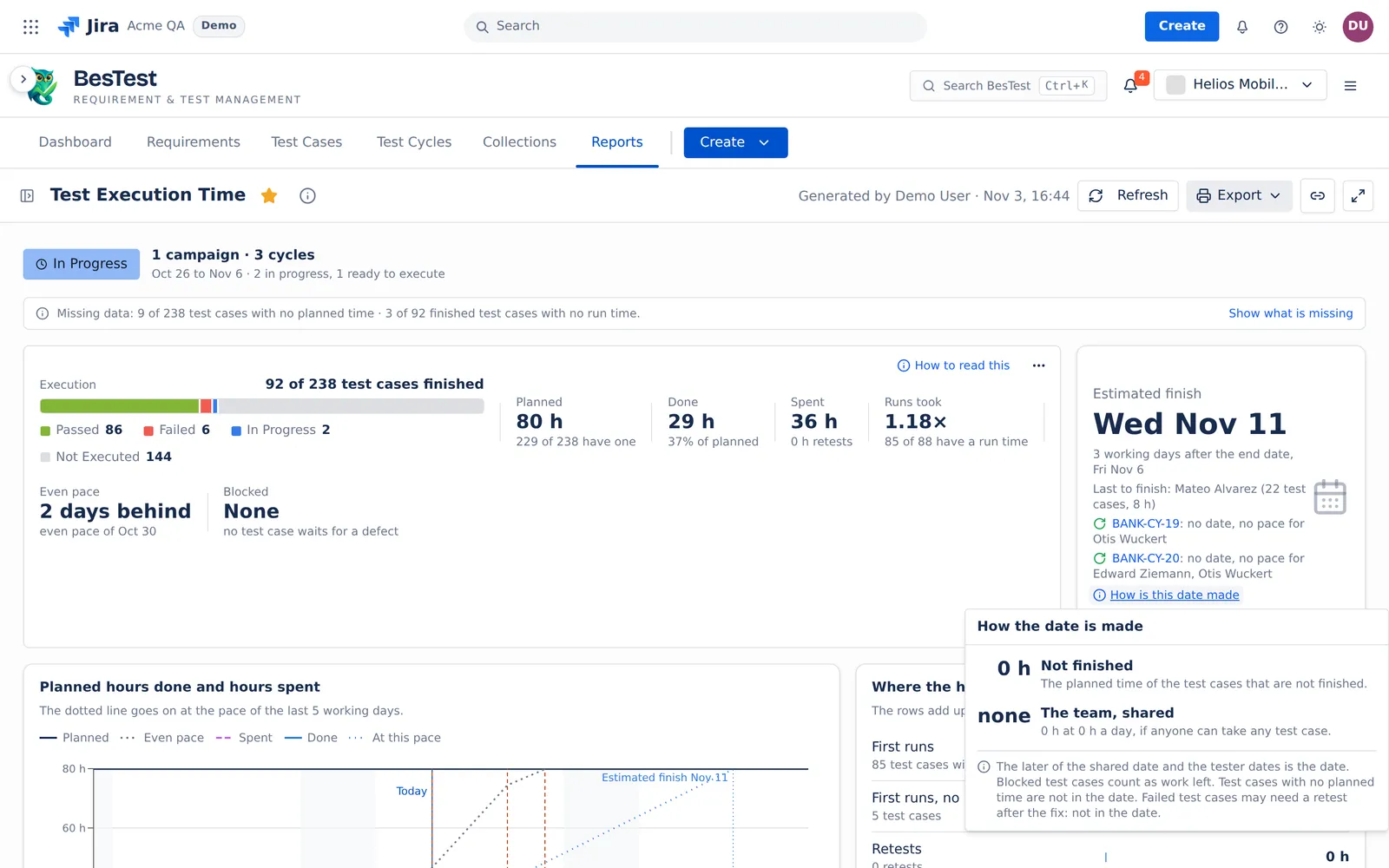
- Then: open How is this date made to see which tester finishes last, and why.
The report shows a different view before, during and after the testing:
- Before the cycles start: how big is the work, and when can the testers finish it?
- While they run: when will the work finish, and why?
- After they are Done: where did the hours go?
What the report reads
The report reads one executions source: cycles or campaigns in any status, or a data set. See Data sets and sources. It has no date range, and Runs counted does not apply.
- An item is one test case in one cycle. A test case in two cycles is two items.
- Automated test cases are not in the numbers: the pipeline runs them. The automation status is read today.
- A test case with no planned time (empty or 0) is counted and named, never guessed. It is not in Planned, Done, Runs took or the date.
- Finished means that the latest run is Passed, Failed or Skipped. A Blocked test case is not finished: it is work left. This is the one report where Blocked is not finished.
- A finished run keeps the planned time it had at its first result. A test case that is not finished reads its planned time of today.
- The first run is the first run that is Passed, Failed or Skipped. Retests are the runs after it that are not Blocked. Blocked tries are the runs with the result Blocked.
- Working days are Monday to Friday, in your time zone. The report does not know holidays.
- The runs of a test case that was archived later still count.
The stats line
| Figure | What it counts |
|---|---|
| Execution | "<n> of <m> test cases finished". |
| Planned | The planned time of the test cases that have one. The line under it: "<x> of <y> have one". |
| Done | The planned time of the finished test cases. Done can never pass Planned. The line under it: the share of Planned. |
| Spent | "All run time: first runs, retests and blocked tries." A run with no timer adds no time. The line under it: the hours of the retests. |
| Runs took | The first run time of each finished test case against its own planned time, over the test cases that have both times. For example "1.15×". |
| Even pace | "On pace", "<n> days behind", or "No end date". The even pace goes from zero on the start date to Planned on the end date, by working days. |
| Blocked | The test cases that a defect blocks now, and the planned time that "waits for a defect". |
When no test case has a planned time, the line shows the run time instead, with Run time per test case: the mean of the first runs.
The finish date
The Estimated finish card gives the date while the cycles run.
- The pace window is the last 5 working days up to today, today included when it is a working day. The window does not start before the start date of the cycle.
- Planned work that was finished in the window counts, also work on a Saturday or a Sunday in the window. The pace still divides by the working days of the window.
- The shared pace is the planned work that everyone finished in the window, divided by the window days. Unassigned runs count here.
- The work left is the planned time of the test cases that are not finished. Blocked test cases count as work left. Failed test cases are finished: they may need a retest after the fix, but they are not in the date.
- The days needed are the work left divided by the pace, rounded up to whole days. The date is today plus that many working days. With no work left, the date is today.
- A tester date uses the work left and the pace of that tester only. Unassigned work has no tester date.
- The cycle date is the later of the shared date and every tester date. The card names the tester who is "Last to finish". It also says "<day> if the team shares the work left".
A cycle gets No date, with the reason, when:
- fewer than half of its test cases have a planned time: "too few planned times";
- a tester with work left finished nothing in the window: "no pace for <names>";
- nothing was finished in the last 5 working days;
- no test case has a tester.
With many cycles, the date is the latest cycle date. A cycle with no date is named with its reason, "<key>: no date, <reason>".
The card compares the date with the end date of the last cycle: "<n> working days after the end date", "On the end date", or "<n> working days before the end date". With no end date, it says "No end date on <key>. Set one to see late or early." The report never suggests an end date.
How is this date made shows the work left, one row per tester, the shared row, and Needed a day: the work left divided by the working days after today up to the end date. When the end date has passed, it says so.
Example
Today is Tuesday 2026-11-03. One cycle runs, with the end date Friday 2026-11-20. Two testers, A and B.
- The window is Wed Oct 28, Thu Oct 29, Fri Oct 30, Mon Nov 2 and Tue Nov 3: 5 working days.
- Planned work finished in the window: A 5 h, B 15 h. B did 3 h of the 15 h on Saturday Oct 31. The team: 20 h.
- Work left: A 20 h, B 10 h. The team: 30 h.
- Shared: the pace is 20 h / 5 = 4 h a day. 30 h / 4 = 7.5, rounded up to 8 working days: Fri Nov 13.
- A: 1 h a day, 20 working days: Tue Dec 1. B: 3 h a day, 10 h / 3 = 3.3, rounded up to 4: Mon Nov 9.
- The Estimated finish is the latest date: Tue Dec 1, with A "Last to finish". The card says "Fri, Nov 13 if the team shares the work left". The date is 7 working days after the end date.
- Needed a day: 30 h / 13 working days after today up to Nov 20 = 2.3 h.
Before the cycles start
The Work to do card and Work per tester give a date for each tester at their own pace.
- The pace of a tester is the planned time of the test cases that the tester finished, on the days they ran tests in the last 20 working days, in any cycle.
- The cycle begins on its start date, or today when it has none or the start date is past.
- A tester first does the open work in other running cycles, and in other cycles that begin earlier. The card also gives the date "with no open work elsewhere".
- The last tester to finish gives the date. Test cases with no tester are not in any date.
Fix the plan before you start compares the planned time with the earlier first runs of the same test cases: the median of the first runs in the last 3 finished cycles of the test case. Size by folder adds up the work by folder.
After the cycles are Done
The Finished card gives "the day the last cycle was set to Done. A later change of a result does not move it." It says "It took <n> working days. The plan had <m>.": from the start date to Done, against the start date to the end date.
The cards
- Planned hours done and hours spent: Done, Spent, Planned and the even pace, day by day. "The dotted line goes on at the pace of the last 5 working days."
- Where the hours went: from the plan to Spent. "The rows add up to Spent." The hours on screen are whole hours that add up to the total on screen. Excel has the exact values.
- What blocks testing ("What blocked testing" when Done): the defects on Blocked runs, the defect that blocks the most test cases first. A test case "ran again" by the retest rule.
- Who did what: "Each person against their own planned time. Sorted by name: this is not a ranking." Group it by Person or by Folder.
- By campaign and cycle: with many sources, one row per campaign and cycle. A Done cycle never makes an open group early.
- Test cases against their planned time: "The first run of each test case against its planned time."
The ready filters
The table Test cases against their planned time has ready filters. Each filter counts its test cases with the other table filters on. The ratio is the first run time divided by the planned time.
| Filter | Its line in the app |
|---|---|
| Over the plan | "The first run took more than 1.25× the planned time" |
| As planned | "The first run took 0.75× to 1.25× the planned time" |
| Under the plan | "The first run took less than 0.75× the planned time" |
| No planned time | "Not in Planned, Done or Runs took" |
| No run time | "Finished with no timer: not in Runs took" |
| Not finished | "Not run yet, or the latest run is Blocked" |
| Longest first runs | "Finished test cases with a run time, the longest first run first" |
When no test case has a planned time, the table shows only Longest first runs, No run time and Not finished. Not finished shows only while the cycles run.
Limits and exports
- A source that holds more than 100 cycles keeps the newest 100, and the report says so.
- Export: Print (PDF), Excel: every table and CSV: every test case, one file. A file holds at most 20,000 test cases.
- When Jira does not answer for the blocking defects, the report says "Could not read the defects from Jira." with Retry, and each row says "Unknown".
The rules that several reports share are on Rules behind the numbers.