
Catalog features
There are multiple catalogs with the same functionality in the app:
On this page
Main tables
There are multiple catalogs with the same functionality in the app:
- Requriements - to collect whats expected
- Test Cases - to cover requirements
- Test Cycles - to execute testcases
- Test Collections - to make it easier to build Test Cycles
- Test Campaigns - to be able to report bigger scopes easier
They both share the same main features
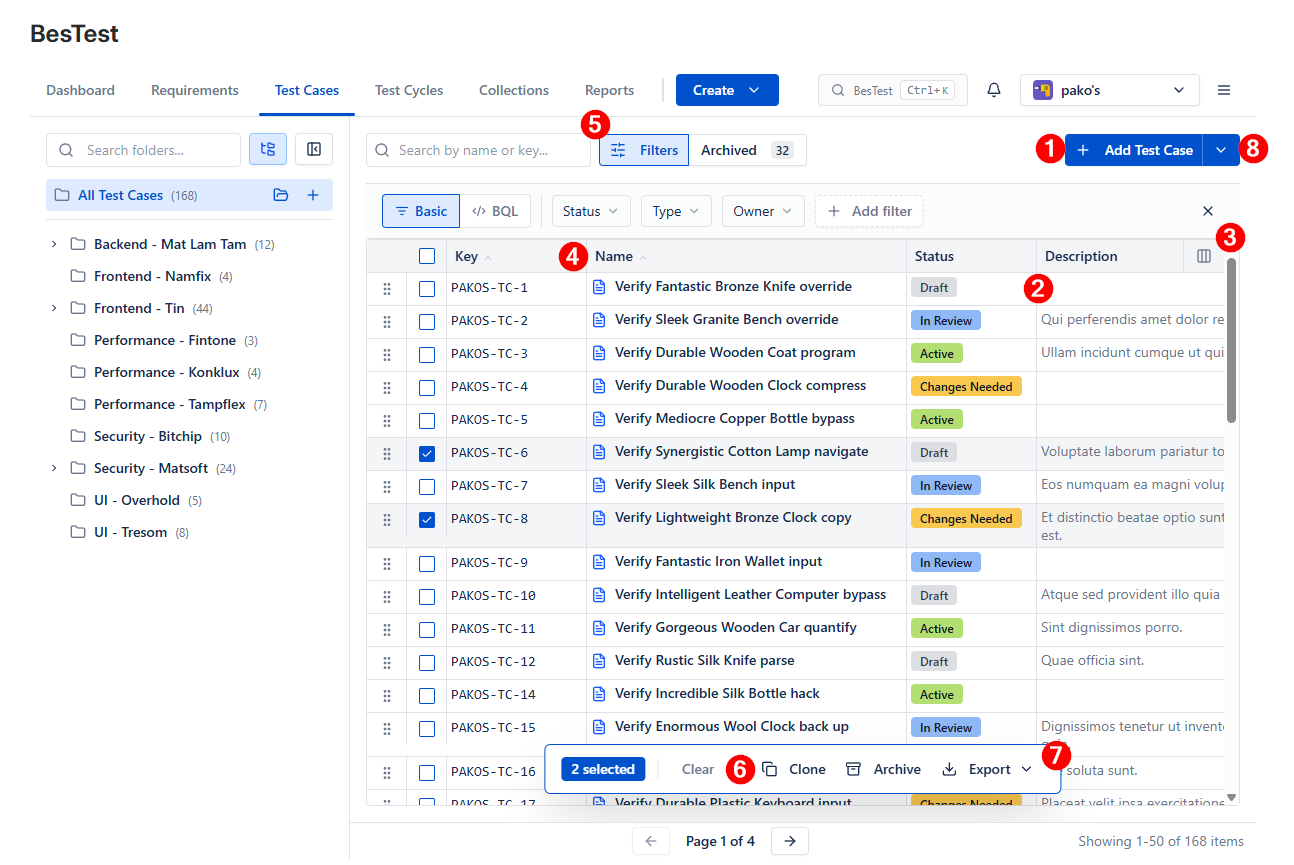
- Create object
- Open by clicking the row
- Personalize columns
- Order by Key and Name
- Search
- Actions like Clone, Archive
- Export - when possible
- Import / Create Bulk - when possible
Folder bars
All the catalogs have the folder sidebar where you can group your testing assets.
Here you can
- Create folder
- Rename a folder
- Update a folder (Name, parent)
- Search a folder
- Toggle behaviour if showing child elements or not
- Show elements without folder
- Drag'n drop reorganize items (select 1 or more, than drag to a folder)