
Test Execution Results
How to read the Test Execution Results report: sources, the latest-run rule, pass rate, completion, defects, and how to print it.
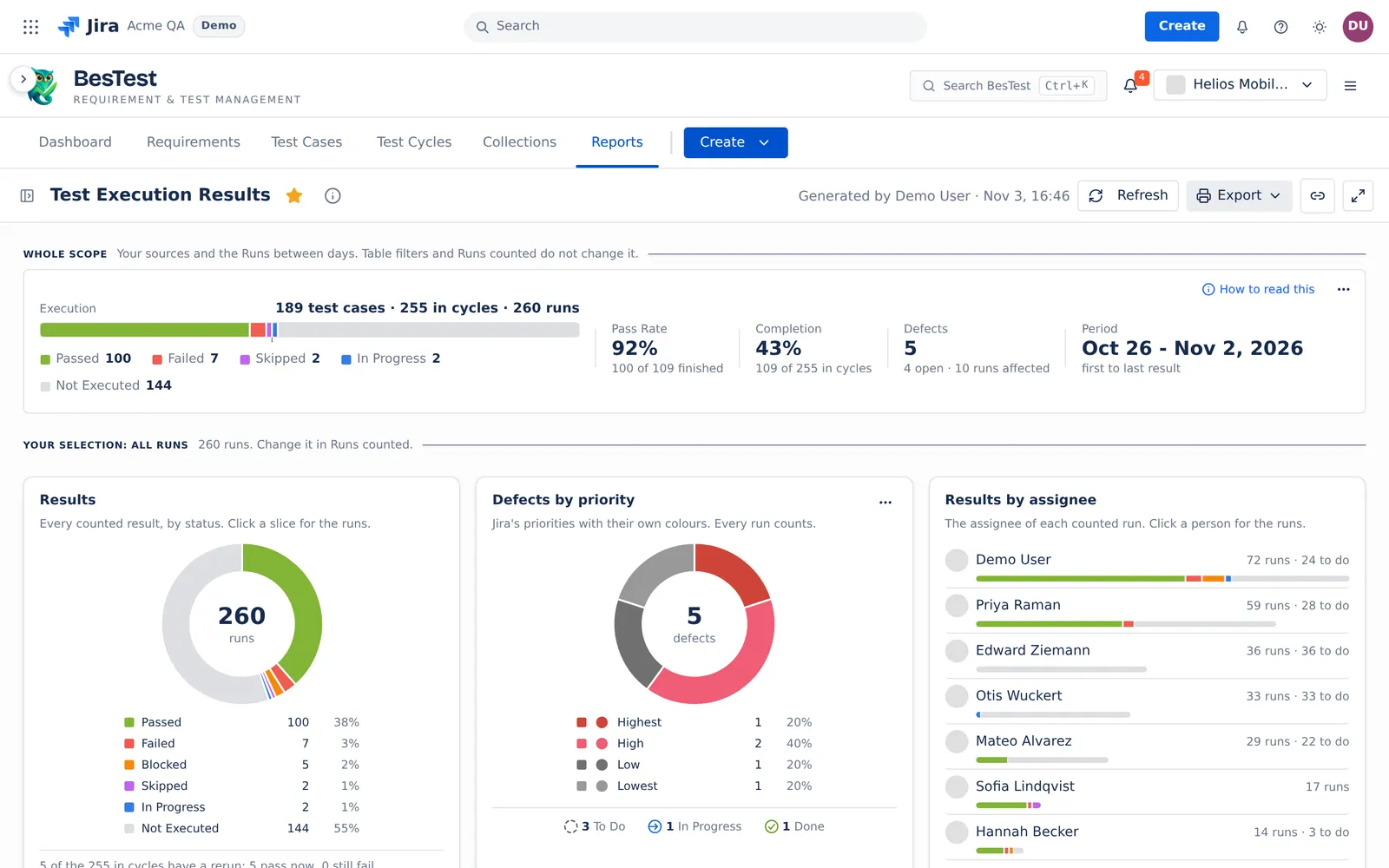
Test Execution Results shows the progress and the results of the runs of your sources: how many test cases ran, how many passed, and which defects the runs found. For a tour of the report, see the report page.
Questions this report answers
How is the testing going?
On All reports, this question opens the report: "progress, pass rate, defects". Test Execution Results has no Questions menu. Its top line and its cards give the answer.
- The question sets: no filter. The report opens on the sources of Answer for (see Reports).
- The rule: the top line counts the whole scope: your sources and the Runs between days.
- In the demo data: 189 test cases, 255 in cycles and 260 runs. Pass Rate 92%, Completion 43%.
- Then: click a part of a card to see the runs behind it. Open the failures in the Test Execution Explorer, and the defects in Defect Analysis.
What the report reads
The report reads one executions source: cycles, campaigns or a data set. See Data sets and sources.
- Runs between applies: a finished run counts when it ran on the days of the range, both days included. A run that is not finished (Not Executed, In Progress) always counts.
- The runs of a test case that was archived later still count.
- A cycle in two picked campaigns counts once in every total.
The three counts
The caption of the top line is "<T> test cases · <C> in cycles · <R> runs".
- test cases: the different test cases of the scope.
- in cycles: a test case counts once in each cycle that has it. A test case in 3 cycles counts 3 times.
- runs: every run, reruns included. A rerun is a run of a test case again in the same cycle.
The latest run in a cycle is the last run of the rerun chain of that test case in that cycle. A new run always replaces the run before it, also when the new run has not run yet.
The top line: Whole scope
"Your sources and the Runs between days. Table filters and Runs counted do not change it."
| Figure | What it counts |
|---|---|
| Execution | Each test case in each cycle at its latest run in that cycle, by result: Passed, Failed, Blocked, Skipped, In Progress and Not Executed. |
| Pass Rate | The passed divided by the finished, over the same test cases in cycles. Finished means Passed, Failed, Blocked or Skipped. The line under it: "<p> of <f> finished". With nothing finished, there is no rate. |
| Completion | The finished divided by the test cases in cycles. The line under it: "<f> of <C> in cycles". |
| Defects | The Jira work items linked to any run in scope, or to a step of such a run, also a run that a rerun replaced. The line under it: "<o> open · <a> runs affected". |
| Period | From the first to the last result: the earliest and the latest day of the finished runs. |
"open" counts the defects that Jira returns and that are not Done. A defect that Jira does not return (deleted, or you have no access) is in the Defects total, but not in "open". While Jira has not answered, "open" shows no number. For the rounding of the rates, see Rounding.
Your selection: Runs counted
The cards and the tables under the top line show your selection. Change it in Runs counted.
- Latest result: "<n> test cases, each once, with its newest finished result." A test case counts once over all the picked cycles: its finished run with the latest run time. A test case with no finished run counts by its open run in the newest cycle.
- All runs: every run in scope.
"Latest result" here means one result per test case over all the cycles. In the Test Execution Explorer, it means the latest run of each test case in each cycle.
The cards
- Results: "Every counted result, by status. Click a slice for the runs." The centre shows the count with "test cases" (Latest result) or "runs" (All runs).
- With Latest result, a line says "<n> more test cases already have a result and also wait in a newer cycle."
- A line counts the reruns: "<n> of the <C> in cycles have a rerun: <x> pass now, <y> still fail". "pass now" means the latest run in that cycle passed.
- Defects by priority: "Jira's priorities with their own colours. Every run counts." One slice per Jira priority, in Jira's order, with "No priority" last. The shares add up to 100%. If Jira does not return the priority of a defect, the card draws no pie. It says "Priorities of <k> of <n> defects could not be read from Jira." with Retry.
- Results by assignee: the assignee of each counted result, with "Unassigned" for a run with no assignee. With Latest result: "<f> finished · <P>% pass". With All runs: "<n> runs", the runs that a click opens.
- Results by day: the counted runs by the day they ran, by Day or by Week (a week starts on Monday). The report starts with Week when the span is over 62 days. With Latest result, the runs that a later run replaced show as a hatched part: "Replaced by a later run".
The tables
Reported defects
"Jira work items linked to any run in the scope or its steps. Status, priority and assignee are read from Jira."
- Found in: the runs in scope that carry the defect.
- Test now: "The newest result of each test case where the defect was found".
- Still fails: the defect is Done in Jira and fixed, but the newest retest of one of its test cases failed or is blocked. See The retest rule.
- Last linked: the newest time a run linked the defect.
- Age: the calendar days from the day Jira created the defect to today. A Done defect counts to the day Jira resolved it.
Test cycles and Test campaigns
One row per cycle. With Latest result, each test case counts at its latest run in that cycle, with Pass rate and Completion by the same rules as the top line. The total row "All <n> cycles" is the same as the top line. With All runs, Runs and Reruns replace the two rates.
On the campaign tab, a campaign row is the sum of its cycles. A cycle in two campaigns shows under each, and the header counts it once. "Cycles picked by themselves" holds the cycles that the source picks directly.
Example
Test case T1 is in three cycles. In Sprint 41 it failed, then a rerun passed. In Sprint 42 it passed. In Release UAT it is Not Executed.
- 1 test case, 3 in cycles, 4 runs, 1 rerun.
- Execution: Passed 2 (Sprint 41 at its rerun, and Sprint 42), Not Executed 1. Completion is 2 of 3: 67%. Pass Rate is 2 of 2: 100%.
- Latest result: T1 counts once, as Passed, by its newest finished run.
- The rerun line: "1 of the 3 in cycles has a rerun: 1 pass now, 0 still fail."
Now a new run of T1 starts in Sprint 41 and is still Not Executed. The latest run in Sprint 41 is that open run. The Execution bar counts it as Not Executed, and Completion goes down. The Latest result card still shows T1 by its newest finished run.
Limits and exports
- The report reads at most 50,000 runs. Above that, it shows no numbers and asks you to narrow the sources.
- A source that holds more than 100 cycles keeps the newest 100, and the report says so.
- When Jira does not answer, the priority card shows its notice with Retry, and "open" waits. The rest of the report does not change.
- Export: Print (PDF).
The rules that several reports share are on Rules behind the numbers.