
Test Execution Results: the test execution report for your Jira cycles
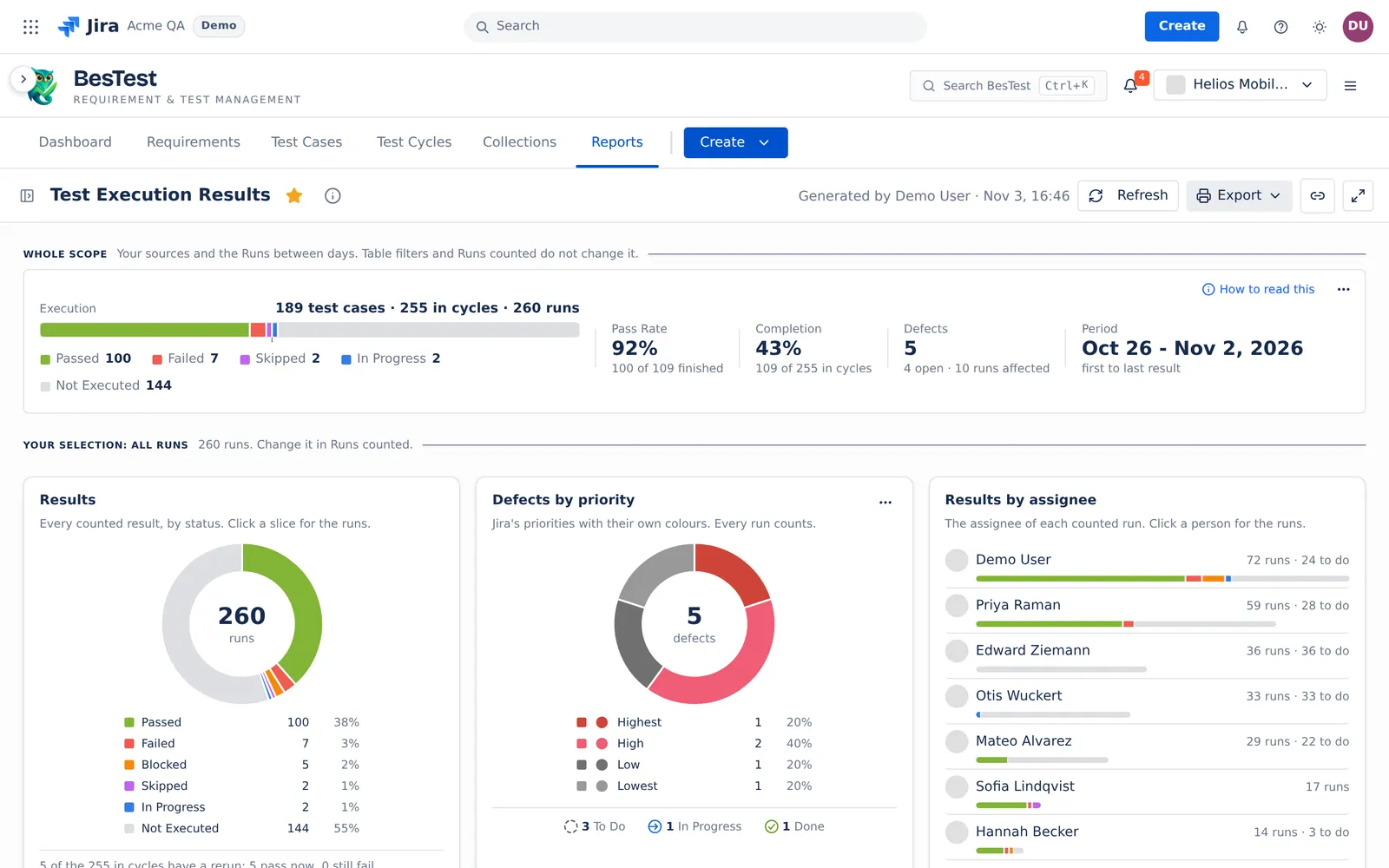
How is the testing going across these cycles? One line for the whole scope, with the pass rate and the completion. Then the results by status, the defects by priority, and the work each assignee still has to do. Click a chart for the runs behind it.
- Reads
- The runs of the cycles you pick: Latest cycle, some cycles, a cycle folder, a campaign, all campaigns or all cycles. Or a saved data set.
- Answers
- A top line and 6 blocks: Results, Defects by priority, Results by assignee, Reported defects, Test cycles or Test campaigns, Results by day.
- Takes out
- Print (PDF), with the scope on top.
 1234
- 1One line for the whole scope189 test cases, 255 in cycles, 260 runs.
- 2Pass Rate and Completion92% of the finished test cases in cycles passed at their latest run. 43% of the test cases in cycles have a finished result.
- 3Click a sliceIts runs open in a list. A run opens its panel.
- 4Results by assigneeThe results of each assignee, and what each one still has to do.
Each chart opens the runs behind it.
Test Execution Results has no Questions menu. Its charts are the questions: a click shows the rows behind a slice, a person or a day.
- A slice of ResultsThe runs with that result, in a list.
- A person in Results by assigneeThe runs of that assignee.
- A bar in Results by dayThe runs of that day.
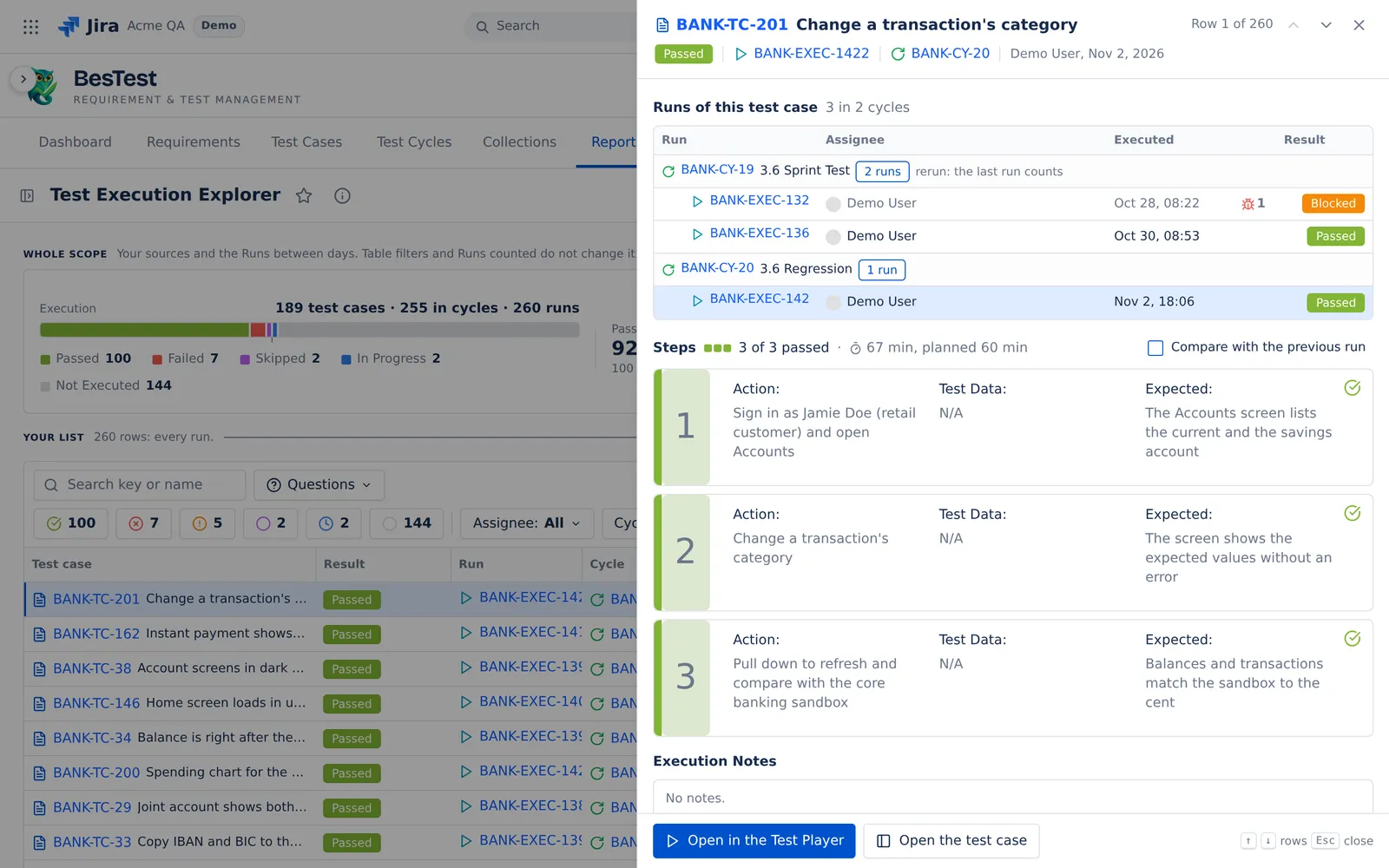
- A run in that listThe run panel: every run of the test case by cycle, the steps, and Compare with the previous run.
- A cycle bar in Test cyclesThe cycle in the Test Player.
- A slice or a status in Defects by priorityThe reported defects of that slice.
- A row of Reported defectsThe defect panel, with the retest of each test case.
 123
- 1Runs of this test caseEvery run of the test case in your sources, by cycle.
- 2StepsEach step with its result and the time spent against the plan.
- 3Compare with the previous runStep by step, with the changed results.
The same run panel opens in Test Execution Explorer, as on this screen.
One rule for a rerun.The latest run in each cycle counts.
Test cases. Each test case once.
In cycles. Each test case in each cycle. A test case in 2 cycles counts 2 times.
Runs. Every run, reruns too.
Pass Rate. Passed of the finished test cases in cycles, at their latest run. Finished means Passed, Failed, Blocked or Skipped.
Completion. The finished test cases in cycles, of all test cases in cycles.
A rerun. In each cycle the latest run counts, also when the rerun is not run yet.
Under the top line
Results
Every counted result by status. Click a slice for its runs.
Defects by priority
Jira's priorities with their own colours. Every run counts.
Results by assignee
The assignee of each counted run, with what each one still has to do. Click a person for the runs.
Reported defects
The defects linked to the runs in scope. A row opens the defect panel.
Test cycles or Test campaigns
One row per cycle or campaign. A cycle bar opens the Test Player.
Results by day
The counted runs per day or week. Click a bar for its runs.
Questions people ask
What is a test execution report?
It shows the results of the runs in your cycles or campaigns: the progress, the pass rate and the defects, by cycle, by assignee and by day.
What is a test cycle report also called?
A test execution report or a test summary report. In BesTest it is Test Execution Results.
How do I create a test execution report in Jira?
Open Reports in BesTest and pick Test Execution Results. In Sources, pick Latest cycle, some cycles, a cycle folder, a campaign, all campaigns or all cycles. Or pick a saved data set.
Does a rerun replace the first result in the report?
Yes, in its cycle, also before the rerun is run. With Latest result, each test case counts once, at its newest finished result. With All runs, every run counts.
Can I use it as the UAT summary report for sign-off?
You can print it to PDF. The print has the scope on top: the sources, the cycles, the dates and who made it. It has no signature lines. For a record to sign, use Print record in Test Execution Explorer.
Open Test Execution Results in your Jira.
Install BesTest from the Atlassian Marketplace. It is free for teams of up to 10 users. Or try the report first in the live demo, on the Helios demo data.
Read how the report works