
Test Execution Explorer: every test run and every step, ready for an audit
Every run of every test case in your sources, in one list, with its steps. Ask one of 7 ready questions. Open a run to see all the runs of its test case, and compare it with the run before. Print a record to sign for an audit.
- Reads
- The runs of the cycles you pick: Latest cycle, some cycles, a cycle folder, a campaign, all campaigns or all cycles, between two days if you want. Or a saved data set.
- Answers
- 7 ready questions, a chip per result, a run panel with every run of the test case.
- Takes out
- Print record (PDF). Excel: one row per run. Excel: runs with their steps. CSV.
 12345
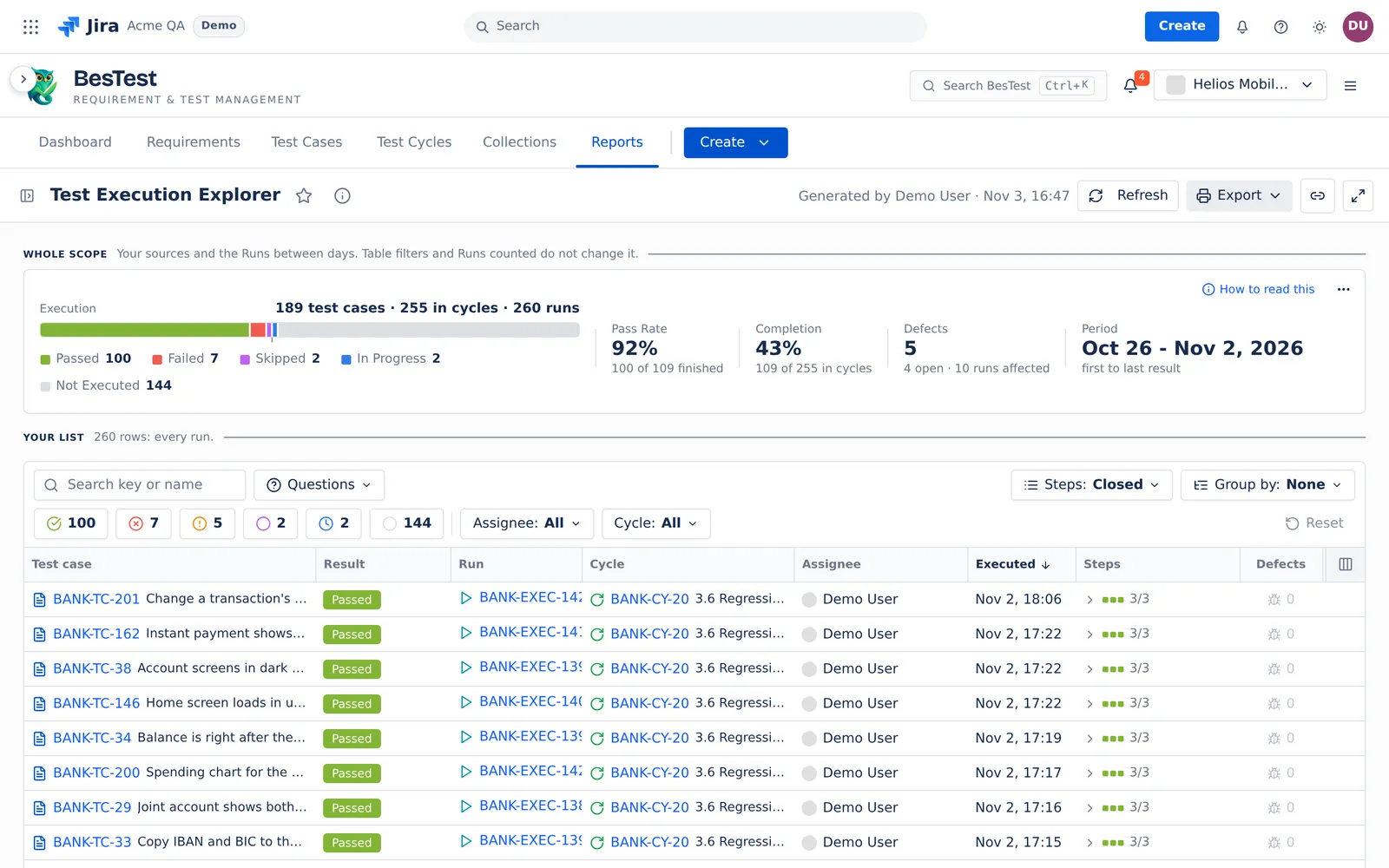
- 17 ready questionsFor example "Top failing test cases" or "Failures without a defect".
- 2A chip per result100 passed, 7 failed, 5 blocked: one click filters the list.
- 3Every runWith its test case, cycle and assignee. A row opens the run panel with the history.
- 4Steps in the row3/3 and a square per step, without leaving the list.
- 5ExportA record to print and sign, Excel with the steps, CSV.
Ask a question. The list answers it.
Pick a question. The screen is the real answer in the Helios demo space, with the filters the question set and its rule.
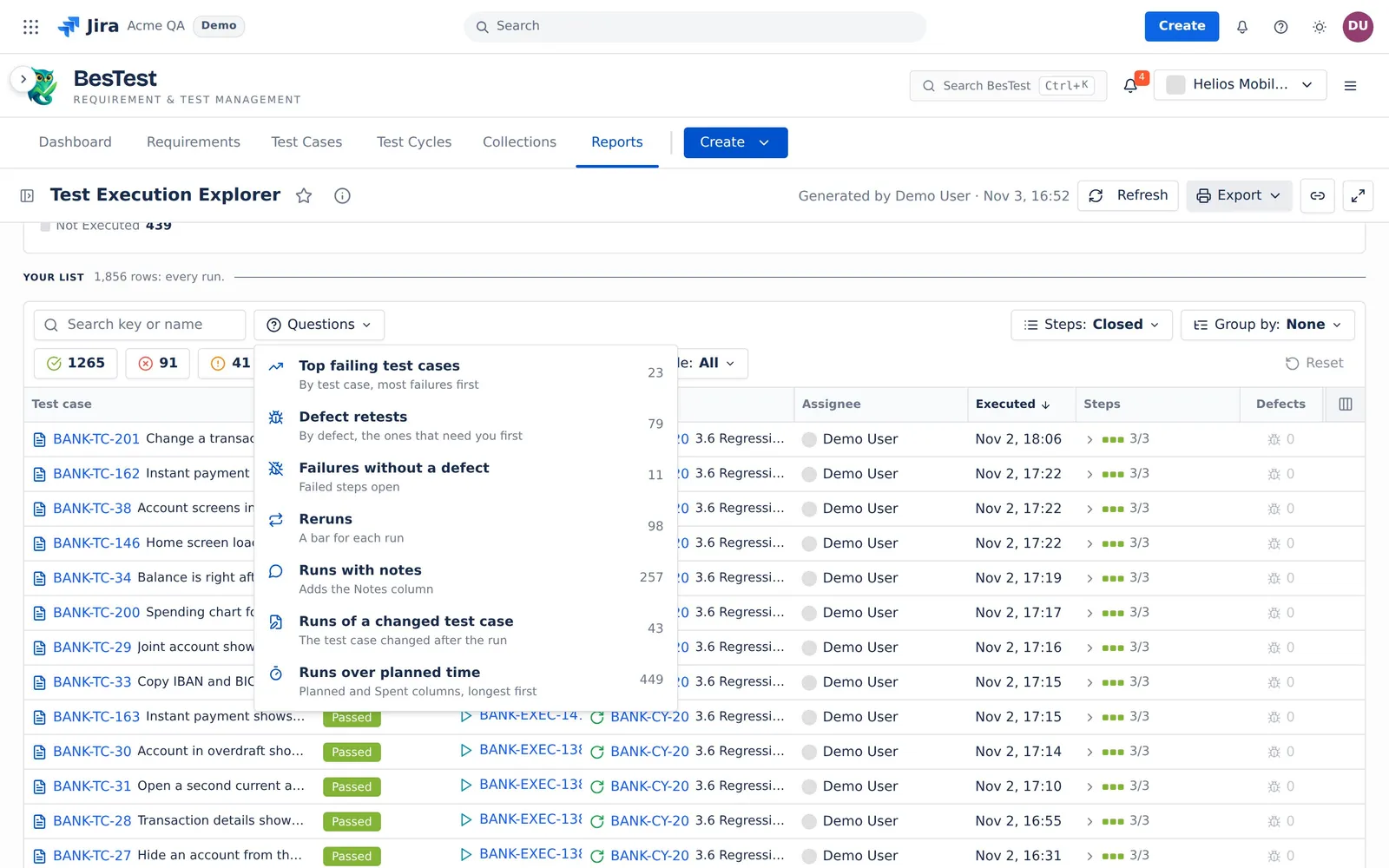
This is the Questions menu of the app. Each number is the count in the demo data. Pick a question: it sets the filters of the report for you.
From the list to one run.With every run of its test case.
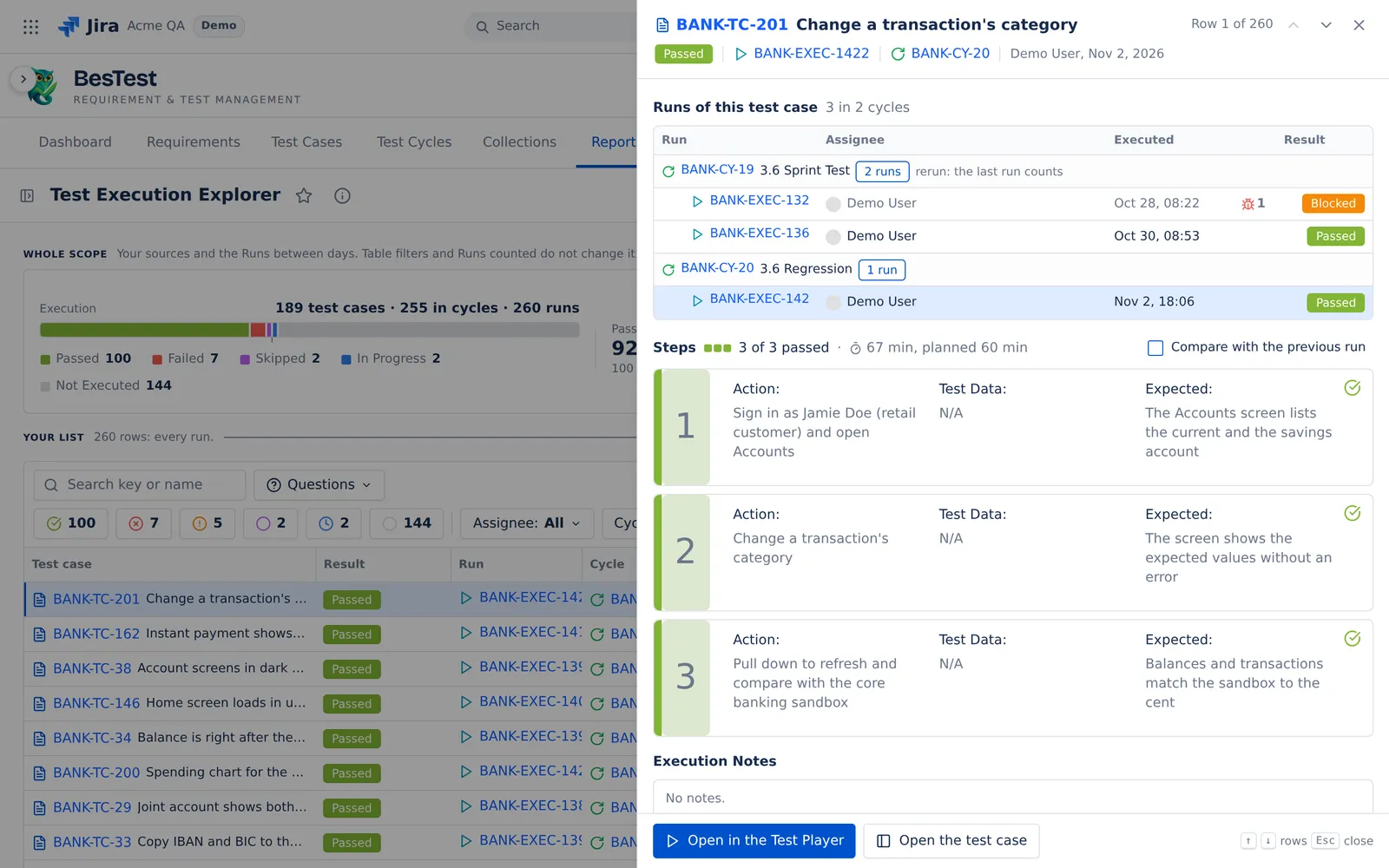
Click a row. The run panel opens over the list. Up and Down walk the rows.
 12345
- 1Runs of this test caseEvery run of the test case in your sources, by cycle. In a cycle with a rerun, the last run counts.
- 2Steps3 of 3 passed, with the time spent against the plan.
- 3Compare with the previous runStep by step: new, removed, moved and edited steps, and changed results.
- 4Open in the Test PlayerOr open the test case.
- 5Walk the rowsRow 1 of 260. Up and Down open the next run.
Print a record to sign.Cover, contents, one block per run.
The record holds exactly the rows of your list. A cover says what it holds, with a summary by cycle, the defects found and an approval line. Then each run follows with its steps, notes and defects. The signature lines are empty lines for a pen. There is no electronic signature.
 12
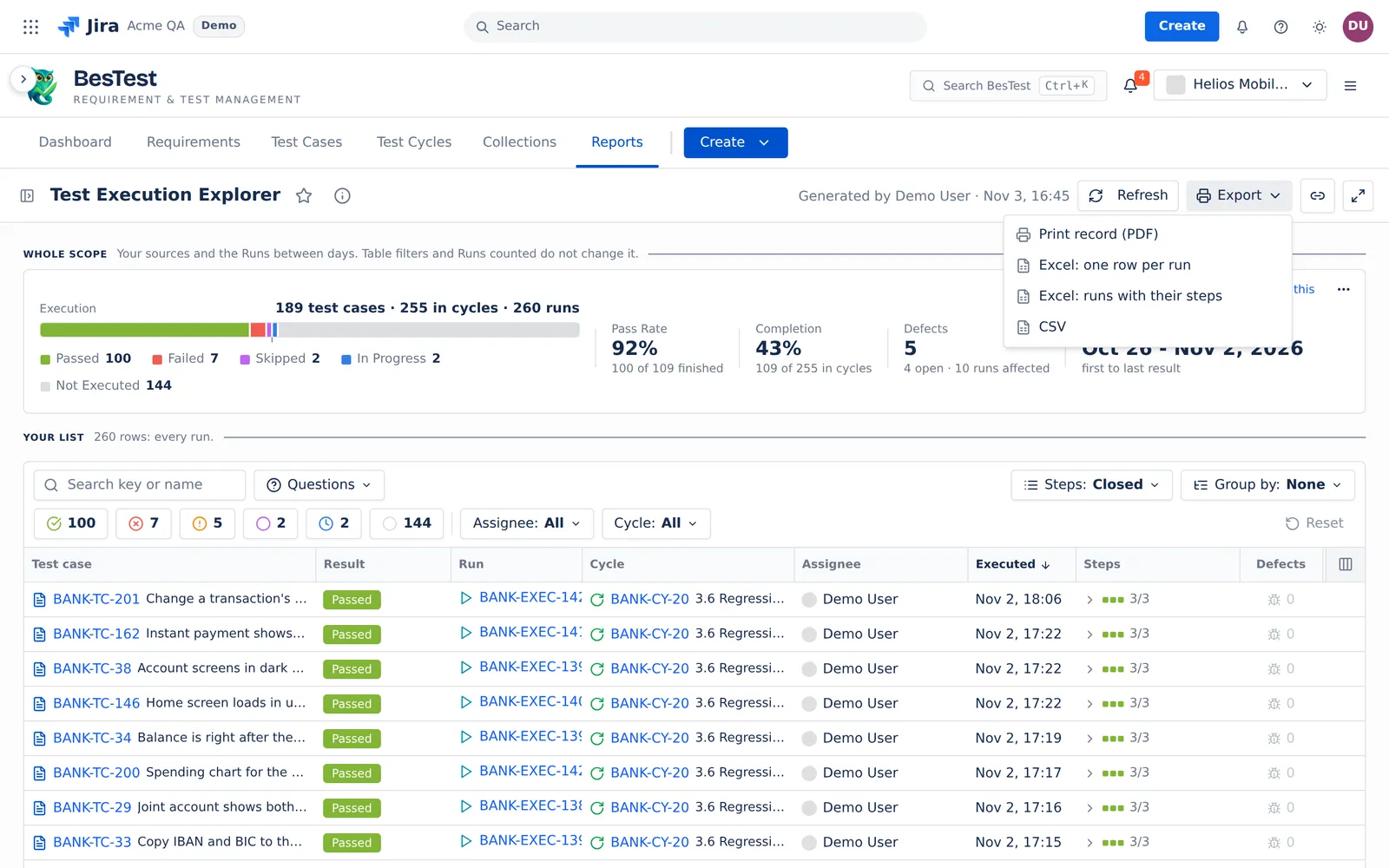
- 1Print record (PDF)The rows of your list, as a record to sign.
- 2Excel and CSVOne row per run, or the runs with their steps. Up to 5,000 runs, 2,000 with their steps.
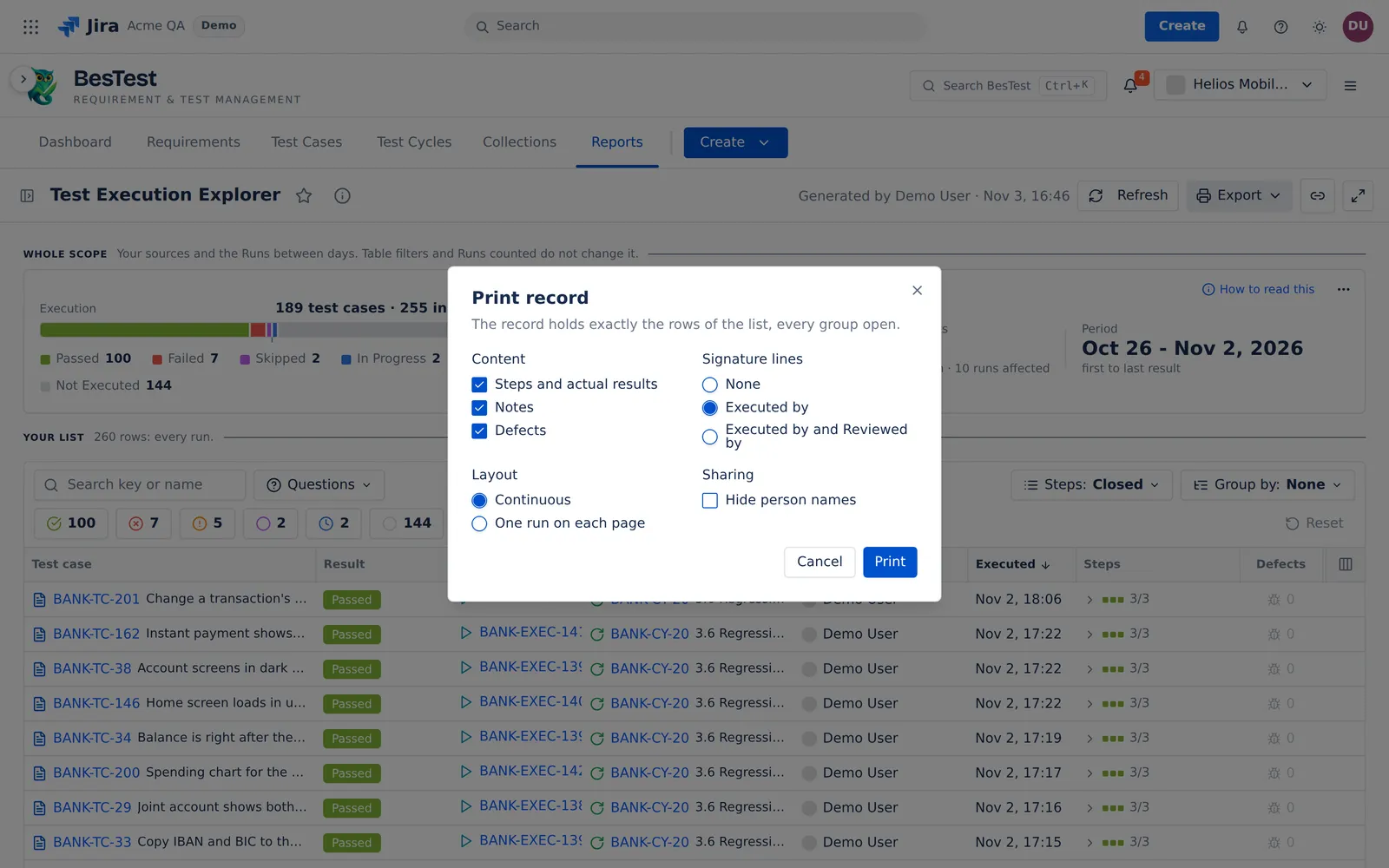 1234
- 1ContentSteps and actual results, notes, defects.
- 2Signature linesNone, Executed by, or Executed by and Reviewed by.
- 3LayoutContinuous, or one run on each page.
- 4Hide person namesThe record prints Tester 1, Tester 2.
The latest run, or every run
Latest result
The latest run of each test case in each cycle. A rerun replaces the run before it.
All runs
Every run. A run that a rerun replaced shows in grey.
Two questions read all runs
"Top failing test cases" and "Defect retests" always read every run, also when Runs counted is Latest result.
Questions people ask
How do I see the execution history of a test case in Jira?
Open Test Execution Explorer and click a run. The run panel lists every run of that test case in your sources, by cycle. In a cycle with a rerun, the last run counts.
Can I compare a test run with the previous run, step by step?
Yes. In the run panel, select "Compare with the previous run". It marks new, removed, moved and edited steps, and changed results and actual results. The previous run is the run before it in the same cycle, or else the newest earlier finished run in another cycle.
How do I print a test record with signatures for an audit?
Select Export, then "Print record (PDF)". Pick the content, the signature lines (Executed by, or Executed by and Reviewed by) and the layout. The record has a cover, a contents page and one block per run. The signature lines are empty lines to sign by hand.
Which test cases fail most often?
Ask "Top failing test cases". It lists the test cases with 2 or more Failed or Blocked runs, the most failures first, with all their runs.
Open Test Execution Explorer in your Jira.
Install BesTest from the Atlassian Marketplace. It is free for teams of up to 10 users. Or try the report first in the live demo, on the Helios demo data.
Read how the report works