
Defect Analysis: open defects, retests and what holds testing back
Every defect your runs found, once, with its status from Jira. See which defects hold testing back now, which fixes a retest proved, and which open defects already pass.
- Reads
- The Jira work items linked to a run or a step of the cycles you pick, with a date range if you want. Or a saved data set.
- Answers
- 6 ready questions, 4 highlight cards, a defect panel with the retest of each test case.
- Takes out
- Print (PDF).
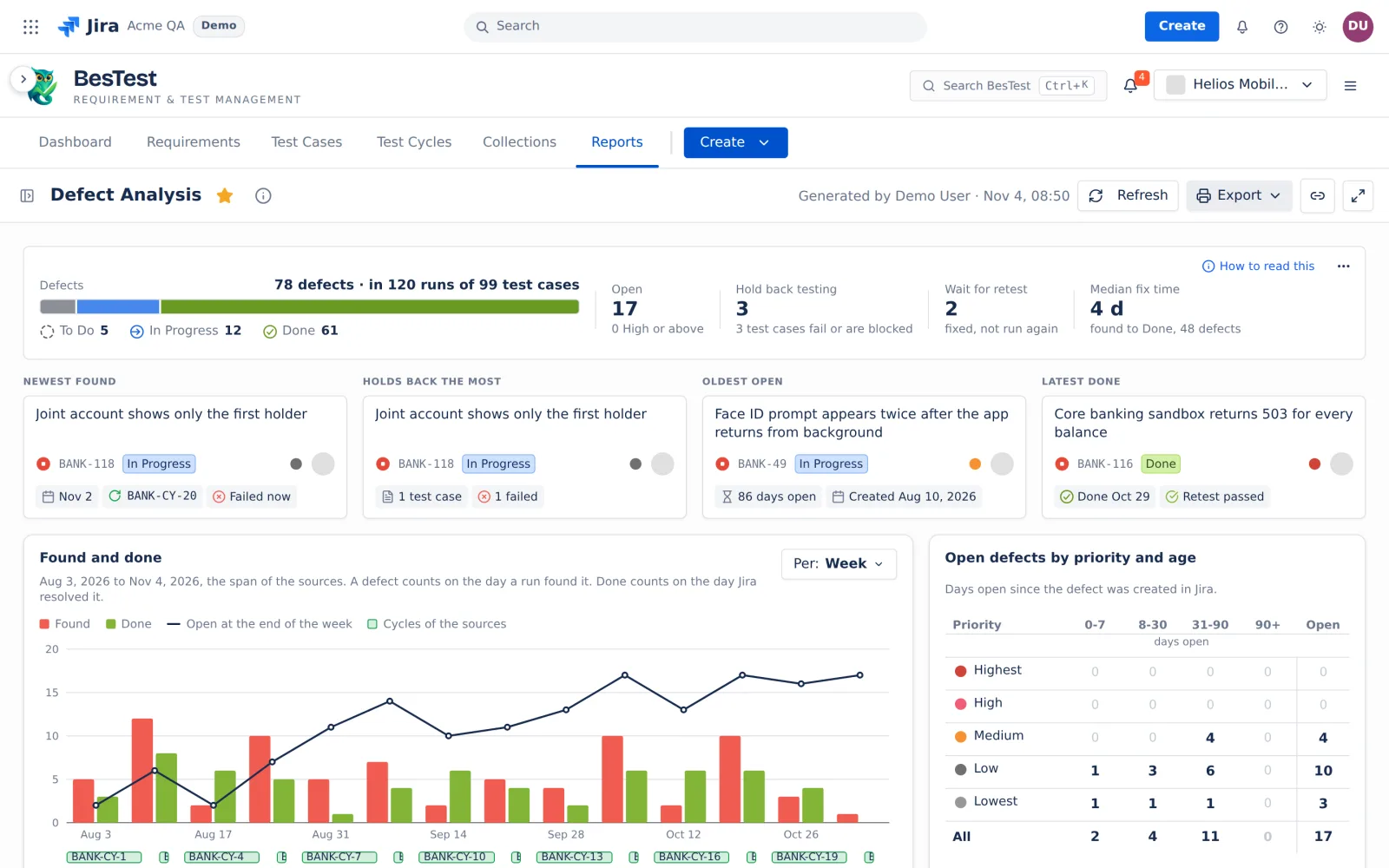 12345
- 179 defects, 121 runs79 defects found in 121 runs, split by Jira status category: To Do, In Progress and Done.
- 2Wait for retest4 defects are fixed in Jira and not run again.
- 3Four defects to look atThe newest found, the one that holds back the most, the oldest open, the latest done.
- 4Open defects by priority and age0 to 7, 8 to 30, 31 to 90 and over 90 days open.
- 5Found and donePer day, week, month or quarter, with the defects still open at the end of each.
Ask a question. The table answers it.
Pick a question. The screen is the real answer in the Helios demo space, with the filters the question set and its rule.
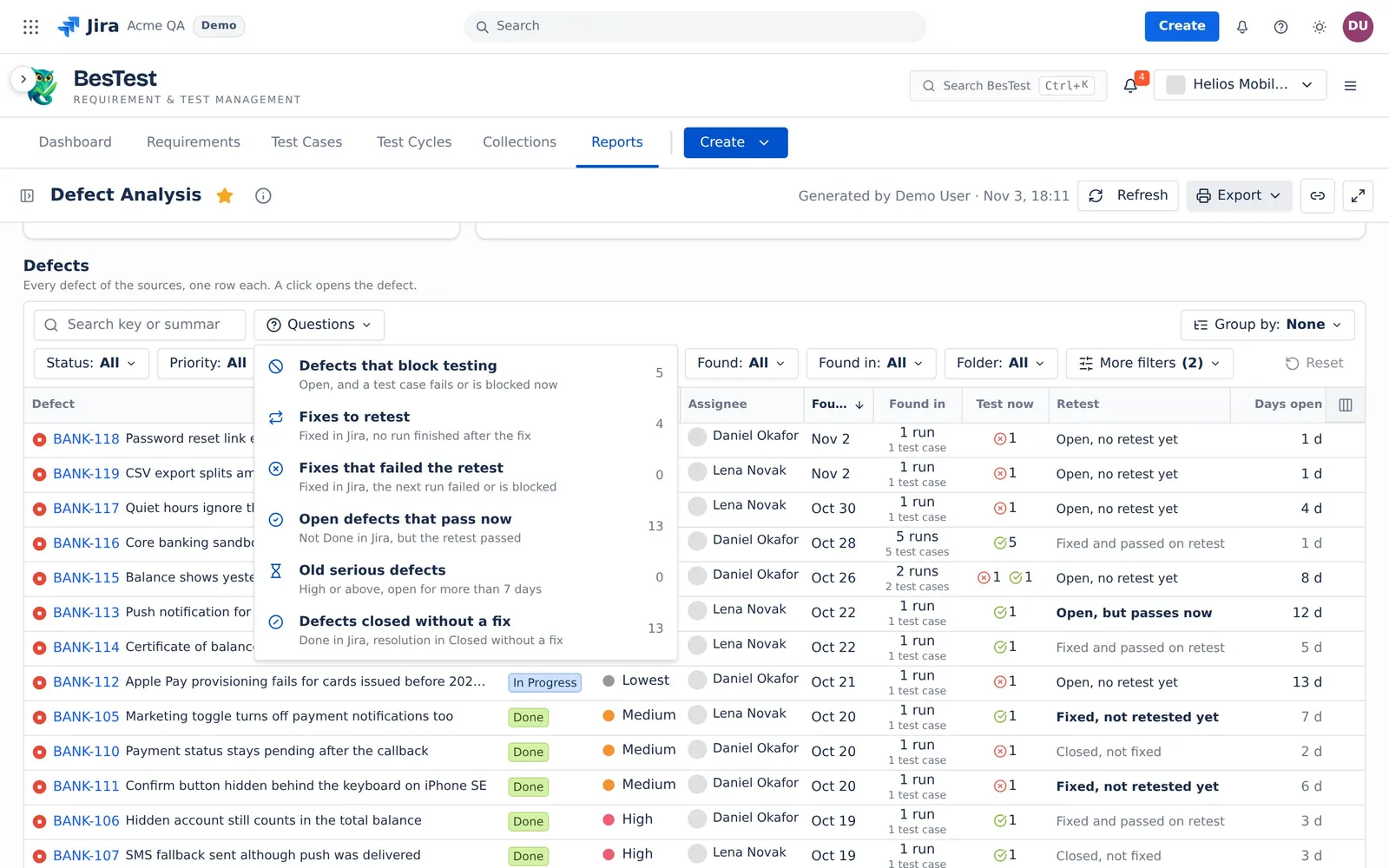
This is the Questions menu of the app. Each number is the count in the demo data. Pick a question: it sets the filters of the report for you.
Fixed in Jira is not the end.A retest decides.
Fixed. Done in Jira, with a resolution that is not in the group Closed without a fix. Done with no resolution counts as fixed.
A retest. A Passed, Failed or Blocked run of the same test case, without the defect, on a later day than the defect's last run on it. For a fixed defect, also on or after the fix day.
The verdict. The newest retest of each test case decides. If one test case did not pass, the fix still fails. Else, if one test case has no retest, the defect waits for its retest.
Days open. Calendar days from the day Jira created the defect to today, or to the day it was resolved.
What is open, what holds testing back, what a fix proved
Top line
The defects by Jira status category, the open ones with how many are High or above, the ones that hold back testing, the ones that wait for a retest, and the median fix time.
Four highlight cards
Newest found, Holds back the most, Oldest open and Latest done. A click opens the defect.
Open defects by priority and age
Open defects only, by the days since Jira created them: 0 to 7, 8 to 30, 31 to 90 and over 90 days.
Found and done
Per day, week, month or quarter. A line shows the defects still open at the end of each.
Defect details
A row opens the defect panel: Created in Jira, Found by a run, Done in Jira, Retested, and the retest of each test case.
Questions people ask
How do I create a defect report in Jira?
Open Reports in BesTest, pick Defect Analysis, and pick the cycles in Sources, with a date range if you want. It lists, once, each Jira work item linked to a run or a step of those cycles. Print it to PDF.
How do I know if a bug fix was retested and passed?
Look at the Retest column. "Fixed and passed on retest" means that on every test case of the defect, the newest run after the fix passed. The defect panel shows the retest of each test case.
How do I track how long defects stay open?
Days open counts from the day Jira created the defect to today, or to the day it was resolved. "Open defects by priority and age" puts the open ones in 4 bands. "Old serious defects" lists the High or above ones open for 8 days or more.
Which defects block testing right now?
Ask "Defects that block testing". It lists the open defects that have a test case whose newest finished run failed or is blocked. The card "Holds back the most" names the defect with the most of them.
How do I keep a UAT defect log in Jira?
Link each defect to the UAT run or step that found it. Then open Defect Analysis on the UAT cycles: it lists each defect once, with its status, priority, assignee, the day a run found it, and its retest. Print it to PDF.
Open Defect Analysis in your Jira.
Install BesTest from the Atlassian Marketplace. It is free for teams of up to 10 users. Or try the report first in the live demo, on the Helios demo data.
Read how the report works