
Traceability Matrix: the requirements traceability matrix for Jira
Trace each requirement to its Jira work items, test cases, newest results and defects. Every gap stays visible. Switch the layout to trace forward from the requirements, or back from a work item, a test case or a defect. Print the RTM or export it to CSV.
- Reads
- Requirements from a folder, a BQL rule, all requirements, or the ones tested in some cycles. Test results from every cycle, or the cycles you pick. Or a saved data set.
- Answers
- 6 ready questions, 8 layouts, a requirement panel and a test case panel.
- Takes out
- Print (PDF), up to 500 requirements and 3,000 lines. CSV, one row per trace, up to 20,000 rows.
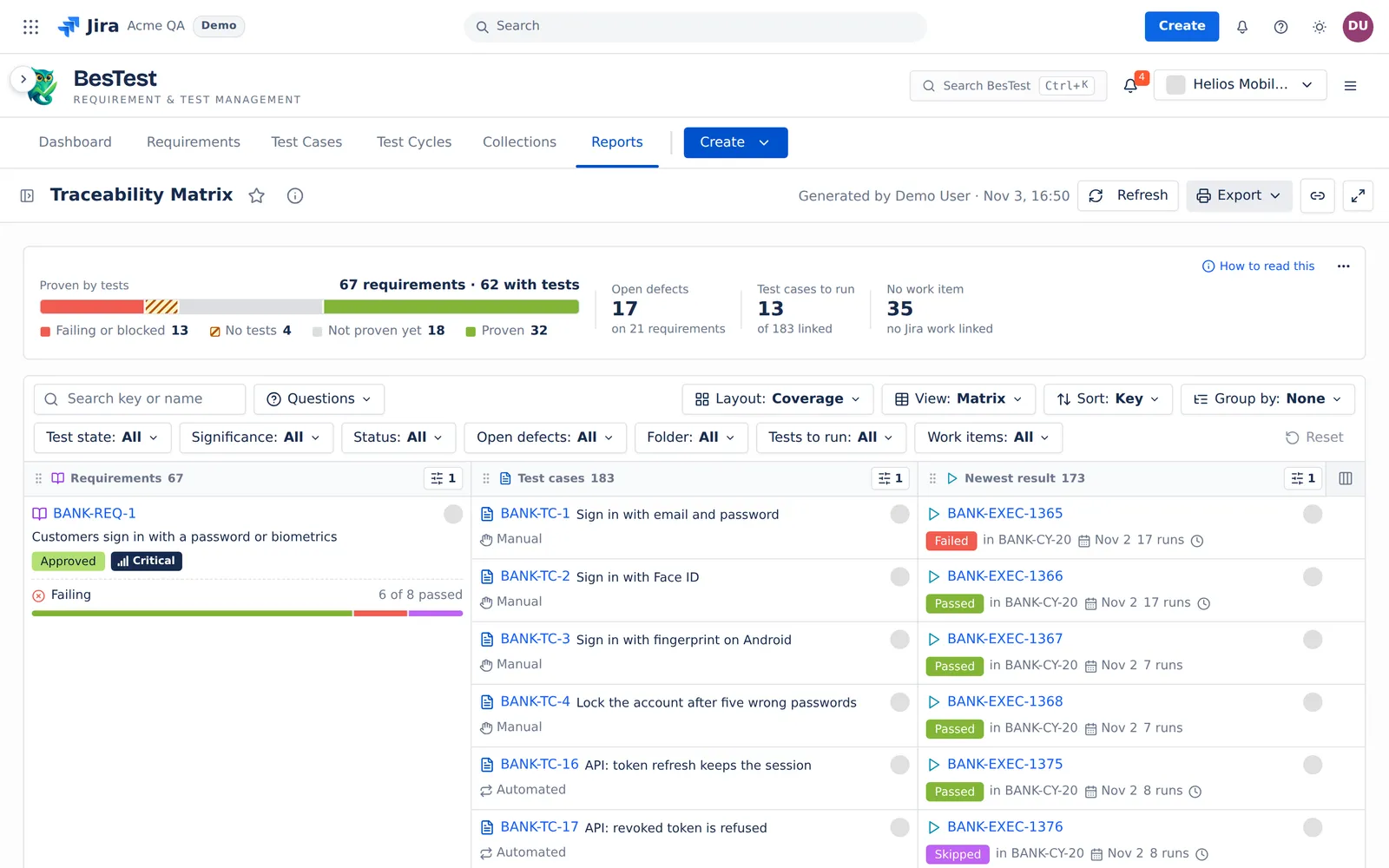 12345
- 1Proven by tests67 requirements: failing or blocked, no tests, not proven yet, proven.
- 2LayoutSwitch what the matrix traces, for example Coverage or Full chain.
- 3Each requirementWith its status, significance and test state.
- 4Newest resultEach test case with its newest result. The gaps stay visible.
- 5No work item35 requirements have no Jira work item linked.
How to build a traceability matrix in Jira.No spreadsheet.
Jira links issues, but it has no matrix of requirements, test cases, results and defects. Teams copy the links and the results into a sheet by hand, and the sheet does not change when a test runs again. In BesTest the matrix reads the links and the newest results when you open it.
- 1
Link. Link each requirement to the test cases that prove it, and to its Jira work items. The matrix reads the links in both directions.
- 2
Pick. Open Traceability Matrix and pick the requirements: a folder, a BQL rule or all requirements. Pick the cycles for the results.
- 3
Trace. Pick one of 8 layouts, for example Coverage or Full chain. A question can pick the layout for you.
- 4
Take it out. Print the RTM to PDF, or export the CSV with one row per trace.
Ask a question. The matrix answers it.
Pick a question. The screen is the real answer in the Helios demo space, with the layout and the filters the question set, and its rule.
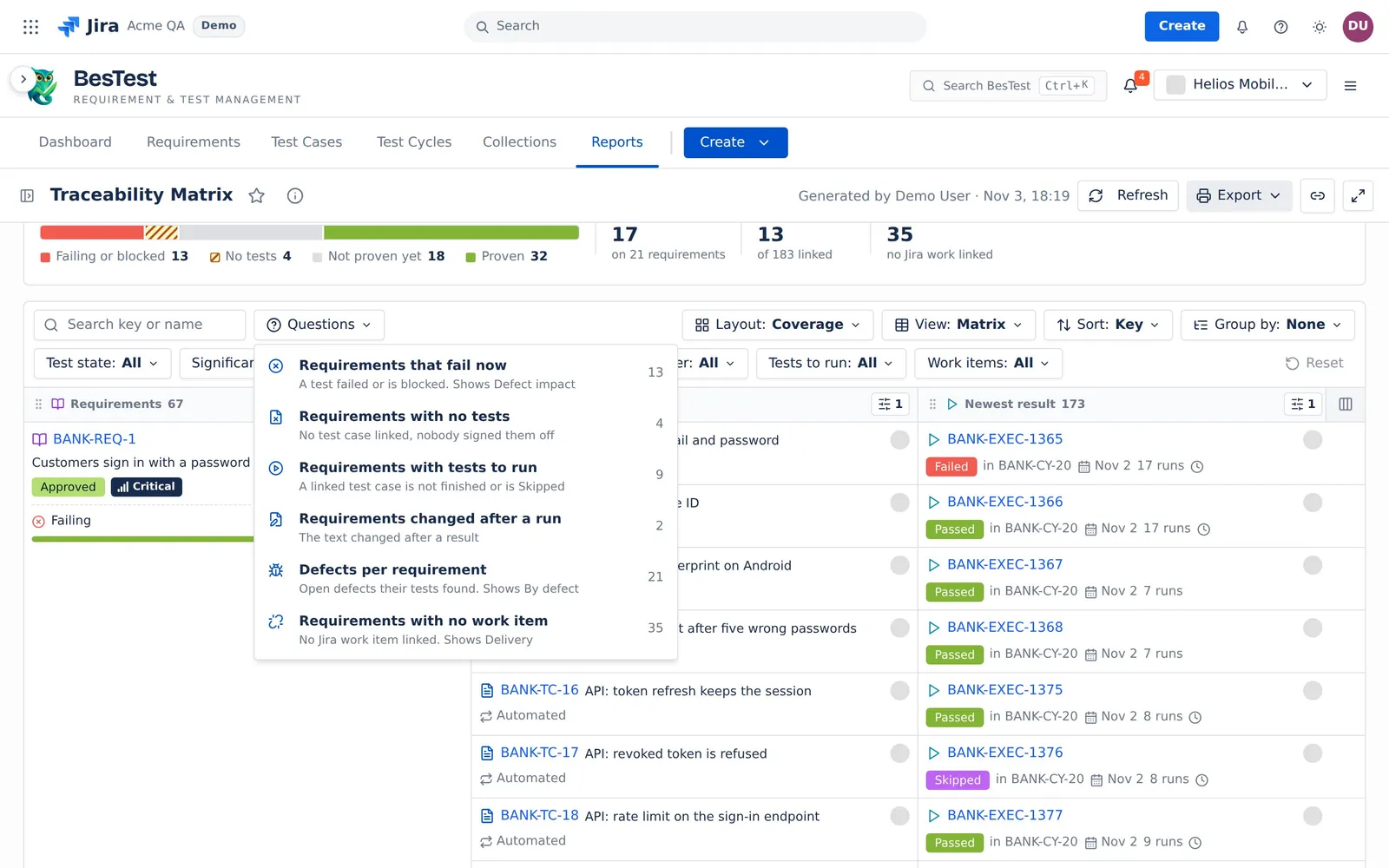
This is the Questions menu of the app. Each number is the count in the demo data. Pick a question: it sets the filters of the report for you.
Trace forward, or trace back.
Requirements first. Coverage (the default), Run history, Defect impact, Delivery and Full chain trace forward from each requirement.
Another column first. By work item, By test case and By defect trace back to the requirements.
A click. A requirement opens the requirement panel. A test case, a cycle or a result opens the test case panel, with its runs and the requirements it proves. A work item or a defect key opens it in Jira.
Questions people ask
Does Jira have a built-in traceability matrix?
No. Jira links issues, but it has no matrix of requirements, test cases, results and defects. BesTest adds the Traceability Matrix inside Jira.
How do I create a traceability matrix in Jira?
Link each requirement to its test cases and Jira work items. Open Traceability Matrix, pick the requirements and the cycles, and pick a layout. Every gap shows: No test case, Not run yet, Not run in these cycles.
How do I get an RTM report out of Jira?
Print the matrix to PDF, up to 500 requirements and 3,000 lines. Or export the CSV, one row per trace, up to 20,000 rows. The CSV holds every line of the filtered requirements.
What is bidirectional traceability?
You trace forward, from a requirement to its test cases, results and work items, and back, from a work item, a test case or a defect to its requirements. The layouts By work item, By test case and By defect trace back.
Can I export the traceability matrix to Excel or PDF?
PDF, yes: use Print. For Excel, export the CSV and open it in Excel. There is no Excel file.
Open Traceability Matrix in your Jira.
Install BesTest from the Atlassian Marketplace. It is free for teams of up to 10 users. Or try the report first in the live demo, on the Helios demo data.
Read how the report works